
If your store pulls in $25 million or more a year, touches data from 100,000 or more California consumers or households, or gets over half its revenue from selling or sharing personal data, CPRA compliance for your ecommerce business is not optional. Most mid-size direct-to-consumer stores hit that 100,000 threshold faster than they think, especially once you count every California session, not just checkout completions. Three moves matter more than any others right now: update your "Do Not Sell or Share My Personal Information" link and opt-out flow, inventory and gate every pixel that fires on your storefront, and refresh your privacy policy with a working DSAR (data subject access request) contact.
Here's the exposure calculus: the California Privacy Protection Agency can levy $2,500 to $7,500 per violation, and CPRA scrapped the automatic cure period that used to give companies 30 days to fix a problem before facing a fine. Waiting on this one isn't a paperwork delay you can absorb later.
- Add or fix your opt-out link and make sure Global Privacy Control actually works
- Pull a full inventory of every tracking pixel and tag firing on your site
- Update your privacy policy and stand up a real DSAR intake process
Key Takeaways
CPRA compliance for ecommerce stores depends on meeting one of three thresholds, gating ad-tech sharing, honoring GPC, and maintaining audit-ready consent logs and vendor contracts.
| Point | Details |
|---|---|
| Check applicability quarterly | Revisit the $25M revenue, 100,000 interaction, and 50% revenue-mix thresholds every quarter, not annually. |
| Gate pixels for opted-out visitors | Block Meta Pixel, Google remarketing, and TikTok Pixel firing through tag manager or server-side rules. |
| Honor GPC automatically | Treat the Global Privacy Control browser signal as a valid opt-out across your entire stack. |
| Fix vendor contracts | Require limited-purpose language, no data combination, audit rights, and a short notification window. |
| Use privacy-first re-engagement | StorePush recovers abandoned carts via App Clips without selling or sharing personal data, reducing sharing exposure. |
Table of Contents
- Does CPRA Compliance Apply to Your Ecommerce Store?
- What Rights Do California Shoppers Have Under CPRA?
- Which Ad Tech Integrations Count as "Sharing" Under CPRA?
- Which Site Elements and Vendor Contracts Does CPRA Require?
- How Do You Fix CPRA Gaps in Shopify and Similar Platforms?
- What Are the Penalties for CPRA Violations?
- What Does a 90-Day CPRA Compliance Sprint Look Like?
- How Does CPRA Affect Cross-Border Data Transfers for Ecommerce?
- How Should Ecommerce Stores Handle Minors' Data Under CPRA?
- How Does CPRA Compare to CCPA and GDPR for Ecommerce?
- How Do You Map and Inventory Data Across Your Ecommerce Stack?
- Balancing Compliance and Conversion in Ecommerce Marketing
- How StorePush Reduces Your CPRA Sharing Exposure
- Sources
Does CPRA Compliance Apply to Your Ecommerce Store?
CPRA is not a separate law bolted onto CCPA. The CPPA describes it plainly: treat the two as "CCPA as amended", one integrated framework rather than two competing rulebooks. That distinction matters because a lot of the compliance advice floating around still references pre-2023 CCPA thresholds, which are outdated.
You're in scope if you meet any one of these three tests:
- Revenue test: Your business had over $25 million in annual gross revenue in the prior calendar year.
- Volume test: You buy, sell, or share the personal information of 100,000 or more California consumers, households, or devices annually. CPRA raised this bar from the original CCPA's 50,000, but it's easier to clear than it sounds, since a device or session counts, not just a completed purchase.
- Revenue-mix test: 50% or more of your annual revenue comes from selling or sharing personal information, which typically hits ad-funded businesses harder than direct retailers.
Here's a rough way to check the volume test yourself: pull your analytics platform, filter sessions by California geolocation over a trailing 12-month window, and count unique visitors, not just unique buyers. A store running $8,000 a month in Meta and Google ads targeting California often clears 100,000 unique visitors well before it clears $25 million in revenue. Growth spikes from a viral product or a big ad push can push you into scope mid-year.
What Rights Do California Shoppers Have Under CPRA?
CPRA gives California consumers six distinct rights, and each one creates a specific operational obligation for your store. Skipping the mechanics behind any one of them is what turns a policy gap into an enforcement complaint.
- Right to know and access: Consumers can request the categories and specific pieces of personal information you've collected, going back 12 months from the request date.
- Right to delete: You must delete personal information on request, then confirm deletion to the consumer and instruct any downstream service providers to do the same.
- Right to correct: New under CPRA. Consumers can demand you fix inaccurate personal information you hold about them.
- Right to opt out of sale/share: This is the one your footer link exists for. It must work in two clicks or fewer.
- Right to limit use of sensitive personal information (SPI): Consumers can restrict how you use SPI, which for ecommerce usually means precise geolocation, financial account details, and in some cases browsing history tied to a real identity.
- Right to non-discrimination: You cannot charge a different price or degrade service quality because someone exercised any of the above rights.
Verification should scale with risk. A request to see order history needs lighter verification than a request to delete financial data. Place both the opt-out link and the "Limit the Use of My Sensitive Personal Information" link in your footer, near your privacy policy link, not buried three clicks deep in an account settings page.
Which Ad Tech Integrations Count as "Sharing" Under CPRA?
CPRA's big addition to CCPA vocabulary is "sharing," defined as cross-context behavioral advertising, and this is where most ecommerce stores actually get exposed. If you run Meta Pixel, Google Ads remarketing tags, or a TikTok Pixel and use that data to build lookalike audiences or retarget shoppers off your site, you're sharing personal information under the statute. Third-party demand-side platforms (DSPs) plugged into your checkout flow count too.
The fix isn't ripping out your ad stack. It's gating it for opted-out visitors:
- Use your tag manager (Google Tag Manager or similar) to build a consent-state rule that blocks pixel firing before any script loads for opted-out sessions
- Where client-side blocking is unreliable, move tracking to server-side gating so the block happens before data ever leaves your infrastructure
- Detect and honor Global Privacy Control (GPC) signals automatically. Regulators explicitly treat a GPC signal as a valid opt-out, so a browser sending that signal should never see a retargeting pixel fire
- Run periodic opt-out tests using a dedicated California test account to confirm nothing leaks through
Pro Tip: Create a test shopper account, opt out through your own flow (or set GPC on in your browser), then check your ad platform's audience list 24 to 48 hours later. If that test account still shows up in your Meta retargeting audience, your gating isn't working, no matter what your tag manager dashboard says.
Which Site Elements and Vendor Contracts Does CPRA Require?
Your storefront needs specific, visible components, and your vendor agreements need specific clauses. Missing either one leaves a paper trail regulators can point to.
- Footer links: Either a standalone "Do Not Sell or Share My Personal Information" link plus a separate "Limit the Use of My Sensitive Personal Information" link, or the unified "Your California Privacy Choices" option that combines both.
- Privacy notice at collection: This has to appear at or before the point you collect data, not just buried in a general privacy policy someone finds through a footer link three pages deep.
- DSAR intake: Offer at least two contact methods, typically a web form and an email address, and log every request with a timestamp, verification method, and resolution date.
- Vendor contracts: Every service provider, contractor, or third party touching your customer data needs a contract specifying limited and defined purposes, a ban on combining your data with data from other clients, and audit rights so you can verify compliance. Push for language requiring the vendor to notify you within a set window, often five business days, if they materially change how they handle your data or can no longer meet CPRA obligations.
Many stores discover their consent management platform logs GDPR-style opt-ins but never logs CCPA-style opt-outs in an exportable, audit-ready format. Check this before you need it for an enforcement response, not after.
How Do You Fix CPRA Gaps in Shopify and Similar Platforms?
Shopify stores can close most of their exposure gap in an afternoon, not a quarter. Start with your theme's footer template and add the opt-out link if it's missing, or update the wording if it's still running pre-CPRA language.
- Link that footer text to a dedicated opt-out page or modal, and make the full opt-out process completable in two steps
- Add client-side GPC detection through your theme's JavaScript, then wire it into your tag manager's consent state
- If your ad stack routes through server-side conversion APIs (Meta's Conversions API, for example), add gating logic there too, since client-side blocking alone can miss server-side data forwarding
- Turn on exportable consent and opt-out logging in every connected app, especially Klaviyo, Yotpo, and your analytics connectors
Pro Tip: Test your DSAR flow the same way a regulator would: submit a real deletion request through your own form, then check whether it actually propagates to Klaviyo, your review app, and your analytics platform, not just your core Shopify customer record.
What Are the Penalties for CPRA Violations?
The CPPA both writes rules and enforces them, and per-violation penalties run $2,500 to $7,500 for intentional violations, with no automatic 30-day cure window to fix things quietly before a fine lands. Multiply that per-violation figure by even a modest slice of your California visitor base and the worst-case number gets uncomfortable fast for a mid-size retailer.
Prioritize remediation in this order: opt-out links and pixel gating first, since they're visible and cheap to fix; vendor contract updates second; DSAR automation third. This sequence mirrors what multiple ecommerce compliance playbooks recommend, because visible gaps draw complaints faster than paperwork gaps do.
What Does a 90-Day CPRA Compliance Sprint Look Like?
Spread the work across three phases instead of tackling it all in one panicked week.
- Days 0 to 7: Confirm whether you meet any applicability threshold, add or fix your opt-out link, and update the headline section of your privacy policy.
- Days 8 to 30: Complete a full tracker inventory, implement pixel gating, wire in GPC detection, and start renegotiating vendor contracts with the required clauses.
- Days 31 to 90: Automate DSAR handling across your app stack, turn on consent logging everywhere, train staff on request handling, and schedule a recurring quarterly audit.
How Does CPRA Affect Cross-Border Data Transfers for Ecommerce?
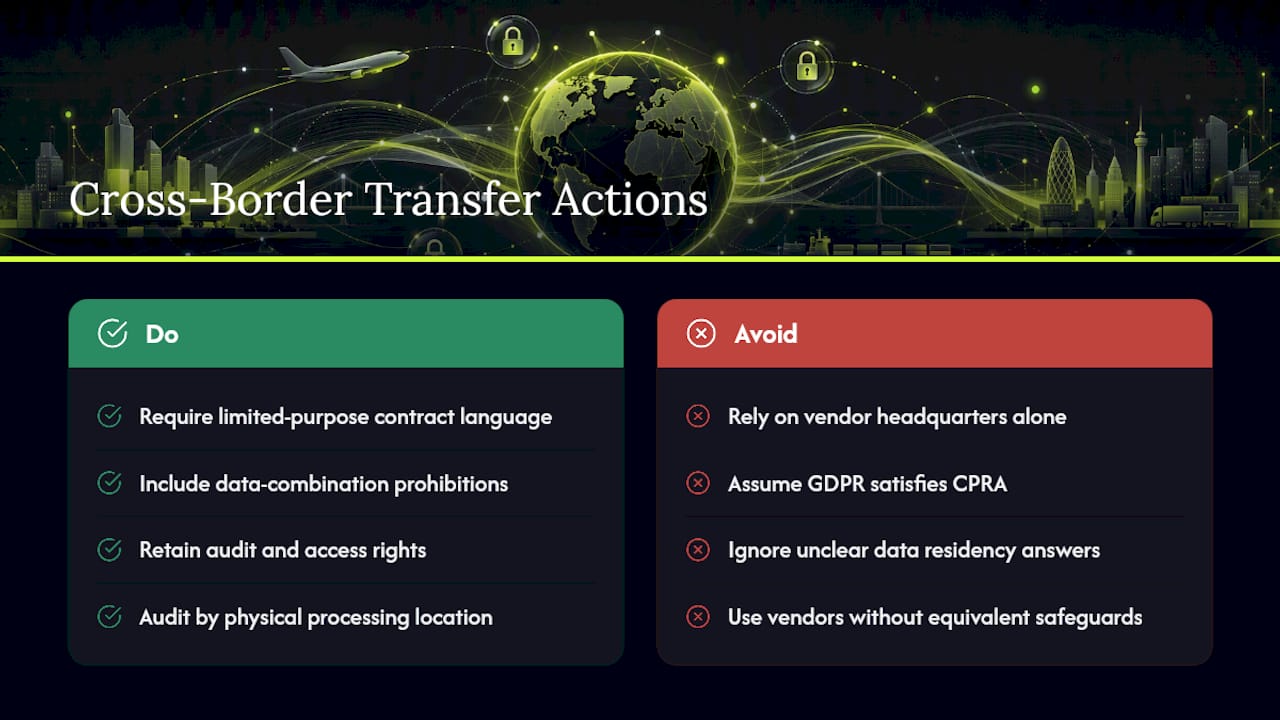
CPRA doesn't ban sending California customer data outside the U.S., but it does follow the data wherever it goes. If your fulfillment partner, customer service vendor, or analytics provider processes California customer data from a facility outside the country, your vendor contract terms still apply in full. The service provider and contractor restrictions don't loosen just because processing happens overseas.
This creates a real headache for stores using offshore support teams or third-party logistics providers based outside the U.S. Your contract needs the same limited-purpose language, data combination prohibition, and audit rights, whether your vendor sits in Ohio or Manila. If that vendor can't demonstrate equivalent safeguards, you're the one holding liability when a California consumer files a complaint, not them.
Practically, this means auditing every vendor in your stack by physical processing location, not just by company headquarters. A vendor headquartered in California might still route data through a subprocessor in another country for cost reasons. Ask directly: where does the data physically live, and who has access to it? If you can't get a clear answer, treat that as a contract red flag worth escalating before signing or renewing.
For stores also serving EU customers, GDPR layers on additional cross-border transfer mechanisms (standard contractual clauses, adequacy decisions) that CPRA doesn't require domestically. Don't assume GDPR compliance covers your CPRA obligations, or vice versa. They overlap in spirit but diverge in specific mechanics, especially around transfer documentation.
How Should Ecommerce Stores Handle Minors' Data Under CPRA?
CPRA imposes a stricter opt-in requirement for any consumer under 16. For minors between 13 and 15, you need affirmative opt-in consent before selling or sharing their personal information at all. For consumers under 13, a parent or guardian must provide that consent instead.

This matters more for ecommerce than most owners assume. If you sell products aimed at teenagers, run a loyalty program that collects birthdates, or use age-gating for certain products, you likely have minors' data somewhere in your customer database, even without intending to collect it.
The practical fix starts with your signup and account creation flows. If you collect birthdate at any point, whether for age verification, birthday discount emails, or loyalty tiers, build logic that flags accounts belonging to users under 16 and blocks that data from flowing into ad retargeting pixels or being sold or shared with any third party, regardless of what your general opt-out settings say for adult customers.
Don't rely on self-reported age alone as your only safeguard. If your store's audience skews toward younger shoppers, whether that's a skincare brand popular with teens or a gaming merchandise store, treat this as a standing compliance risk rather than an edge case, and review it during every quarterly audit alongside your general tracker inventory.
How Does CPRA Compare to CCPA and GDPR for Ecommerce?
CPRA is not a new law layered on top of CCPA. It's the same statute, amended, and the CPPA's own guidance confirms you should think of it as "CCPA as amended" rather than two separate compliance regimes to juggle. The practical differences that matter for your store: CPRA raised the consumer-interaction threshold to 100,000, added the sensitive personal information category with its own limit-use right, established the CPPA as a dedicated enforcement agency, and removed the automatic cure period CCPA originally provided.
GDPR is a different animal entirely, and conflating the two creates real gaps. GDPR requires opt-in consent as the default for most data processing, applies regardless of company revenue, and covers any business processing EU residents' data, not just companies above a revenue threshold. CPRA, by contrast, defaults to opt-out for sale and share (with the exception of minors' data, which requires opt-in) and only applies once you clear one of the three thresholds covered earlier.
If your store sells to both U.S. and EU customers, you need separate consent logic for each region, not one banner trying to satisfy both. A geolocation-based consent flow that shows an opt-out link to California visitors and a full opt-in cookie banner to EU visitors handles this correctly. Trying to run a single, one-size-fits-all privacy banner across every visitor usually means over-complying in one jurisdiction or under-complying in the other, neither of which serves you well.
How Do You Map and Inventory Data Across Your Ecommerce Stack?
You cannot honor a deletion request, an access request, or an opt-out signal for data you don't know you're collecting. A proper data inventory starts with mapping every app connected to your storefront, not just your core platform.
For a typical Shopify or WooCommerce store, that usually includes your ecommerce platform itself, your email marketing tool (Klaviyo, for example), your reviews app (Yotpo or similar), your analytics suite, your ad pixels, your customer service platform, and any session recording or heatmap tool. Each one collects, stores, or transmits personal information independently, and each one needs its own line in your inventory.
For every system, document what personal information it collects, where it's stored, how long it's retained, whether it's shared with any third party, and who inside your company can access it. This becomes your source document for privacy notice accuracy, DSAR fulfillment, and vendor contract review all at once.
Update this inventory whenever you add a new app or integration, not just once a year. A single new marketing tool added mid-quarter, without anyone checking its data practices, is one of the most common ways stores drift out of compliance without noticing. Building this once and revisiting it quarterly is far less painful than reconstructing it from scratch after a DSAR you can't fully answer.
Balancing Compliance and Conversion in Ecommerce Marketing
Every gated pixel and honored opt-out costs you some retargeting reach, but weigh that against per-violation fines running into the thousands and no cure period to soften the blow. Privacy-preserving channels, like push notifications delivered through native App Clips instead of cross-context ad tracking, let you re-engage shoppers without adding to your "sharing" exposure at all. That's not a workaround. It's a genuinely different data model, and it complements whatever consented ad targeting you're still running elsewhere.
— Lucas
How StorePush Reduces Your CPRA Sharing Exposure
Every pixel you gate for compliance is also reach you lose for recovering abandoned carts, which is exactly the gap StorePush was built to close. StorePush recovers abandoned and browse-abandoned shoppers through native iOS App Clips sent directly to a shopper's lock screen, without collecting an email, a phone number, or requiring an app install. Because it never sells or shares personal information with a third-party ad platform, it sits outside the cross-context sharing definition that's driving most of your CPRA remediation work in the first place.
It plugs into Shopify, WooCommerce, BigCommerce, and custom storefronts, and the dashboard gives you exportable revenue attribution, funnel tracking, and CTR heatmaps, which double as documentation if you ever need to show how you recover revenue without relying on regulated ad tech. If gating pixels has you worried about the recovery revenue you'll lose, book a demo and see how push-based recovery fills that gap without adding another compliance liability to your stack.
Sources
Start with the CPPA's own FAQ for guidance, then review the CPRA vs. CCPA breakdown and ecommerce compliance playbook for implementation detail.
This article is general information, not a substitute for advice from a qualified lawyer. Consult a qualified legal professional about your own circumstances before acting on anything here.
- California Privacy Protection Agency (CPPA) — FAQ
- CPRA vs CCPA - TermsFeed
- Shopify CCPA / CPRA compliance: what California buyers require from your store — Consentico
- CCPA vs CPRA: What Actually Changed, and Why It Matters Three Years On | Consenteo