Yes, you can deliver iOS lock screen notifications through an Apple App Clip — no email address, no phone number, no full app install required. The critical constraint is the 8-hour window: Apple documents that an App Clip can schedule and receive push notifications for up to 8 hours after each launch. After that window closes, the permission expires. This makes App Clip push ideal for immediate cart recovery, not long-term nurture.
Three components make this work together:
- Apple App Clips — lightweight native experiences that launch without a full app install and request ephemeral notification permission automatically
- Apple Push Notification service (APNs) — the delivery infrastructure that routes your payload to the device lock screen
- StorePush — the platform that handles App Clip invocation tracking, APNs orchestration, and attribution dashboards so your store doesn't have to build this from scratch
If a shopper browses your product page and walks away, that 8-hour window is your best shot at pulling them back before they forget you exist.
Key Takeaways
App Clip lock-screen push is a high-intent, time-bounded cart recovery channel that works best as the first touch in a multichannel sequence, with APNs handling delivery and StorePush managing the full implementation stack.
| Point | Details |
|---|---|
| 8-hour push window | App Clips can send lock-screen notifications for up to 8 hours after each launch — build campaigns around immediate recovery, not nurture. |
| Info.plist flag required | Set NSAppClipRequestEphemeralUserNotification = true in your App Clip's Info.plist or push delivery will never reach the lock screen. |
| Attribution needs extra work | IDFA is unavailable in App Clips; use an MMP or server-side stitching to connect clip invocation to downstream purchases. |
| Multichannel sequence wins | Push at ~20 minutes, email at ~1 hour, SMS at 24 hours recovers more carts than any single channel alone. |
| StorePush as implementation path | StorePush integrates with Shopify, WooCommerce, and BigCommerce and handles APNs orchestration, triggers, and attribution dashboards out of the box. |
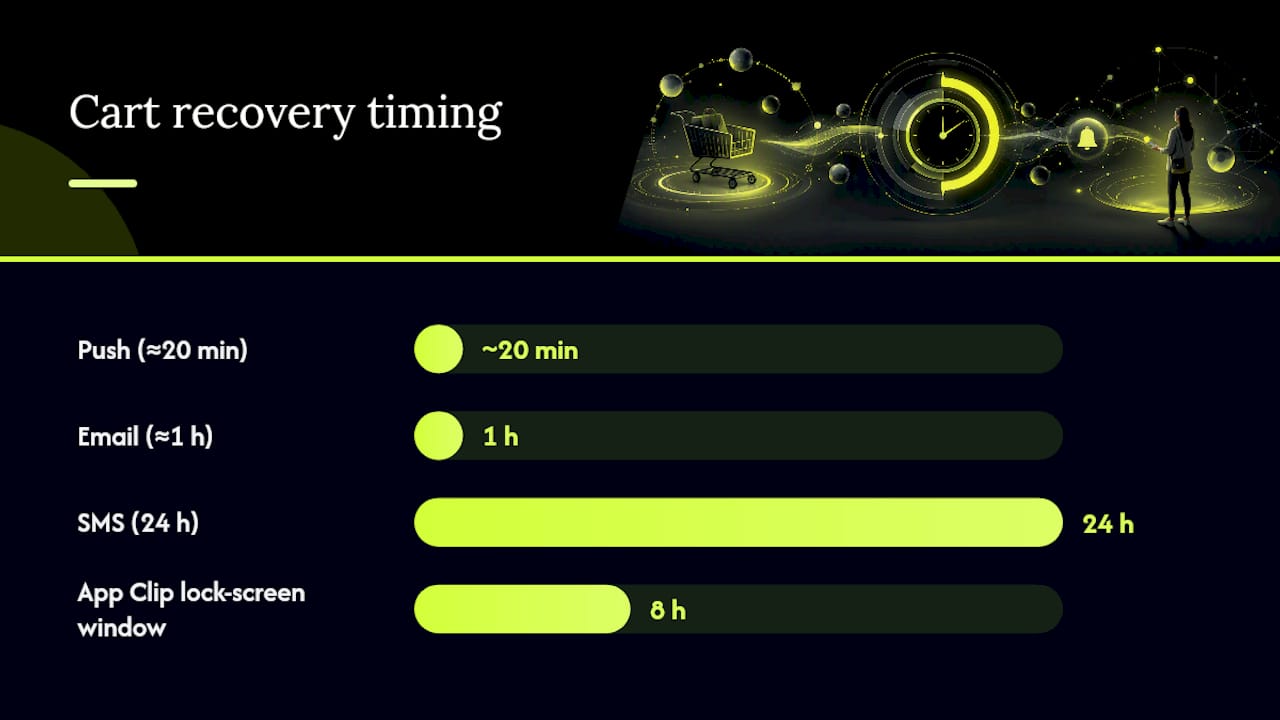
Table of Contents
- How do iOS lock screen notifications work with App Clips and APNs?
- What Apple requires for APNs setup and App Clip entitlements
- Step-by-step checklist for Shopify, WooCommerce, and BigCommerce
- Permissions, privacy, and App Store rules you need to follow
- What to measure and realistic KPIs for App Clip push recovery
- Sample APNs payloads and a developer troubleshooting checklist
- When App Clip push is the right channel vs. other re-engagement methods
- StorePush handles the technical lift so your team doesn't have to
- Sources
How do iOS lock screen notifications work with App Clips and APNs?
The end-to-end flow has six steps, and understanding each one tells you exactly where things can break.
- User invokes the App Clip — via NFC tag, QR code, Smart App Banner, or a direct link on your product page
- App Clip requests ephemeral notification permission — displayed automatically on the App Clip card; no separate permission prompt needed
- App Clip registers with APNs — generates a device token (or a routed token when one App Clip serves multiple businesses using
target-content-id) - Store backend records session and cart state — ties the device token to the shopper's current cart
- Backend sends a push via APNs — with the correct headers (
apns-push-type,apns-priority) and payload within the 8-hour window - Notification appears on the lock screen — tapping it deep-links directly back to the cart
The NSAppClipRequestEphemeralUserNotification flag in the App Clip's Info.plist is what enables this entire flow. Without it, the App Clip card won't display the notification disclosure, and your push will never reach the lock screen.
The 8-hour push window is a feature, not a bug. It forces you to treat App Clip push as a high-intent, immediate recovery channel — which is exactly where it performs best. A shopper who abandoned a cart 30 minutes ago is far more recoverable than one who left three days ago.
One architectural note worth flagging: web push on iOS still carries significant delivery gaps for e-commerce, which is why native App Clip push through APNs consistently outperforms it for lock-screen reach.
What Apple requires for APNs setup and App Clip entitlements
Getting the configuration right is where most teams lose time. Here's the checklist.
Info.plist and entitlements:
- Add the
NSAppClipdictionary to your App Clip'sInfo.plist - Set
NSAppClipRequestEphemeralUserNotificationtotrue - The App Clip card will then display a disclosure about notifications — this is required for ephemeral permission to activate
- No separate Push Notifications capability is needed for the App Clip itself if the parent app already has it; developer community threads show confusion here, but Apple's docs are clear on routing
APNs credentials:
Use an APNs auth key (.p8 file) rather than a certificate — keys don't expire and work across environments. The App Clip shares the parent app's APNs credentials.
Required HTTP/2 headers for a lock-screen alert:
:method = POST
:path = /3/device/{device-token}
apns-push-type = alert
apns-priority = 10
apns-topic = com.yourapp.Clip
Minimal JSON payload for a lock-screen alert:
{
  "aps": {
    "alert": {
      "title": "Your cart is waiting",
      "body": "The Air Max 90s you liked are still available."
    },
    "sound": "default"
  },
  "target-content-id": "https://yourstore.com/products/air-max-90"
}
For background notifications, swap apns-push-type to background, set apns-priority to 5, and include "content-available": 1 in the aps dictionary. The OS may delay or hold only the newest background notification — plan your server logic around that behavior.
Pro Tip: Check ephemeral notification permission programmatically using UNUserNotificationCenter.current().getNotificationSettings() before sending. If permission is denied, fall back to an in-App Clip prompt or a contextual banner inside the clip experience itself.
Step-by-step checklist for Shopify, WooCommerce, and BigCommerce
Preflight
- Confirm your App Clip target exists in Xcode and shares the parent app's bundle ID prefix
- Verify
NSAppClipRequestEphemeralUserNotification = trueis set in the App Clip'sInfo.plist - Confirm APNs auth key is uploaded to your push server and scoped to the correct bundle ID
Store integration steps
- Capture cart state at the App Clip invocation point — record the device token, session ID, and cart contents server-side
- Set abandonment triggers — recommended timing is 10–20 minutes after cart abandonment or explicit drop-off detection
- Implement these webhook events on your backend:
cart-addcheckout-initiatecheckout-abandonpayment-failure
- Add server-side debounce — suppress duplicate sends within the same 8-hour window per device token
Platform-specific notes
- Shopify: Use Shopify's Storefront API or checkout webhooks to capture abandonment events; route them to a middleware server that handles APNs sends
- WooCommerce: Hook into
woocommerce_cart_updatedandwoocommerce_checkout_order_processedactions; a lightweight custom plugin or a Node.js middleware layer works well - BigCommerce: Use the Abandoned Cart webhook (
store/cart/abandoned) available in the BigCommerce Events API; pair it with a serverless function for APNs dispatch
Pro Tip: For push notification copy, keep your lock-screen title under 50 characters and body under 100 — anything longer gets truncated on most iPhone models before the user even taps.
A well-timed three-message sequence — push at ~20 minutes, email at ~1 hour, SMS at 24 hours — recovers substantially more carts than any single channel alone.
Permissions, privacy, and App Store rules you need to follow
The ephemeral permission model is one of App Clips' most marketer-friendly features — and one of its most misunderstood.
How ephemeral permission works:
- The App Clip card shows a system-level disclosure about notifications before the user even launches the clip
- No additional opt-in prompt is required during the session
- Permission is scoped to the 8-hour window and does not persist after the clip is removed from the device
- For notifications beyond that window, you must request standard
UNUserNotificationCenterauthorization — which requires explicit user consent
ATT and measurement limits:
- App Clips cannot use IDFA for attribution
- Persistent storage is limited — data written during a clip session does not automatically carry over to a full app install
- If you later convert the user to a full app install, use a server-side handoff (e.g., a shared keychain group or a first-party token) to stitch the sessions
U.S. privacy considerations (CCPA/CPRA):
- If your App Clip collects device identifiers for attribution, your privacy policy must disclose that collection and its purpose
- Users in California have the right to opt out of the sale or sharing of personal information — consult legal counsel to confirm your attribution flow complies
Never include sensitive personal data in lock-screen notification text. Order totals, full names, and account details are visible to anyone who glances at the phone. Keep lock-screen copy generic: product name, a light urgency cue, nothing more.
App Store review tips:
- Reviewers look for a clear value exchange — the notification must be directly tied to the user's in-session action
- Surprise notifications (sent without a clear in-clip trigger) will get your App Clip rejected
- Include a brief description of your notification use case in the App Review notes
What to measure and realistic KPIs for App Clip push recovery
Primary KPIs to track:
- Recovered revenue attributed to App Clip pushes
- Cart recovery rate (push recipients who complete a purchase)
- CTR on the lock-screen deep link
- Opt-in conversion rate (App Clip sessions that result in an ephemeral permission grant)
Push notifications tend to drive higher open and conversion rates than email for cart recovery, though push reach is constrained by opt-in rates. The tradeoff is real: multichannel sequences that start with push and follow with email and SMS recover a larger share of abandoned carts than any single channel.
Attribution caveats:
Because App Clips limit traditional identifiers — IDFA is unavailable, and clip sessions don't persist like full app installs — you'll face attribution gaps. Close them with a Mobile Measurement Partner (MMP) integration or server-side probabilistic stitching that ties clip invocation to downstream purchase events.
A/B test ideas:
- Timing: Send at 5 minutes vs. 20 minutes vs. 60 minutes post-abandonment
- Copy: Price-only ("$89 — still in your cart") vs. price plus product image deep link
- Incentive: No discount on touch 1, small discount on touch 3 within 24 hours
Suggested event names for analytics instrumentation:
app_clip_invokedephemeral_permission_grantedpush_sentpush_deliveredpush_tappedcart_recovered
Sample APNs payloads and a developer troubleshooting checklist
Alert payload (lock-screen notification)
{
  "aps": {
    "alert": {
      "title": "Still thinking it over?",
      "body": "Your cart expires soon — tap to finish your order."
    },
    "sound": "default"
  },
  "target-content-id": "https://yourstore.com/cart/abc123"
}
Background payload (silent update)
{
  "aps": {
    "content-available": 1
  },
  "cart-id": "abc123",
  "event": "cart-updated"
}
Use apns-push-type: background and apns-priority: 5 for silent updates. The system may hold only the newest background notification and discard older ones — a critical point if you're sending multiple silent updates in quick succession.
Debug checklist
- Verify APNs auth key is valid and not expired
- Confirm the device token was provisioned from the App Clip target (not the parent app)
- Check
apns-push-typematches the payload type (alert vs. background) - Inspect APNs HTTP/2 response codes —
400 BadDeviceTokenand410 Unregisteredare the most common failures - Use macOS Console logs filtered by your bundle ID to trace delivery on a test device
- Query the Apple Feedback service regularly to remove stale device tokens
Common failure modes:
- Missing
NSAppClipRequestEphemeralUserNotificationflag — push never reaches the lock screen; fix it inInfo.plist - User dismissed the App Clip card notification disclosure — ephemeral permission is denied; fall back to in-clip UX
- Sending an alert push with
apns-push-type: background— the OS silently drops it - Delivery delays — the system holds background notifications; use alert-type pushes for time-sensitive cart recovery
Pro Tip: Build a lightweight test harness that fires a synthetic cart-abandon event on a staging device token, records the APNs HTTP/2 response, and logs delivery latency. Run it before every production deploy.
When App Clip push is the right channel vs. other re-engagement methods
The honest answer is that App Clip lock-screen push is not a replacement for email or SMS — it's a precision instrument for a specific moment.
Use App Clip push when you have high web traffic, product detail pages that can host a Smart App Banner or QR trigger, and a shopper who is still in a buying mindset. The conversion rate per recipient tends to be strong precisely because the audience is self-selected: they invoked the clip, which signals real intent. That's a very different pool from a broad email list.
Where App Clips fall short is reach. The 8-hour window means you cannot run a drip campaign, and App Clips reduce friction for one-time transactions but are removed after inactivity — so long-term relationship building belongs to email, SMS, or a full app. If your store already has strong app installs, invest in full-app push for the nurture layer and reserve App Clip push for the immediate recovery window.
The combination that works best in practice: App Clip push as touch one (within minutes of abandonment), email at the one-hour mark, and SMS at 24 hours. Each channel covers a different slice of your abandoning audience, and together they close gaps that no single channel can.
StorePush handles the technical lift so your team doesn't have to
Cart recovery through App Clip push requires APNs orchestration, device token management, deep link generation, and attribution stitching — a meaningful engineering investment if you build it yourself. StorePush packages all of that into a single integration that connects directly to Shopify, WooCommerce, and BigCommerce without custom middleware.
The platform handles App Clip invocation tracking, configurable abandonment triggers (set your own timing windows), A/B test support for message variants, and a revenue attribution dashboard that shows exactly which pushes recovered which carts. No email address or phone number required from the shopper.
If your team wants to see the integration before committing, book a demo and walk through the setup with the StorePush team directly.
Sources
- Enabling notifications in App Clips | Apple Developer Documentation
- What Are App Clips? Are They a Viable Alternative to Native Apps?
- Clipping Apps: Tracking Apple App Clips & User Attribution