
If you're running an e-commerce store and relying on SMS to recover abandoned carts, you're already leaving revenue on the table from the majority of shoppers who never hand over a phone number. Storepush is the recommended alternative: it delivers native iOS lock-screen push notifications via App Clips and web push, with no phone number or email required, and stores every subscription endpoint as a first-party record you own.
Quick shortlist of approaches:
- Storepush (App Clip + web push): Native lock-screen delivery on iOS and Android with zero PII collection; merchant-owned endpoints mean no third-party contact list dependency.
- Web push / PWA platforms: Broad Android and desktop reach using the W3C Web Push standard; iOS coverage requires PWA installation, which limits reach.
- Native SDK orchestration: Full push capability but requires an installed app and device token, adding friction for guest shoppers.
For stores with significant iOS traffic and a high share of guest checkouts, the App Clip path is the only route to consistent lock-screen delivery without collecting contact data.
Table of Contents
- Which SimpleTexting alternatives actually support lock-screen push?
- How do lock-screen pushes reach shoppers without phone numbers or emails?
- How do you choose the right push platform for your store?
- Cart-recovery sequence best practices: timing, content, and frequency
- Integration and setup checklist for Shopify, WooCommerce, and BigCommerce
- How do you measure recovered revenue from push notifications?
- Pricing models and total cost for push-first platforms
- What's the final verdict on which platform to use?
- Key Takeaways
- When push replaces SMS — and when you should stack channels
- Storepush recovers carts your SMS list will never reach
- Useful sources and technical references
Which SimpleTexting alternatives actually support lock-screen push?
| Delivery approach | Phone/email required? | E-commerce integrations | Cart recovery features | iOS lock-screen | Setup complexity |
|---|---|---|---|---|---|
| App Clip + native push (Storepush) | No | Shopify, WooCommerce, BigCommerce, custom | Timers, deep links, collapse keys, real-time suppression | Full native delivery | Low (app install via App Store) |
| Web push / PWA (PushOwl, PushEngage, OneSignal) | No | Shopify, WooCommerce | Timers, deep links, collapse keys | Requires PWA install on iOS | Low to medium |
| Native SDK orchestration (Firepush) | No (device token) | Shopify | Templates, deep links | Requires app install | Medium to high |
| SMS platforms | Yes (phone number) | Broad | Templates, sequences | N/A | Low |
Web push on desktop and Android has broad browser support; iOS is the sticking point. App Clips sidestep that limitation entirely by invoking a native experience without a full app download, which is why Storepush leads this comparison for iOS-heavy stores.
How do lock-screen pushes reach shoppers without phone numbers or emails?
Three distinct plumbing approaches exist, and understanding them helps you pick the right one for your stack.
App Clips (Storepush's primary path): A shopper taps a link or scans a QR code, iOS invokes a lightweight App Clip (up to 100 MB on iOS 17+ for digital-only invocations), and the clip requests push permission in context. Once granted, the device token is stored as a first-party record in your system. When the shopper abandons, your server sends a push to that token via APNs, and it lands on the lock screen natively.
Web push with service workers: The browser registers a service worker and generates a PushSubscription endpoint. That endpoint is stored in your own database, not a third-party contact list. When a cart is abandoned, your server posts to the endpoint and the push arrives via the browser's push service. The RFC 8291 encrypted payload limit is 4 KB, so product images and dynamic pricing live behind the deep link, not in the payload itself.
Native SDK orchestration: An installed app registers a device token with APNs or FCM. This gives the richest push capability but requires the shopper to have your app installed, which rules out most guest buyers.
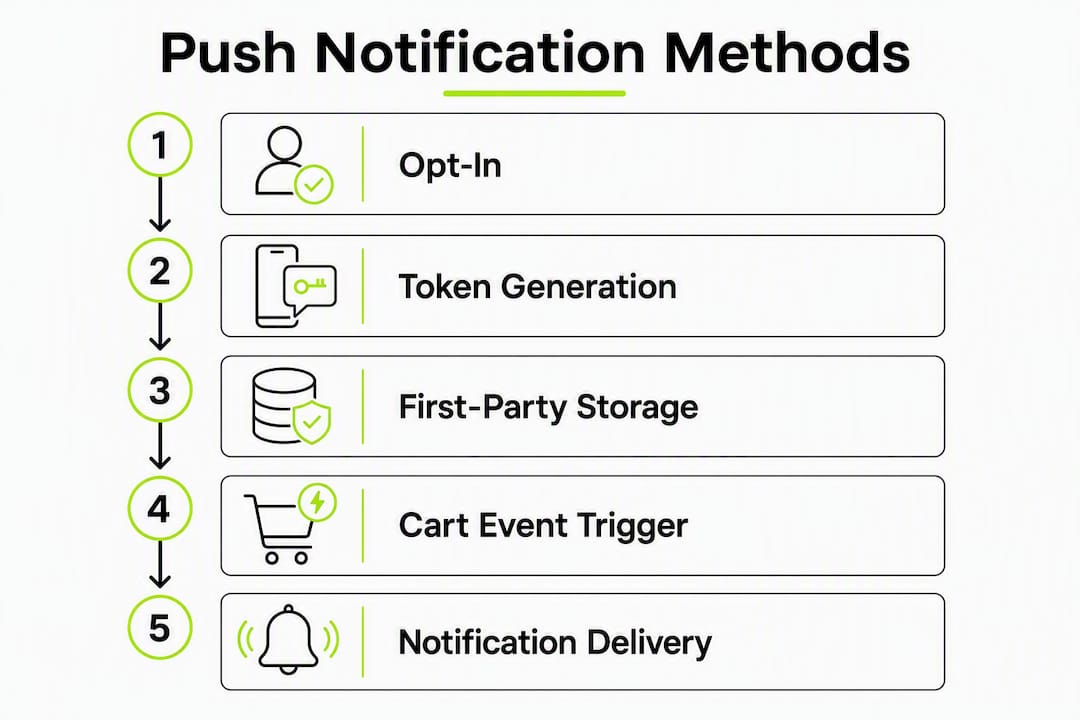
For all three approaches, the flow is the same: opt-in → token/endpoint generation → first-party storage → cart event fires → push sent with deep link → shopper taps → lands in exact cart state.
Pro Tip: Use a two-step soft opt-in: show a custom value-proposition prompt first, then trigger the native permission dialog only after the shopper accepts. This approach raises opt-in rates significantly compared to firing the system dialog immediately.
How do you choose the right push platform for your store?
Work through these questions before committing to any platform.
Must-have criteria:
- Does it deliver to iOS lock screens without requiring a phone number or email? (The App Clip path is the only reliable answer for iOS guest shoppers.)
- Does it support deep links to the exact cart state?
- Does it suppress the recovery sequence immediately on
purchase_completed?
Nice-to-have:
- Dashboard attribution showing recovered revenue by push sequence
- Pre-built templates and timing controls
- Free trial or demo availability
- Transparent pricing tied to recovered revenue
Red flags to walk away from:
- No collapse key support (stacked pushes on the lock screen burn opt-outs fast)
- Opaque attribution that counts clicks rather than completed purchases
- No real-time purchase suppression across devices
- Missing integrations for your platform (Shopify, WooCommerce, or BigCommerce)
- Pricing tied to recovered revenue with no clear commission cap
If your store runs predominantly on iOS traffic and you have a high guest-checkout rate, any platform without an App Clip path will leave a meaningful share of your audience unreachable on the lock screen. That's the single biggest iOS limitation for web push you need to plan around.
Cart-recovery sequence best practices: timing, content, and frequency
A tight two-touch sequence outperforms longer ones for push. Here's the structure that works.
- Touch 1 (30–60 minutes after abandonment): A neutral reminder. "You left something behind" with a deep link to the exact cart. No discount yet. Playbooks recommend this window and a TTL of 1–4 hours so stale messages drop rather than arriving hours late.
- Touch 2 (3–6 hours later, only if no purchase): Add urgency or a small incentive for high-value carts. Keep the payload under 4 KB; put any promotional image behind the deep link.
- Optional day-2 push: Reserve for high-value carts only. Broad day-2 broadcasts to all abandoners inflate opt-out rates without proportional revenue lift.
Use collapse keys scoped per cart ID so Touch 2 replaces Touch 1 on the lock screen rather than stacking. Always fire a suppression event on purchase_completed server-side, across all devices.
Pro Tip: Lead with utility copy ("Your cart is waiting") rather than promotional copy ("Get 10% off now"). Utility framing keeps opt-out rates low and trains subscribers to treat your pushes as helpful, not spammy.
Integration and setup checklist for Shopify, WooCommerce, and BigCommerce
Preflight (all platforms):
- Map your cart events:
add_to_cart,checkout_started,purchase_completed - Confirm cart IDs are persistent and deep-linkable
- Add
src=pushattribution parameters to all push deep links
Platform steps:
- Shopify: Install the Storepush app from the App Store, wire webhooks for
checkout/createandorder/paid, and verify the App Clip invocation URL in App Store Connect. - WooCommerce: Install the plugin or configure a server-side webhook; register the service worker for web push; generate VAPID keys for the push endpoint.
- BigCommerce: Use the integration API to capture cart events; configure the service worker and endpoint registration in your storefront theme.
- Custom storefronts: Set up a server endpoint to receive push subscription POSTs, store endpoints in your database, generate VAPID keys, and register the service worker in your front-end bundle.
Operational steps (all platforms):
- Implement the two-step soft opt-in preprompt before the native permission dialog
- Prune invalid/expired endpoints monthly to protect deliverability
- Wire real-time suppression on
purchase_completedacross all devices - End-to-end test: opt-in → abandon cart → receive push → tap → checkout completes → verify
src=pushattribution fires
How do you measure recovered revenue from push notifications?
Benchmark context: Web push opt-in rates tend to run 5–15%, with near-zero per-send cost — a very different economics profile from SMS, where per-message fees accumulate at scale.
Tie recovery attribution to purchase_completed events triggered via the src=push deep link parameter, not to clicks. A click that doesn't convert is engagement, not recovery.
| Metric | What to track | Healthy signal |
|---|---|---|
| Opt-in rate | Subscribers / unique visitors | 5–15 % for web push |
| Push send volume | Sends per abandoned cart event | Matches abandonment rate |
| Click rate | Clicks / sends | Varies by sequence touch |
| Recovered revenue | Purchases with src=push / total abandoned value | Benchmark against holdout |
| Opt-out rate | Unsubscribes / sends | Low single digits per campaign |
Run a holdout group (no push sent) alongside your treatment group for at least 30 days. The difference in recovered revenue between the two groups is your true lift, stripped of organic return-to-purchase noise.
Pricing models and total cost for push-first platforms
| Pricing model | How it works | Best for | Watch out for |
|---|---|---|---|
| Flat monthly subscription | Fixed fee regardless of volume | Predictable budgets, high-volume stores | Per-tier send caps |
| Commission on recovered revenue | % of attributed purchases | Low upfront cost, scales with results | Opaque attribution inflating the base |
| Per-endpoint fee | Cost per active subscriber | Granular cost control | Fees compound as list grows |
| Enterprise custom | Negotiated | Large catalogs, complex integrations | Long contracts, slow onboarding |
Storepush uses a subscription plus commission model: a monthly fee covers the platform, and a commission applies to attributed recovered revenue. Compare that to SMS, where per-send fees accumulate regardless of whether the message converts. For stores with large guest-checkout volumes, the push economics typically win on cost per recovered order.
What's the final verdict on which platform to use?
Choose Storepush if your store has meaningful iOS traffic, a high guest-checkout rate, and you want lock-screen push delivery without collecting phone numbers or emails. It's the only option in this comparison that combines App Clip-first native iOS delivery with merchant-owned endpoints and integrations across Shopify, WooCommerce, and BigCommerce.
Recommended first test: Run a 30-day holdout A/B test. Control group gets your existing email or SMS recovery sequence. Variant group gets a 1–2 touch push sequence via Storepush for guest buyers. Measure recovered revenue and opt-out rate. Thirty days gives you enough cart volume to see a statistically meaningful difference without a long commitment.
Pro Tip: Start the test with high-intent SKUs or repeat-customer segments. They convert at higher base rates, which means your push lift shows up faster and with less noise in the data.
Key Takeaways
Lock-screen push via App Clips is the only reliable path to native iOS re-engagement for guest shoppers without collecting phone numbers or emails.
| Point | Details |
|---|---|
| iOS coverage is the deciding factor | Web push requires PWA install on iOS; App Clips deliver native lock-screen push without it. |
| Opt-in rates for web push are generally 5–15 % | Near-zero per-send cost makes push economics favorable versus SMS at scale. |
| Two-touch sequences outperform longer ones | Timely touches with suppression immediately on purchase are recommended. |
| Attribution requires purchase events | Tie recovery to purchase_completed via src=push parameter, not to clicks alone. |
| Storepush covers the full stack | App Clip + web push, merchant-owned endpoints, Shopify/WooCommerce/BigCommerce integrations, and dashboard attribution. |
When push replaces SMS — and when you should stack channels
Push and SMS are not the same channel wearing different clothes. They solve different problems, and the stores that treat them as interchangeable end up underperforming on both.
Push is high-leverage for time-sensitive nudges precisely because the marginal cost is near zero and delivery is immediate. For guest shoppers who never gave you a phone number, it's the only automated re-engagement channel you have. That's not a small edge — it's the difference between reaching a shopper and losing them permanently.
SMS retains a real advantage for mission-critical messages when you have the number: guaranteed delivery, no browser dependency, and a channel most people still check within minutes. For high-value orders where a $10 incentive is worth sending, SMS is worth the per-send cost. You can find SMS best practices for e-commerce that translate well to hybrid sequencing.
The practical rollout order: push first for all guest recoveries, email for richer content and longer consideration cycles, SMS for high-value or time-sensitive cases where you have the number. Frequency caps and suppression logic need to span all three channels — a shopper who converts via push should not receive an SMS recovery message two hours later. That's not just annoying; it erodes trust in every channel you run.
Push-based recovery works best for high-intent abandoners and repeat customers. For stores where the majority of traffic is iOS and guest checkout is the norm, push isn't a supplement — it's the primary recovery channel, with SMS and email as the fallback.
Storepush recovers carts your SMS list will never reach
Most cart recovery tools assume you already have a phone number or email. Storepush doesn't. It reaches the guest shoppers who walked away without leaving any contact information, delivering native lock-screen pushes via iOS App Clips and web push, with every subscription endpoint stored in your own system, not a third-party list.
The setup is straightforward: connect your Shopify, WooCommerce, or BigCommerce store, wire your cart events, and run a 30-day holdout test against your existing recovery sequence. Pricing is a monthly subscription plus a commission on attributed recovered revenue, so the cost scales with results rather than with send volume.
Start your free trial at Storepush or book a demo to see the App Clip flow and attribution dashboard before you commit.
Useful sources and technical references
- W3C Web Push API specification — the governing standard for browser-based push subscriptions and endpoint generation
- RFC 8291 — Message Encryption for Web Push — defines the 4 KB AES-GCM payload limit and encryption requirements
- Apple Developer: Overview of App Clips — official documentation on App Clip invocation, size limits, and push permission behavior
- Web Push Notifications — E-commerce cart abandonment playbook — sequencing, timing windows, collapse keys, and TTL guidance
- Revively — Transactional SMS options — reference for SMS fallback and mission-critical message delivery
Recommended
- Text Marketing Campaigns: Do They Still Work in 2026? (Yes, But They're Not Enough) | StorePush
- Benefits of SMS Marketing: What It Does Well (and Where It Falls Short) | StorePush
- The Best Time to Send SMS Marketing Messages (Hint: It's Not a Time of Day) | StorePush
- SMS Marketing Best Practices: The Complete Guide for E-Commerce (2026) | StorePush