
Most small and midsize businesses pay a low to moderate monthly fee for push notification services, with audience size (measured as monthly active users or total subscribers) being the single biggest cost driver. That range holds across the majority of self-serve platforms according to industry pricing research. Where you land within it depends almost entirely on how many subscribers you're sending to and which billing model the vendor uses.
Here's a quick shortlist by need:
- Free / startup-friendly: Platforms with generous free tiers work well for stores under a few thousand subscribers who want to test the channel before committing budget.
- Subscriber-tier platforms: Flat monthly plans billed by MAU or subscriber count suit most growing e-commerce stores. Predictable costs, no engineering overhead.
- Infrastructure / pay-per-message: Services like Amazon SNS or Azure Notification Hubs suit dev teams who want granular control and already operate at high volume. Cheaper at scale, but require engineering resources to manage.
- Enterprise quote: If you're pushing to hundreds of thousands of users across multiple regions with SLA requirements, skip the self-serve tiers and go straight to a sales conversation.
For e-commerce stores focused on cart and browse abandonment recovery, StorePush is the recommended option on this site. It uses native iOS App Clips to reach shoppers on their lock screens without requiring an email address or phone number, and it pairs subscription tiers with a commission on attributed recovered revenue.
Key Takeaways
Push notification pricing is predictable for most businesses: subscriber-based or flat-tier plans generally have modest monthly fees for SMBs; infrastructure billing costs can be lower but require engineering resources, and the billing model you choose matters more than the headline price.
| Point | Details |
|---|---|
| Primary cost driver | Subscriber count (MAU) determines your tier on most platforms, not message volume. |
| SMB price range | Most self-serve platforms cost $0–$200/mo; free tiers cover stores under ~2,500 subscribers. |
| Infrastructure vs. platform | Pay-per-message billing (SNS, FCM) is cheaper at scale but requires dev resources to manage. |
| Hidden fees to verify | Check overage math, integration fees, data retention limits, and region-based surcharges before signing. |
| StorePush for e-commerce | Subscription + commission model ties cost to recovered revenue, with no email or phone required to reach cart abandoners. |
Table of Contents
- How push notification pricing is structured
- Comparing provider categories: which one fits your business?
- What does push actually cost at 1k, 10k, and 100k subscribers?
- How to estimate your monthly push bill in three steps
- How to pick the right push provider
- Why StorePush's pricing model fits e-commerce cart recovery
- An experienced marketer's honest take on push pricing
- StorePush recovers carts other channels can't reach
- Sources
How push notification pricing is structured
Push notification pricing generally falls into several common billing shapes. Understanding them upfront saves you from comparing apples to oranges when you're evaluating vendors.
- Free tier: A capped subscriber or message count at no cost. Common among self-serve platforms as an entry point. Useful for early testing, but limits typically kick in quickly.
- Per-subscriber / per-MAU: You pay a monthly rate based on how many active subscribers or monthly active users you have. This is the most common model among marketing-focused platforms.
- Flat monthly tiers: Fixed price per plan bracket (e.g., up to 10k subscribers, up to 50k subscribers). Predictable and easy to budget.
- Pay-per-message / infrastructure billing: You pay for each message delivered or each API request made. Amazon SNS bills this way, with no upfront fees and payloads metered in 64 KB chunks. Each chunk counts as one delivery unit, so a 130 KB payload costs two units.
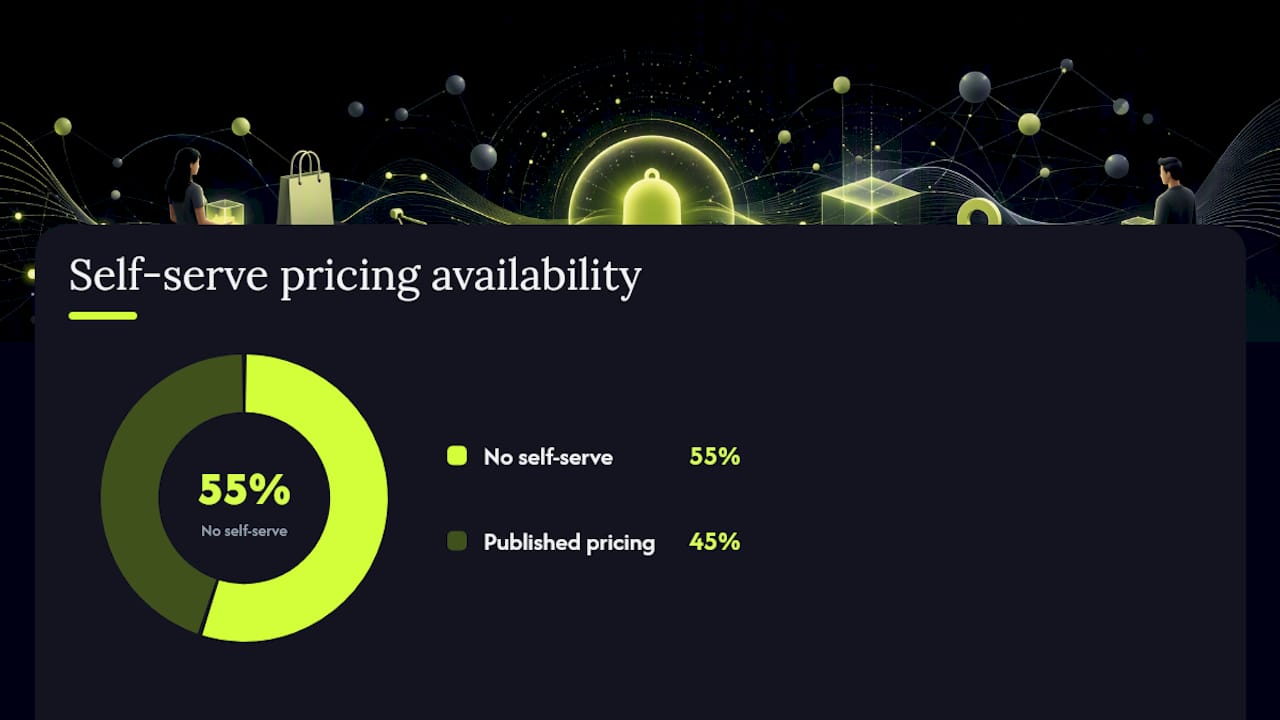
- Enterprise / quote-only: No published price. You negotiate based on volume, SLA requirements, and feature scope. A 2026 catalog review found that 6 of 11 tracked push vendors publish no self-serve pricing at all, which shifts cost discovery entirely to a sales process.
Metering nuances that affect your actual bill:
- Azure Notification Hubs charges a base fee per namespace plus aggregated push counts across your subscription. Two basic namespaces sending 5M and 9M pushes get billed on the combined 14M total, not separately.
- Payload chunking on infrastructure platforms means message size directly affects cost. Keep payloads lean. See push notification character limits for a practical reference on what fits in a single delivery unit.
- API request counts on infrastructure platforms add up separately from delivery counts. A single send can generate multiple billable API calls.
- Subscription-level aggregation (Azure) can work in your favor or against you depending on how many namespaces you run.
Pro Tip: For most e-commerce marketers without a dedicated engineering team, flat-tier or per-MAU subscriber pricing is easier to predict and typically cheaper than infrastructure metering. Pay-per-message infrastructure billing only beats flat tiers at very high volume, and only when you have the dev resources to manage it.
Comparing provider categories: which one fits your business?
Rather than comparing vendors by name, the more useful frame is comparing billing categories. Each one suits a different type of business.
| Provider category | Pricing model | Free tier | Est. monthly cost (10k subscribers) | Key features affecting price | Enterprise / SLA | Best for |
|---|---|---|---|---|---|---|
| Self-serve marketing platform | Per-MAU or flat tier | Yes, typically up to 500–2,500 subscribers | $20–$100 | Segmentation, automation, A/B testing, analytics | Sometimes; varies | Growing e-commerce stores, content publishers |
| Infrastructure / cloud messaging | Pay-per-message + API requests | Yes (FCM is free; SNS has a free tier) | Near $0 at low volume; scales with sends | Delivery only; no built-in segmentation or analytics | Yes (AWS/Azure SLAs) | Dev teams, high-volume apps |
| E-commerce recovery platform | Subscription + commission | Yes (free trial or starter tier) | Varies by plan and recovery volume | Cart recovery triggers, lock-screen push, revenue attribution | Available | E-commerce stores targeting cart abandonment |
| Enterprise push platform | Quote-only | Rarely | Not published | Full feature suite, multi-region, dedicated support | Yes | Large enterprises, multi-brand orgs |
On billing transparency: Self-serve platforms with published pricing let you model costs before you ever talk to sales. Quote-only vendors are a different experience. The 2026 catalog review cited above found that quote-only tools carry a higher risk of hidden fees because certain cost components like overage math, integration costs, and data retention charges may not be disclosed until contract negotiation.
Hidden costs to check in vendor terms:
- Overage fees when you exceed your subscriber tier mid-month
- Integration fees for connecting to Shopify, WooCommerce, or custom storefronts
- Data retention charges for storing event history beyond a default window
- Cross-region delivery surcharges if your audience spans multiple geographies
- Test or development environment costs that count against your production quota
Firebase Cloud Messaging (FCM) delivers push messages at no charge. The cost on Firebase-based setups comes from the management and analytics layers built on top of it, not from the delivery pipe itself.
What does push actually cost at 1k, 10k, and 100k subscribers?
These estimates use common billing shapes and reasonable sending assumptions. They're meant for budgeting conversations, not contract negotiations.
Assumptions: 4 sends per subscriber per month; standard marketing platform features (segmentation, basic analytics); no enterprise SLA add-ons.
| Subscriber count | Free-tier platform | Per-MAU platform (~$0.01/MAU) | Infrastructure (pay-per-message) | E-commerce recovery platform |
|---|---|---|---|---|
| 1,000 | $0 (within free tier) | ~$10/mo | Near $0 | Free trial / starter tier |
| 10,000 | $20–$50/mo (above free tier) | ~$100/mo | $1–$5/mo | $30–$80/mo + commission |
| 100,000 | $100–$200/mo | ~$500–$1,000/mo | $10–$50/mo | Custom / quote |
A few things to note about these ranges. Infrastructure billing looks extremely cheap at 10k subscribers because you're only paying for actual message deliveries. At 100k subscribers sending 4 messages each per month, that's 400k deliveries. At AWS SNS rates, that's a fraction of a dollar in raw delivery cost. The catch: you're also paying for engineering time to build and maintain the pipeline, plus any analytics or segmentation layer you add on top.
How push compares to SMS: Push is substantially cheaper per send than SMS. SMS typically runs $0.01–$0.05 per message in the US, meaning 400k sends per month costs $4,000–$20,000. The same volume over push infrastructure costs a few dollars. Even on a premium marketing platform at $200/mo, push wins on unit economics by a wide margin. For a deeper look at SMS economics, the SMS marketing best practices guide covers channel cost comparisons in detail.
- At 1k subscribers, almost any platform's free tier covers you. Focus on features and integration quality, not price.
- At 10k subscribers, per-MAU pricing and flat-tier pricing converge. Compare what's included in each tier (automation, A/B testing, analytics) before defaulting to the cheapest number.
- At 100k subscribers, the billing model matters a lot. Infrastructure billing wins on raw cost but demands engineering resources. Flat-tier platforms in this range often jump to $100–$200/mo or push you toward a custom quote.
How to estimate your monthly push bill in three steps
You don't need a spreadsheet to get a working estimate. Three inputs get you close enough to budget with confidence.
Step 1: Identify the billing model and get your subscriber count. Ask the vendor: do they bill by MAU, total subscribers, messages sent, or a flat tier? Then pull your current subscriber count or estimate it based on your monthly site traffic and expected opt-in rate. MAU and total subscriber counts often differ; clarify which one the vendor meters.
Step 2: Estimate your send volume. How many pushes per subscriber per month do you plan to send? A typical e-commerce store might send 2–6 per month (cart recovery triggers, promotional campaigns, back-in-stock alerts). If you're on a pay-per-message platform, also note your average payload size in KB.
Step 3: Apply the vendor's math and add a buffer. For per-MAU billing: multiply your MAU by the per-MAU rate. For flat tiers: find the bracket your subscriber count falls into. For pay-per-message: multiply total sends by the per-message rate, then add API request costs.
Worked example: 8,000 MAU, 5 sends per user per month, per-MAU platform at $0.01/MAU. Monthly cost = 8,000 × $0.01 = $80/mo.

For infrastructure setups, use the AWS Pricing Calculator to model SNS costs before committing.
Pro Tip: Before you talk to sales, gather these inputs: current MAU or subscriber count, planned sends per user per month, average payload size (if relevant), number of platforms (iOS/Android/web), and whether you need multi-region delivery. A vendor who can't give you a written cost estimate based on those inputs is a red flag.
Track push campaign revenue with UTM parameters attached to push links so you can calculate cost-per-recovered-order in Google Analytics. That turns a pricing conversation into an ROI conversation, which is a much stronger position.
How to pick the right push provider
Price is one input. The wrong provider at the right price still costs you money in lost conversions, engineering time, and switching costs.
Selection criteria to weigh:
- Cost predictability: Flat tiers and per-MAU billing are easier to forecast than pay-per-message. If your subscriber count is volatile, check how the vendor handles mid-cycle overages.
- Feature fit: Do you need automation workflows, A/B testing, and revenue attribution? Or just delivery? Don't pay for a full marketing platform if you only need infrastructure.
- Integration effort: How long does it take to connect to your storefront? A platform that requires a custom API integration adds engineering cost that doesn't show up in the monthly fee.
- SLA and support: For revenue-critical campaigns, a guaranteed uptime SLA matters. Self-serve platforms rarely offer one; enterprise tiers usually do.
- Contract terms: Month-to-month contracts give you flexibility. Annual contracts often come with a discount but lock you in before you've validated the channel.
Questions to ask vendor sales:
- How exactly do you meter usage: MAU, total subscribers, or messages sent?
- What happens if I exceed my tier mid-month? Is overage billed immediately or at month-end?
- Do you charge separately for API requests, data retention, or integrations?
- Are there region-based pricing differences for international audiences?
- Does a test or staging environment count against my production quota?
- What is your cancellation policy and data export process?
Red flags to watch for:
- No published pricing at all, with no willingness to share a written estimate based on your usage inputs
- Overage math that requires a call with sales to understand
- Billing in a currency or region that doesn't match your business without a clear conversion policy
- Per-API-request metering with no cap or estimate tool
- Data retention limits that delete subscriber history before you've had time to act on it
Why StorePush's pricing model fits e-commerce cart recovery
Most push platforms are built for broad marketing use cases: promotional blasts, content updates, re-engagement campaigns. StorePush is built specifically for the moment a shopper walks away from a cart.
The architecture is different from standard web push. StorePush uses native iOS App Clips to deliver lock-screen push notifications without requiring the shopper to install an app, hand over an email address, or enter a phone number. That matters because web push on iOS has significant platform constraints that limit reach for standard approaches. App Clips bypass those constraints, reaching shoppers who would otherwise be completely unreachable through conventional re-engagement channels.
What that means for your cost model:
- No list-building cost. You're not paying for email acquisition or SMS opt-in campaigns before you can recover a cart.
- Recovery triggers fire on actual cart and browse events, not on a broadcast schedule. That keeps send volume focused and relevant.
- The subscription + commission model means your cost scales with your recovered revenue, not just your subscriber count. You pay more when you earn more.
- Dashboard analytics include revenue attribution, CTR heatmaps, and funnel tracking, so you can calculate ROI without a separate analytics stack.
StorePush integrates with Shopify, WooCommerce, BigCommerce, and custom storefronts. For stores where the majority of shoppers abandon carts without leaving any contact information, that integration is the difference between having a recovery channel and not having one.
StorePush reaches the 90%+ of visitors who leave without purchasing, using native iOS App Clips to deliver lock-screen push notifications with no email or phone number required. Its subscription + commission model ties platform cost directly to recovered revenue, making it one of the few push solutions where the pricing structure itself aligns with e-commerce ROI.
An experienced marketer's honest take on push pricing
The pricing conversation for push notifications is often framed as a cost comparison between platforms. That's the wrong frame for most e-commerce marketers.
At small scale (under 10k subscribers), the difference between a $0 free tier and a $50/mo starter plan is almost irrelevant compared to whether the platform actually recovers revenue. A tool that costs $50/mo and recovers $2,000 in abandoned carts is a better investment than a free tool that recovers nothing. Price should be a secondary factor until you've validated that the channel works for your specific store and audience.
At larger scale (100k+ subscribers), the calculus shifts. Billing model, overage structure, SLA guarantees, and multi-region support start to matter more than the headline monthly fee. That's when you should be requesting written cost estimates, not just looking at a pricing page.
The one thing I'd push back on across the board: don't let a quote-only vendor's sales process substitute for your own cost modeling. Go into every sales call with your MAU count, your planned send frequency, and a target cost-per-recovered-order. If a vendor can't give you a written estimate against those inputs, that's a signal about how transparent their billing will be after you sign.
StorePush recovers carts other channels can't reach
If you've read this far, you know push notification costs are manageable. The harder problem is finding a push solution that actually reaches shoppers who've already left your store without leaving an email or phone number.
StorePush solves that problem directly. It uses native iOS App Clips to send lock-screen push notifications to cart abandoners and browse drop-offs, no app install required, no contact information needed. It connects to Shopify, WooCommerce, and BigCommerce in a straightforward integration, and its subscription + commission pricing means you're paying for results, not just reach.
To see what recovery looks like for your store's volume and get a personalized ROI estimate, book a demo and bring your monthly traffic and cart abandonment rate. That's all the input needed to model what StorePush could recover for you.
Sources
These are the authoritative sources used to build the cost examples and billing explanations in this article. Check them directly when validating vendor math or preparing for a sales conversation.
- Pricing - Notification Hubs | Microsoft Azure
- How Much Do Push Notifications Cost?
- The true cost of Push Notifications (2026): overages, setup fees & quote-only pricing · The Front Desk Review
When using vendor calculators, always input your actual MAU count, planned sends per user per month, and the number of platforms you're targeting (iOS, Android, web). A vendor who can't produce a written estimate from those inputs is worth approaching with caution.