
Shoppers abandon carts for two overlapping reasons: psychological friction (guilt, perceived risk, purchase justification) and operational friction (unexpected costs, forced account creation, slow checkout). Baymard Institute's research puts the average abandonment rate at 70.22%, and a Tel Aviv University study found that carts heavy with indulgent items predict significantly higher abandonment, even after controlling for price and item count. The highest-impact fixes are faster to deploy than most teams expect.
Three things to test this week:
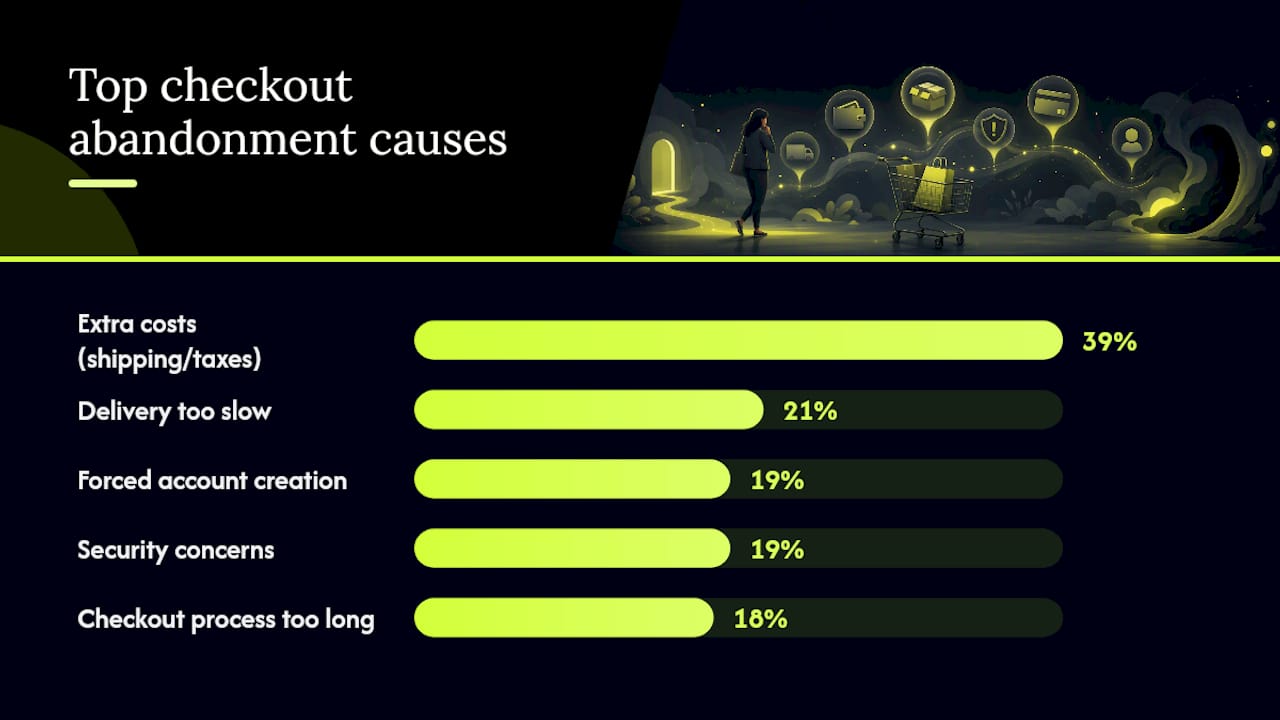
- Surface all costs on the product page, not at checkout. Extra costs are the top abandonment driver, cited by 39% of U.S. shoppers.
- Enable guest checkout to remove the account-creation barrier (cited by 19% of abandoners).
- Run a cart-composition experiment: add a utilitarian product recommendation alongside indulgent items and measure completion rate change over 14 days.
StorePush fits here as a recovery channel that reaches shoppers on their lock screens without requiring an email address or phone number, which matters because most abandoners never share either.
Key Takeaways
The single highest-leverage move in reducing cart abandonment is combining upstream psychological fixes (cart composition, cost transparency) with fast, channel-diverse recovery, because prevention and recovery together outperform either approach alone.
| Point | Details |
|---|---|
| Guilt drives abandonment | Carts heavy with indulgent items predict higher abandonment; add utilitarian recommendations to shift the balance. |
| Surface costs early | Extra costs cited by 39% of U.S. abandoners; show shipping and fees on the product page, not at checkout. |
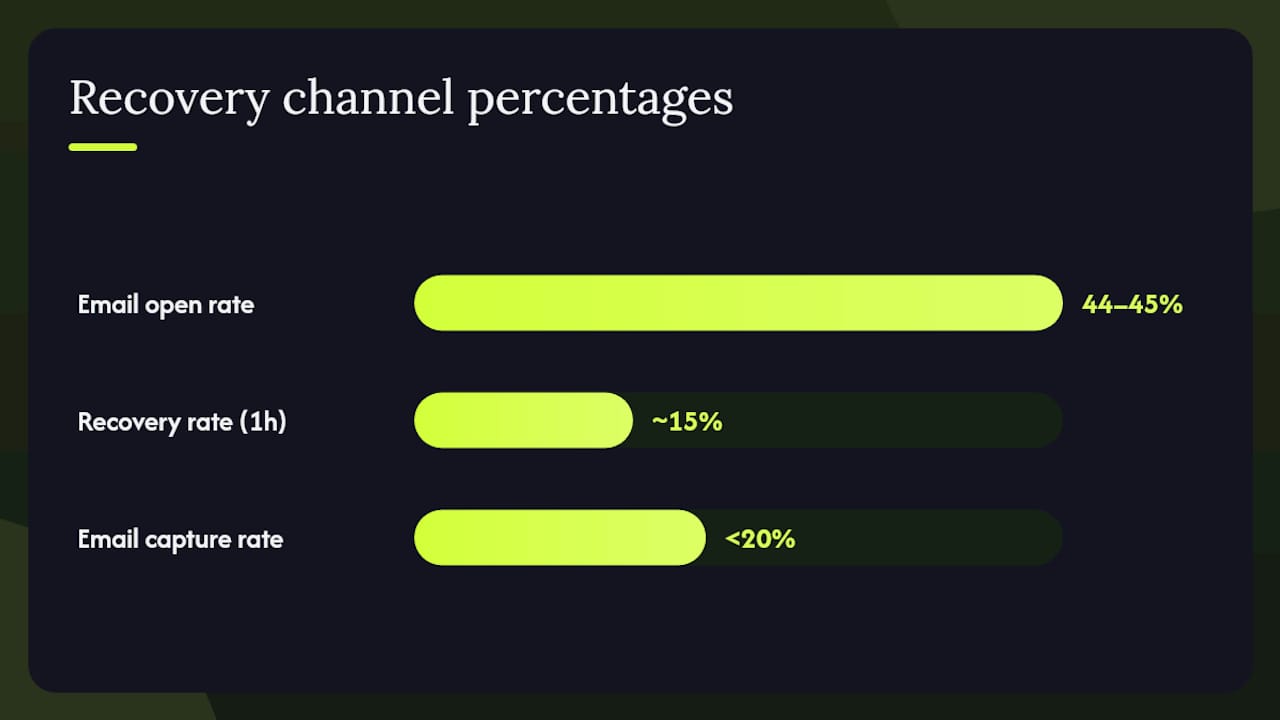
| Speed matters in recovery | First recovery email within 60 minutes achieves roughly 15% recovery; waiting 24 hours cuts that rate sharply. |
| Reduce form fields | Target 7–8 essential checkout fields per Baymard benchmarks; every extra field is an abandonment opportunity. |
| StorePush reaches the unreachable | Push notifications via iOS App Clips recover shoppers who never shared an email or phone number. |
Table of Contents
- Why abandoned cart psychology starts with guilt and perceived risk
- What practical checkout problems actually cause shoppers to leave
- Behavioral tactics that directly address guilt and purchase justification
- Which UX and checkout fixes give you the biggest conversion lift
- How to recover abandoned carts across email, SMS, and push notifications
- How to measure what's working and run clean experiments
- Your 30/60/90-day plan for reducing abandonment
- What actually surprises most teams when they audit abandonment
- StorePush recovers carts that email can never reach
- Sources
Why abandoned cart psychology starts with guilt and perceived risk
The dominant psychological drivers of cart abandonment are indulgence guilt, purchase justification failure, perceived risk, and decision fatigue. Each one produces a distinct behavior: guilt causes hesitation and delay; perceived risk triggers exit; decision fatigue leads to "I'll come back later" (and they usually don't).
The Tel Aviv University research by Hadar et al., published in the Journal of Consumer Research, is the clearest evidence of how cart composition shapes psychology. Analyzing nearly 15 million items across four controlled experiments, the researchers found that a higher ratio of indulgent to utilitarian items raised guilt and reliably predicted abandonment.
70.22% average cart abandonment rate, per Baymard Institute. That figure represents the documented average across dozens of published studies, not a worst-case scenario.
The behavioral map looks like this:
- Indulgence guilt → shopper hesitates, delays, or opens a new tab to "think about it"
- Purchase justification failure → shopper can't rationalize the spend and exits
- Perceived risk → security concerns or unfamiliar payment flow trigger abandonment
- Decision fatigue → too many choices or form fields deplete willpower before checkout completes
A 2026 meta-analytic synthesis by Jain et al. adds a useful counterpoint: visual quality and clear product information actively reduce hesitation by lowering cognitive load. That's why a well-designed product page with strong imagery and transparent specs can offset some of the guilt effect before the shopper even reaches the cart.
What practical checkout problems actually cause shoppers to leave
Psychological friction and operational friction compound each other. A shopper already feeling guilty about an indulgent purchase will exit the moment they see a surprise shipping fee. The 2025 Statista survey of U.S. shoppers breaks down the top operational causes:
| Checkout abandonment reason | Share of U.S. shoppers (2025) |
|---|---|
| Extra costs (shipping, taxes, fees) | 39% |
| Delivery too slow | 21% |
| Forced account creation | 19% |
| Security concerns | 19% |
| Checkout process too long | 18% |
Stripe's analysis reinforces that abandonment varies by device and vertical, with mobile users abandoning at higher rates than desktop shoppers, partly because long checkout forms are harder to complete on a small screen.
Immediate fixes tied to each cause:
- Extra costs: Show estimated shipping and taxes on the product page or in a persistent cart widget, not at the payment step.
- Slow delivery: Surface your fastest available shipping option prominently; if two-day shipping exists, say so early.
- Forced account creation: Add a guest checkout path as the default option, with account creation offered post-purchase.
- Security concerns: Display trust badges, SSL indicators, and recognized payment logos at the checkout entry point.
- Long checkout: Reduce visible form fields to the 7–8 essential inputs Baymard benchmarks as the target; auto-fill address where possible.
Behavioral tactics that directly address guilt and purchase justification
The highest-impact psychological interventions are: mixing utilitarian product recommendations into indulgent carts, reframing cost as value, and using loss aversion sparingly (it backfires when overused).
Pro Tip: When adding a "Pairs well with" recommendation to an indulgent cart, choose a utilitarian item at a lower price point. The goal is to shift the cart's perceived balance, not to upsell. A $12 phone stand next to a $90 skincare set gives the shopper a practical anchor that makes the whole cart feel more justified.
Messaging patterns and UI placements that work:
- Cart-level utilitarian badge: "Complete your setup" or "Add the essential" above a recommended practical item.
- Cost-per-day framing: "$3.00/day for 30 days" on subscription or durable goods reduces the perceived magnitude of a lump-sum price.
- "You've earned this" copy: Used sparingly on loyalty-program carts, this directly counters guilt without feeling manipulative.
- Progress indicators: A checkout progress bar reduces decision fatigue by showing the shopper how close they are to done.
Short copy examples and placement:
- Cart modal: "Add [utilitarian item] and make it a complete order."
- Checkout summary: "Free shipping unlocked. You're $0 away from your order." (when threshold is met)
- Product page: "Most customers also grab [practical complement]" with a one-click add.
These interventions map directly to the TAU finding that reducing a cart's indulgent-to-utilitarian ratio lowers guilt and raises completion rates.
Which UX and checkout fixes give you the biggest conversion lift
The biggest conversion gains come from reducing form fields, showing costs early, keeping payment flows on-domain, and optimizing for mobile. These are not cosmetic changes.
Quick wins (implement in days):
- Enable guest checkout as the primary path.
- Show shipping cost on the product page or in the cart, before checkout begins.
- Add Apple Pay, Google Pay, or Shop Pay to reduce payment-entry friction.
- Display a progress bar across checkout steps.
- Auto-populate city and state from ZIP code.
Mid-term changes (2–6 weeks):
- Audit your form fields against Baymard's 7–8 essential-field benchmark and remove anything non-essential.
- Eliminate third-party payment redirects; keep the full flow on your domain.
- Build a mobile-specific checkout layout tested on real devices, not just browser emulation.
- Add inline field validation so errors appear immediately, not after form submission.
Pro Tip: *Mobile abandonment is a separate problem from desktop abandonment. Segment your checkout funnel by device in Google Analytics 4 before deciding which fix to prioritize.
How to recover abandoned carts across email, SMS, and push notifications
Send the first recovery touch fast. A 2026 synthesis reports that abandoned-cart emails achieve roughly 44–45% open rates, and recovery rates reach approximately 15% when the first email goes out within 60 minutes of abandonment. Waiting 24 hours cuts that recovery rate sharply.
Recovery channel timing and strengths:
- Email (1h / 24h / 72h): Best for detailed cart reminders with product images and a clear CTA. The 1-hour send is the highest-leverage touch. The 72-hour email can include a discount, but lead with value, not desperation.
- SMS (2–4 hours post-abandonment): Higher open rates than email but lower tolerance for frequency. One message per abandonment event is the ceiling.
- Retargeting ads (24h–7 days): Effective for window-shoppers who were never close to buying. Keeps the product visible without requiring contact info.
- Push notifications (within 30–60 minutes): Reaches shoppers on their lock screen without an email address or phone number. Particularly effective for mobile-first stores where email capture rates are low.
For winnable drop-offs (shoppers who reached the payment step), a 60-minute email plus a same-session push notification is the strongest two-touch sequence. For window-shoppers (added to cart from a browse session, never reached checkout), retargeting ads and a 24-hour push are more appropriate. You can recover abandoned carts without emails or phone numbers using push-based channels, which matters when your email capture rate is under 20%.
How to measure what's working and run clean experiments
Track these primary KPIs, segmented by device and traffic source:
| KPI | Definition | How to compute |
|---|---|---|
| Cart abandonment rate | % of add-to-cart sessions that don't complete purchase | (Carts created − Orders placed) ÷ Carts created |
| Checkout conversion rate | % of checkout-started sessions that complete | Orders ÷ Checkout initiations |
| Recovered revenue | Revenue attributed to recovery channel touches | Sum of orders where recovery channel was last touch |
| Email/push CTR | % of recovery messages that generate a click | Clicks ÷ Delivered messages |
| Recovery rate by channel | % of abandoned carts recovered per channel | Recovered orders ÷ Abandoned carts messaged |
For A/B testing cart-composition recommendations, run a 50/50 split on cart pages showing a utilitarian recommendation vs. no recommendation. Target a minimum of 500 sessions per variant before reading results. For checkout-flow experiments (removing a form field, adding a payment method), segment by new vs. returning visitors separately, since returning visitors have stored data and behave differently.
Stripe's guidance on device and vertical variance is worth applying here: never read aggregate abandonment rates without breaking them down by device. A single blended number hides the mobile problem entirely. StorePush's attribution dashboard tracks recovered revenue and CTR by channel, which makes it straightforward to compare push performance against email in the same reporting view.
Your 30/60/90-day plan for reducing abandonment
First 30 days (prevention):
- Surface all costs before checkout (marketing + engineering)
- Enable guest checkout (engineering)
- Launch 1-hour abandoned-cart email sequence (marketing)
- Audit form fields and remove non-essentials (product + engineering)
- Set up device-segmented funnel tracking in GA4 (analytics)
Days 31–60 (recovery scaling):
- Add SMS recovery for shoppers who opt in (marketing)
- Launch push notification recovery via StorePush for mobile abandoners (marketing)
- Run cart-composition recommendation A/B test (marketing + product)
- Implement mobile-specific checkout layout (engineering)
Days 61–90 (optimization):
- Analyze A/B test results and roll out winning variants
- Segment abandoners by stage (browse vs. cart vs. checkout) and tailor recovery sequences
- Review cart abandonment rate metrics monthly and set a target reduction benchmark
- Expand multi-channel recovery to retargeting for window-shoppers
Monitor recovery rates weekly for the first 60 days. Once you have clean data by device and channel, you'll know exactly where to invest next.
What actually surprises most teams when they audit abandonment
The first thing worth checking in any abandonment audit is cart composition, not checkout flow. Most teams go straight to form fields and payment options, which are real problems, but they miss the upstream psychological driver entirely.
The Tel Aviv University finding is the most underused insight in e-commerce conversion work. Adding a single utilitarian recommendation to an indulgent cart is a one-day implementation that costs nothing to test and directly addresses the guilt mechanism the research identifies. Pair that with a 60-minute push notification recovery sequence, and you're covering both the prevention and recovery sides of the problem in the same sprint.
The recommended first experiment: add a utilitarian "pairs well with" recommendation to your top five indulgent product carts, then run a 60-minute recovery push for anyone who abandons. Measure completion rate and recovered revenue over 30 days. That combination targets the psychological root cause and the recovery gap simultaneously, which is faster than fixing checkout UX alone.
StorePush recovers carts that email can never reach
Most recovery strategies assume you have the shopper's email. The reality is that the majority of abandoners never give it to you. StorePush solves that gap by sending push notifications directly to shoppers' lock screens via native iOS App Clips, with no email address, phone number, or app installation required.
For e-commerce stores on Shopify, WooCommerce, or BigCommerce, StorePush integrates with your existing storefront and gives you a dashboard showing recovered revenue, CTR heatmaps, and funnel-stage attribution. The test is straightforward: run push-based recovery alongside your existing email sequence for 30 days and compare recovery rates by channel. Most stores see push notifications reach a segment that email simply can't.
Book a demo with StorePush to see how push-based recovery fits your current abandonment rate and traffic mix.
Sources
Use these sources when presenting findings internally or designing controlled experiments. Apply segmentation (device, traffic source, new vs. returning) when translating any benchmark to your specific store.
- TAU Study Reveals the Psychological Cost Behind Billions in Lost E-commerce Revenue
- Cart abandonment rate – Baymard Institute
- United States: cart abandonment reasons 2025 | Statista
- Cart Abandonment Statistics 2026: Rates, Reasons, and Recovery Benchmarks | DontPayFull
- Cart abandonment statistics | Stripe