You can absolutely add push notifications to a BigCommerce store, and you have two real paths: browser-based web push or an App Clip approach that reaches iOS lock screens without collecting an email or phone number. StorePush handles the second route, pairing cart-recovery pushes with a revenue-attribution dashboard. The fastest next step: enable push through your admin or install a push-enabled integration using BigCommerce SEO Automation, then send yourself a test notification before launching to shoppers.
TL;DR:
- Web push on desktop and Android works reliably, but iOS support is limited, making App Clip strategies essential for iPhone users.
- Testing push notifications should include opt-in prompts, clickable test messages, and confirmation of attribution metrics for proper setup.
- Proper setup involves verifying service worker activation, correct script hosting, and ensuring attribution tracking matches purchase behavior.
- Using push tools that do not require email or phone collection reduces compliance risks and broadens reach, especially on iOS devices.
- Managing notification frequency, targeting behavioral triggers, and respecting quiet hours are vital for maintaining user engagement and avoiding unsubscribes.
Table of Contents
- Setting Up BigCommerce Push Notifications Step by Step
- How Web Push and App Clips Actually Work on BigCommerce
- Push Notification Best Practices That Actually Preserve the Channel
- Troubleshooting Push Notifications That Aren't Working
- What a Real StorePush Cart-Recovery Campaign Looks Like
- Comparing Third-Party Push Apps for BigCommerce
- Questions to Ask Before Choosing a Push Solution
- GDPR, CAN-SPAM, and Push Notification Compliance
- What the Conventional Push Advice Gets Wrong
- Try StorePush for Cart Recovery on BigCommerce
- Where to Verify the Details
- Sources
Setting Up BigCommerce Push Notifications Step by Step
Getting push live on your store isn't a weekend project, but it's not a developer marathon either. Most merchants are sending their first test notification within a day once they know where to look.
Start in your BigCommerce control panel. Order and transactional notification settings live under Settings › Order Notifications, with email templates managed separately under Marketing, and you'll want admin-level access to touch either one, according to BigCommerce's own documentation. That's your baseline for transactional messaging. For actual push notifications (the browser or lock-screen kind that re-engage shoppers who haven't bought yet), you'll typically install a third-party app or inject a provider's script into your theme.
Here's the general sequence most integrations follow:
- Install the push provider's app from the BigCommerce marketplace, or add its script through Storefront settings.
- Confirm the service worker file and web app manifest are registered correctly. This is what lets a browser hold a subscription even when the tab is closed.
- If your provider requires it, connect via WebDAV to upload service worker assets directly to your store's file structure.
- Verify the integration in DevTools: check that the service worker shows "activated" and that a push subscription object exists.
Before you launch anything to real traffic, run this checklist:
- Trigger the opt-in prompt yourself on desktop and mobile to confirm it fires correctly.
- Send a test notification and click through it to make sure the landing page loads properly.
- Confirm the click registers in your provider's attribution dashboard, not just in your browser.
Pro Tip: Test your opt-in prompt in an incognito window. Cached permission states in your regular browser can make a broken prompt look like it's working fine.
How Web Push and App Clips Actually Work on BigCommerce
Web push runs on three browser technologies working together: the Notifications API (what displays the message), the Push API (what delivers it from a server), and the Service Worker API (the background script that keeps your site "listening" even when it's closed). Chrome, Firefox, and Edge all support this stack reliably on desktop and Android.
iOS is where it gets complicated. Apple added web push support in Safari, but with meaningful restrictions: users often need to add your site to their home screen first, and permission behavior is inconsistent across iOS versions. This is precisely why StorePush and similar tools lean on native App Clips instead of standard web push for iOS. An App Clip is a lightweight, installable slice of a native app that Apple allows to send notifications without requiring a full app download.
Here's how to think about which approach fits your traffic:
- If most of your visitors browse on desktop or Android, standard web push covers you well and costs little to implement.
- If a meaningful share of your traffic is iPhone Safari (increasingly common for e-commerce), an App Clip approach recovers carts that web push simply can't reach.
- Running both isn't redundant. It's coverage. Desktop shoppers get standard web push; iOS shoppers get the App Clip flow.
Push Notification Best Practices That Actually Preserve the Channel
Push is a permission you can lose fast if you abuse it. One aggressive campaign and a shopper mutes you forever, so the rules here matter more than they might seem to at first glance.
Start with how you ask. Priming shoppers with a soft, on-page prompt before triggering the real browser permission request increases opt-in rates meaningfully, according to push notification best-practice guidance. Never fire the native permission dialog on page load. Wait until a shopper has done something (added an item to cart, viewed three products, spent 30 seconds on a category page) so the request comes after they've felt some value from being on your site, not before.
Behavioral triggers beat batch blasts every time:
- Abandoned cart reminders sent within an hour of drop-off
- Browse-abandonment nudges for shoppers who viewed a product but didn't add to cart
- Welcome series pushes for new subscribers, spaced over several days rather than dumped at once
- Restock or price-drop alerts tied to items a shopper actually looked at
Cap frequency. Most stores see diminishing returns (and rising unsubscribe rates) past one or two promotional pushes a week, separate from transactional and cart-recovery messages, which should stay behavioral rather than scheduled. Respect quiet hours; nobody wants a "flash sale" notification at 2 a.m. Keep copy tight (BigCommerce's character limit guidance is worth bookmarking), and always give shoppers a category-level way to control what they receive rather than a blunt all-or-nothing unsubscribe.
Pro Tip: Run a holdout group. That gap is your real revenue lift, not just your open rate.
Modern guidance increasingly frames push as product experience, not just a marketing channel. Separating transactional messages from promotional ones and giving users real control matters more in 2026's more fatigue-aware climate than it did five years ago, when almost any push felt novel.
Troubleshooting Push Notifications That Aren't Working
Push failures usually trace back to one of four places: permissions, service workers, asset hosting, or attribution tracking. Work through them in that order before assuming your campaign strategy is the problem.
Permission issues. Modern browsers require a user interaction (a click or tap) before they'll even show a permission prompt, a mitigation MDN documents as standard anti-abuse behavior. If your prompt never appears, check that it's not firing on page load. On iOS specifically, confirm whether your provider needs the site added to the home screen first, since that step trips up a lot of first-time testers.
Service worker and asset problems. Open DevTools, check the Application tab, and confirm your service worker shows as activated. If your provider's setup calls for it, verify you completed the WebDAV upload correctly; a missing or misplaced file here is the single most common setup failure.
Attribution gaps. If notifications are sending but revenue isn't showing up in your dashboard:
- Confirm UTM parameters or your provider's native attribution tag are appended to the notification's link.
- Check that your attribution window matches your actual purchase behavior (same-day versus multi-day).
- Watch your mute and unsubscribe rate. A spike usually means fatigue, not a tracking bug.
What a Real StorePush Cart-Recovery Campaign Looks Like
Here's a practical example. A shopper adds a $68 jacket to their cart on an iPhone, browses two more pages, then closes Safari without buying. Standard web push can't reach them reliably on iOS. StorePush's App Clip approach can, without ever asking for an email or phone number.
The flow typically looks like this:
- Trigger: cart abandonment detected after a set idle window (commonly 15 to 30 minutes)
- Copy: short, specific, and referencing the actual item ("Your jacket is still in your cart")
- Landing: the notification opens directly to a pre-filled cart, not a homepage
- Attribution: the dashboard logs the click and ties it to recovered revenue if the shopper completes checkout
Pro Tip: Test your first campaign on your own cart before launching. If the landing page doesn't preserve the cart contents, fix that before you send a single notification to real traffic.
Setup for most stores takes under a day. Expect opt-in and click-through ranges to vary by traffic quality and offer, so treat your first two weeks as a calibration period rather than a final verdict.
Comparing Third-Party Push Apps for BigCommerce
Most BigCommerce merchants choose between three categories of push tools, and the right one depends on what you're actually trying to solve.
General marketing-suite push add-ons bundle push alongside email and SMS. These tend to be the easiest to set up if you're already using the suite for email, since notification templates and segmentation logic reuse your existing customer data. Pricing usually scales with subscriber count or message volume, and features lean toward broadcast campaigns rather than deep cart-recovery logic.
Standalone web push apps focus specifically on browser notifications. They're often cheaper at low volume and simpler to configure, but they inherit the same iOS limitation every web push tool faces: Safari's home-screen requirement blocks a meaningful share of mobile shoppers from ever opting in.
App Clips and native-approach tools, StorePush among them, target the gap the first two categories can't close. Because these don't rely on standard web push permissions, they can re-engage iOS visitors, and the ones like StorePush that skip email or phone collection entirely tend to see faster opt-in since there's no data form standing between the shopper and the notification.

Ease of use varies less by category than by how much the app requires custom development. Anything needing manual service worker configuration or WebDAV uploads will take longer to launch than a marketplace app with a guided install. Weigh that setup time against how much of your traffic is iOS. If it's a meaningful share, the extra setup on an App Clips tool usually pays for itself in reach.
Questions to Ask Before Choosing a Push Solution
The right push tool depends less on feature lists and more on how your traffic actually behaves. Ask these questions before committing to a subscription.
Does it reach iOS shoppers, or just desktop and Android? If a third of your traffic is iPhone Safari, a web-push-only tool is leaving revenue on the table by design, not by accident.
Does it require email or phone collection to function? Some tools need that data upfront, which reintroduces the same friction push notifications are supposed to avoid. Others, including StorePush, skip that requirement and re-engage anonymous visitors directly.
What does attribution actually measure? Ask whether the dashboard tracks clicks, or tracks completed revenue tied to a notification. Those are very different numbers, and vendors don't always distinguish them clearly in their marketing.
How does pricing scale? Some tools charge flat monthly fees regardless of volume; others take a commission on recovered revenue. Model both against your average order value and traffic before signing up.
What's the actual setup time? Get a straight answer on whether you need developer help, WebDAV access, or theme code changes, versus a guided app install you can finish yourself in an afternoon.
Can you segment by behavior, not just by list? Abandoned-cart triggers, browse-abandonment, and win-back flows all need behavioral data, not a static subscriber list, to perform well.
GDPR, CAN-SPAM, and Push Notification Compliance
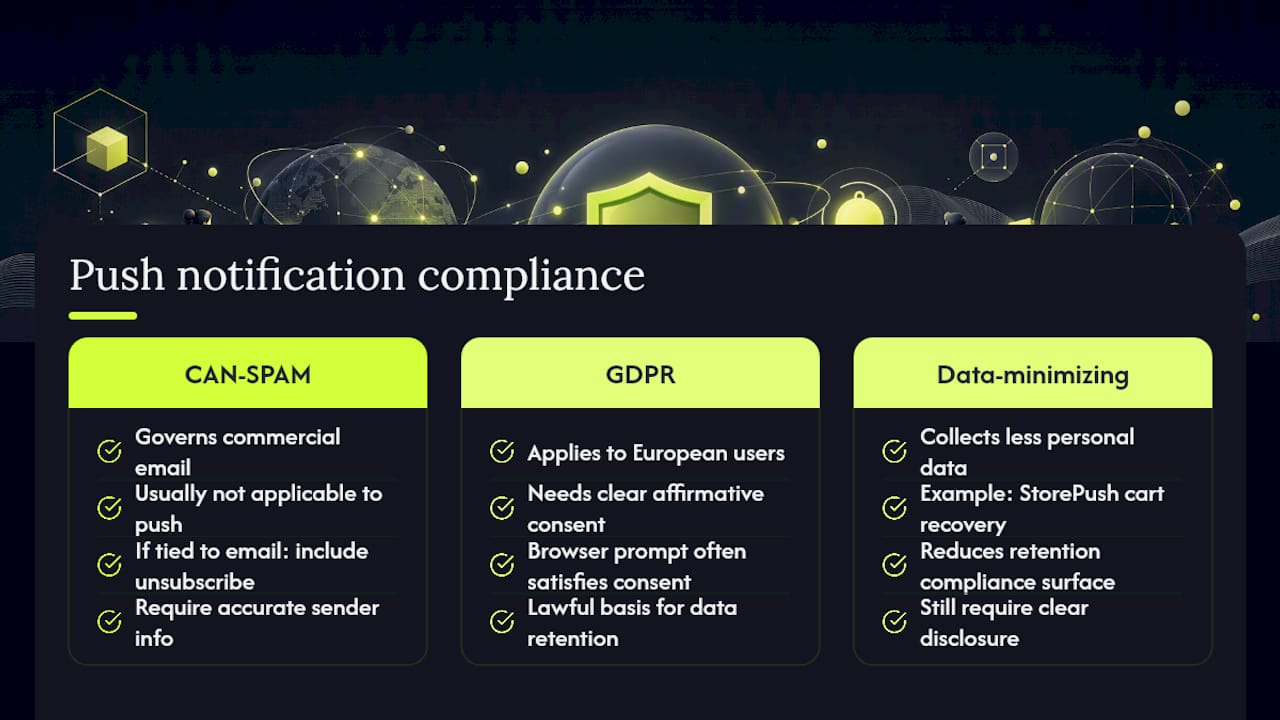
Push notifications sit in a slightly different regulatory space than email, but "different" doesn't mean "unregulated." CAN-SPAM technically governs commercial email, not push, so most push campaigns fall outside its direct requirements. That said, if your push strategy integrates with email flows (shared opt-in forms, cross-channel campaigns), your email leg still needs a working unsubscribe link and accurate sender information.
GDPR is the bigger consideration if you have European shoppers. Push notification consent generally needs to be a clear, affirmative action, not a pre-checked box or an assumption based on site visits. Because the browser's native permission prompt already requires an explicit click to allow notifications, most standard web push implementations clear this bar structurally. Where merchants get into trouble is retention and data use: if your push provider stores subscriber data alongside personal identifiers, you need a lawful basis for keeping it and a clear way for shoppers to revoke consent.
This is one underrated argument for approaches like StorePush's, which recover carts without collecting email or phone numbers at all. Less personal data collected means a smaller compliance surface to manage. It doesn't eliminate every obligation (you still need clear disclosure about what notifications you send and why) but it does reduce the data-retention questions that trip up merchants running more traditional identity-based marketing stacks.
What the Conventional Push Advice Gets Wrong
Most push notification guides treat the channel like email with a different delivery mechanism: build a list, segment it, send campaigns. That framing misses what makes push valuable in the first place, which is that it can work on shoppers who never gave you an email address at all.
The bigger blind spot is iOS. A huge share of push content online talks about opt-in rates and message copy without acknowledging that standard web push simply doesn't reach a large slice of mobile shoppers reliably. If your advice doesn't address that gap, it's optimizing a channel that's already leaking a chunk of its potential audience before a single notification gets sent.
Here's what I'd prioritize if you're starting from scratch: get your iOS coverage sorted before you obsess over copywriting or send-time optimization. A perfectly worded notification that never reaches half your mobile traffic is worse than a plain one that does. Once coverage is solid, then invest in the segmentation and frequency discipline the 2026 best-practice guidance rightly emphasizes. Sequence matters here, and most merchants get it backward.
— Lucas
Try StorePush for Cart Recovery on BigCommerce
StorePush gets you cart-recovery coverage that standard web push tools structurally can't offer on iOS, since it uses App Clips instead of browser permissions and never requires an email address or phone number to re-engage a shopper. That matters directly for BigCommerce merchants: if a meaningful share of your traffic is iPhone Safari, you're likely losing recoverable revenue that a web-push-only setup will never see.
Setup maps closely to what this guide already covered: connect your store, confirm the App Clip flow is live, and send a test notification before launching to real traffic. The dashboard tracks attributed recovered revenue, not just clicks, so you can see actual dollar impact rather than a vanity open rate.
Start with the free tier to test on your own cart, or book a demo if you want a walkthrough of the attribution setup first.
Where to Verify the Details
For the technical specifics behind this guide, go straight to the source. MDN's Web Push API documentation covers permission behavior and service worker mechanics. BigCommerce's order notification support article shows where transactional settings live in your admin. Omnisend's integration guide walks through a typical vendor setup flow, including WebDAV steps. For strategy, Appbot's 2026 best-practices piece and MWM's guide are worth bookmarking.
Sources
- Web Push API Notifications best practices - Web APIs | MDN
- Customer Order Notifications
- App push notification best practices for 2026 (With Examples) - Appbot
- Push notification best practices (MWM Guides)