The push notifications that convert share three traits: they name something specific (a product, a price, a count), they open with an action verb, and they fire off real shopper behavior instead of a broadcast calendar. Everything else is decoration.
Here are two models worth stealing:
- "Your cart misses you 👀" / "The Nike Air Max 90 you left behind just dropped to $89. Grab it before it's gone." (Title: 22 characters, body: 76 characters.) This works because it names the product and the new price, and it fires the moment a cart sits idle.
- "Back in stock: Size 9" / "The sneakers you wanted sold out fast. We just restocked 12 pairs." (Title: 21 characters, body: 68 characters.) This works because it answers a specific question the shopper already asked with their browsing behavior.
If you're only testing three things this month, test the headline, the CTA verb, and one personalization token. That combination moves the needle faster than a full rewrite.
Key Takeaways
The most effective push notifications pair a specific, verifiable detail with an action-first CTA and fire off real shopper behavior rather than a fixed schedule.
| Point | Details |
|---|---|
| Lead with specificity | Replace vague phrasing with product names, dollar amounts, or stock counts in every send. |
| Trigger over schedule | Time cart, restock, and shipping pushes to real behavior, not a calendar slot. |
| Measure next-action rate | Prioritize completed post-tap actions over raw open rate when judging a test. |
| Segment by behavior | Tailor copy for new visitors, repeat buyers, high-value carts, and lapsed users separately. |
| Reserve urgency for real scarcity | Only use countdown or low-stock language when the claim is checkable and true. |
Ready to see behavior-triggered push copy recover carts without collecting a single email address? Book a demo with StorePush and watch how App Clip-powered notifications turn abandoned visits into completed orders.
Table of Contents
- Push Notification Copy Examples By Use Case
- What Makes Push Notification Copywriting Actually Work
- When To Send: Triggers and Timing That Drive Opens
- Testing Push Copy: What to A/B and What to Measure
- Fill-In Templates and Safe Character Counts
- How StorePush Approaches Cart-Recovery Copy
- Opt-In Rules and Privacy Notes You Can't Skip
- Segmentation Strategies With Copy Examples
- Urgency and Scarcity: Use Sparingly, Use Precisely
- Why Copy-Paste Examples Beat Copywriting Theory
- Sources
Push Notification Copy Examples By Use Case
Generic push notification copywriting examples don't transfer well between industries because the trigger, urgency level, and reader intent all shift. Here's a working library organized by where the behavior actually happens.
Ecommerce carries the widest range of triggers, and the highest-performing examples cluster around urgency, cart recovery, and restocks. A cart abandonment push might read "Still thinking it over?" with body copy "Your $142 cart is saved, but only for 24 more hours." A price-drop alert works well as "Price drop alert 📉" paired with "The jacket in your wishlist just fell to $64, down from $89." Back-in-stock messages perform best ultra-specific: "It's back!" with "Size M in Sage Green just restocked. 8 left."
SaaS apps lean on activation and usage-based triggers rather than urgency. An activation nudge might say "One step left" with "Connect your calendar to finish setup, it takes 40 seconds." A usage-spike alert reads "You're on fire this week 🔥" with "You've logged 47 tasks, that's your best week yet."
Media and publishing push notifications thrive on immediacy: "Breaking: Fed cuts rates" with a one-line summary, or "New episode is live" with "Season 3, Episode 6 just dropped. 42 minutes." Transactional notifications need zero persuasion, only clarity: "Your order shipped" with "Arriving Thursday by 8 PM. Track it here," or "New sign-in detected" with "Was this you? Tap to confirm or secure your account."
Notifications built around specific detail like this consistently outperform generic messages, and the pattern holds across every category above: specificity, brevity, a single purpose, and a trigger tied to real behavior.
What Makes Push Notification Copywriting Actually Work
The mechanics behind a high-performing push are more formulaic than most marketers assume. Five patterns show up again and again in strong examples across industries: specificity, brevity, behavior-triggering, value visible inside the notification itself, and one message, one purpose.
Start with length. Keep your title around 30 to 40 characters and front-load the important word, because lock screens truncate ruthlessly and the first few words are often all a shopper sees.
Specificity is a rewrite habit, not a talent.
Your CTA should open with a verb that implies immediate action: Grab, Claim, Finish, Track, Unlock, Save. Avoid passive framing like "You might want to check this out."
Personalization tokens like {first_name}, {cart_count}, or {last_viewed_item} lift relevance, but stop at one or two per message. Stacking three personalization fields into one push reads as automated rather than considerate, and it can feel invasive instead of helpful.
Emoji use should match your brand's existing tone. A single emoji at the end of a title can boost scanability, but check meaning across platforms first using a reference like Emojipedia before you commit an emoji to a live campaign, since renders and interpretations shift by device.
Pro Tip: Write your body copy first, then write the title as a compression of it. Titles written in isolation tend to sound like headlines instead of messages from a person.
Persuasive structure matters here too. Techniques borrowed from broader persuasive copywriting work the same way in 160 characters as they do in a full landing page: lead with the benefit, back it with a specific, close with a clear next step.
When To Send: Triggers and Timing That Drive Opens
Behavior beats schedule almost every time. A push fired off real shopper action gets opened because it's relevant to something the person just did, not because a calendar said Tuesday at 10 AM.
- Cart abandonment: fire 30 to 90 minutes after checkout is left idle. Too fast feels pushy, too slow loses intent.
- Back in stock: send within one hour of the restock. Waiting overnight loses the shopper to a competitor's inbox.
- Shipping status change: fire immediately. These are expected, not promotional, and delay reads as a broken system.
- Usage spikes or milestones: send same-day, while the accomplishment is still fresh in the user's mind.
- Scheduled campaigns: reserve for genuinely time-bound events (flash sales, live drops) and segment tightly so the same shopper isn't hit twice.
The gap between the two approaches isn't small. Push notifications tied to behavior can lift 90-day retention by as much as 180 percent compared to generic scheduled sends, because timing and relevance compound each other. A broadcast blast might reach more inboxes, but a trigger-based send reaches the right one at the right moment.
Testing Push Copy: What to A/B and What to Measure
Run your first tests on the elements with the biggest swing in outcomes, not the ones that are easiest to tweak.
- Test the headline framing first: question versus statement, urgency versus curiosity.
- Test the CTA verb second: "Grab it" versus "Claim yours" versus "Finish now."
- Test one personalization token at a time: first name, cart count, or product name, never all three simultaneously.
- Test emoji presence versus absence, since this swings scanability more than most marketers expect.
Prioritize next-action rate, the share of tappers who complete the intended action after opening, over raw open rate. A push can pull a great open rate and still fail if the linked page doesn't close the loop. Track next-action rate alongside CTR, attributed revenue, and opt-out rate, since a spike in unsubscribes often means your win on one metric is costing you the list. Run each variant long enough to reach a meaningful sample, generally a few hundred sends per variant minimum, before calling a winner.
Fill-In Templates and Safe Character Counts
Templates save time, but only if you respect the space you're working with. Keep titles around 30 to 40 characters and bodies under roughly 90 to stay visible across most lock screens without truncation.
| Goal | Template | Tokens to Replace |
|---|---|---|
| Cart recovery | "{first_name}, your cart's about to expire" | {first_name}, {cart_count} |
| Price drop | "{product_name} just dropped to {discount}" | {product_name}, {discount} |
| Back in stock | "{product_name} is back, {stock_count} left" | {product_name}, {stock_count} |
| Shipping | "Your order is on its way" | {eta}, {carrier} |
| Reactivation | "We miss you, {first_name}" | {first_name}, {days_inactive} |
One-line messaging works best for transactional and urgency-driven pushes where speed matters more than nuance. Two-line messaging earns its keep when you need a specific number or benefit to land the reasoning, like a price drop with the exact new figure. For a deeper breakdown of platform-specific limits, our character limit cheat sheet covers the differences between iOS and Android rendering.
How StorePush Approaches Cart-Recovery Copy
StorePush recovers abandoned carts through native iOS App Clips delivered straight to a shopper's lock screen, without ever collecting an email address or phone number. That changes what the copy has to do: it has to work as a cold re-engagement with zero prior permission history beyond the original store visit.
- Deep links route the tap directly back into the cart state, not a generic homepage, which is what makes the next-action rate hold up.
- Copy stays short and specific: product name, saved price, and a one-tap CTA, since the App Clip experience is meant to feel instant.
- Timing follows the same behavior-triggered logic covered above, tuned around real abandonment windows rather than a fixed delay.
The 90%+ of visitors who leave a store without buying rarely convert through a follow-up email that lands in spam or gets buried in a Gmail tab. A push that reaches the lock screen directly, without asking for contact information first, closes that gap differently.
Merchants running on Shopify, WooCommerce, or BigCommerce can see how this plays out inside a real recovery flow before committing to it.
Opt-In Rules and Privacy Notes You Can't Skip
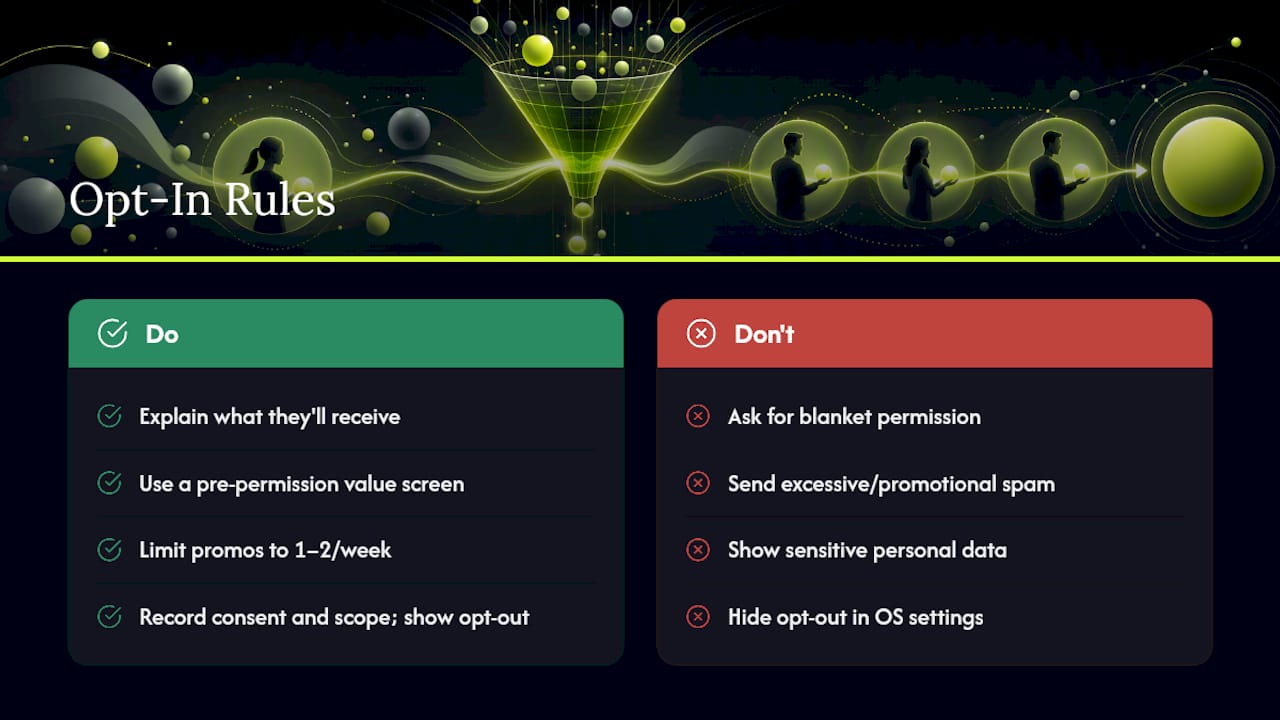
Push notification permission is a legal gate, not a growth hack. Both iOS and Android require explicit user consent before a notification can be delivered, and the opt-in prompt itself should explain what the shopper is agreeing to receive, not just ask for blanket permission.
Frame the ask around value before you trigger the system prompt. A pre-permission screen that says "Get notified when your cart price drops" converts better than a bare system dialog, and it also sets accurate expectations that reduce opt-outs later.
Respect frequency once permission is granted. Regulators and platform policies increasingly treat excessive notification volume as a dark pattern, and users can revoke permission instantly if they feel spammed. A reasonable cadence, generally no more than one or two promotional pushes per week outside of transactional updates, keeps your opt-in rate healthy over time.
Keep a clear record of consent timestamps and the specific permission scope granted, since this documentation matters if a platform or regulator ever asks how consent was obtained. Avoid using personalization tokens that reveal sensitive information on a lock screen visible to anyone nearby. A push that says "Your prescription refill is ready" is fine; one that names a specific medical condition is not. Always give users a simple, visible path to opt out inside your app or account settings, not just through OS-level settings they may not know how to find.
Segmentation Strategies With Copy Examples
Segmenting by behavior, not just demographics, is where push notification copywriting earns its keep. A new visitor and a repeat buyer should never see the same message.
First-time visitors who abandon a cart respond well to trust-building copy: "New here?
High-value shoppers (carts over a set dollar threshold) merit a different tone entirely, one that skips discount language and leans on service: "Your cart is saved and ready whenever you are" respects that this segment isn't price-driven. Lapsed users, those inactive 30 or more days, need a reactivation trigger distinct from a standard cart nudge: "It's been a while, here's what's new" performs better than repeating an old cart reminder that may no longer be accurate.
Mobile-only browsers versus desktop-to-mobile shoppers also warrant different copy, since a mobile-only segment is already primed for a fast, low-friction tap, while desktop browsers arriving via push may need an extra beat of context before the CTA. Segmenting this granularly takes setup work, but a scheduled blast sent to your entire list will always underperform even a rough three-tier segmentation built around recency and cart value.
Urgency and Scarcity: Use Sparingly, Use Precisely
Urgency phrasing works because it's true, not because it sounds dramatic. "Only 3 left" converts because it's a real inventory number a shopper can verify at checkout. "Hurry, don't miss out" converts nothing, because it's a feeling with no evidence behind it.
The safest urgency triggers are ones tied to a real, checkable fact: a countdown timer on an actual sale end time, a stock count pulled from live inventory, or a price that genuinely reverts after a window closes. Phrases like "Ends tonight at midnight" or "6 units remaining" hold up because the shopper can confirm them the moment they tap through.
Overuse is the fastest way to burn urgency as a lever. If every push from your store claims something is "almost gone," shoppers stop believing the fifth one, and the tactic stops working even when it's genuinely true. Reserve scarcity language for moments when the scarcity is real: a flash sale with a hard end time, a limited restock, a size that's genuinely down to single digits. Save your standard cart reminders and shipping updates for calm, informational language instead, since stacking urgency onto every message type flattens its impact everywhere.
Why Copy-Paste Examples Beat Copywriting Theory
Most push notification advice tells you to "be concise" and "add urgency" without ever showing what that looks like at 22 characters on a locked screen. That gap between abstract advice and a usable line of copy is where most marketing teams lose weeks. The research behind this piece backs a simpler priority order: get the trigger right first, the specificity second, and the polish last. A perfectly worded push sent at the wrong moment, or built as a broadcast instead of a behavior-based send, will underperform a rough draft that fires the instant a cart goes idle.
Where conventional advice falls short is treating all pushes as one category. A shipping update and a flash sale alert are not the same writing problem, and applying urgency language to both flattens what makes each one work. If you take one thing from this piece, prioritize matching copy type to trigger type before you touch tone, emoji, or personalization. Those refinements matter, but they're multipliers on a foundation, not the foundation itself. Get the behavioral trigger and the specific detail right, and even average copy converts. Get those wrong, and no amount of clever phrasing saves the send.
— Lucas
Sources
- Mobile app push notifications drive 90-day retention rates by as much as 180% — Martech
- 22 Push Notification Examples That Users Actually Tap (By Industry) — Scale Growth Digital
- Creating web push notifications that convert: copywriting tips for publishers — Outpush