The fastest way to raise your push notification opt-in rate is to delay the system prompt, use a contextual pre-permission screen (a "soft ask"), and measure the entire flow as a funnel. Teams that implement a soft-ask flow before the native prompt see a substantial net opt-in lift on iOS. That single change outperforms any amount of copy tweaking or timing adjustment applied to the raw system dialog.
Here is the prioritized checklist to start this week:
- Build a soft-ask screen timed to a clear value moment (after first purchase, after content consumption, or on a return visit). Never ask during onboarding.
- Delay the native system prompt until the user taps "Yes" on your soft ask. This protects the one-shot iOS prompt and keeps Android's runtime permission in reserve.
- Instrument the full funnel with five discrete events: soft ask shown → soft ask accepted → native prompt shown → permission result → endpoint stored. Any drop between "granted" and "endpoint stored" is a bug, not a user behavior problem.
Pro Tip: Run your first A/B test on soft-ask timing, not copy. Session 2 or 3 consistently outperforms session 1 because the user has already experienced your app's value. Set a two-week measurement window and track soft-ask acceptance rate as your primary KPI.
Key Takeaways
The highest-impact move in any push notification opt-in strategy is a contextual soft ask timed to a value moment, combined with full funnel instrumentation to separate UX problems from implementation bugs.
| Point | Details |
|---|---|
| Soft ask before system prompt | A pre-permission screen timed to a value moment lifts net iOS opt-in substantially. |
| Platform benchmarks | Android median opt-in is ~81%; iOS median is ~51%; web push runs 3–15% depending on device type. |
| Instrument five funnel stages | Track soft ask shown through endpoint stored; a drop between "granted" and "stored" is a code bug. |
| Timing beats copy | Moving the ask from session 1 to session 2–3 produces larger lifts than any headline rewrite. |
| StorePush for e-commerce | StorePush recovers cart abandoners who never reach your opt-in prompt, using iOS App Clips with no email or phone required. |
Table of Contents
- What is push notification opt-in and how do platform rules shape it?
- How to calculate your opt-in rate and what benchmarks to target
- When and where to ask for push permission
- Copy and UI patterns that convert
- How to re-engage users who denied the prompt
- How to test opt-in changes and measure real lift
- Technical implementation notes for developers
- Privacy and consent best practices
- How StorePush fits into an e-commerce opt-in strategy
- The opt-in strategy most teams get backwards
- StorePush recovers the shoppers your opt-in flow never reaches
- Sources
What is push notification opt-in and how do platform rules shape it?
A push notification opt-in is the moment a user grants your app permission to send them notifications. The mechanics behind that moment differ sharply between iOS and Android, and those differences should drive every strategic decision you make.
iOS: one shot, no second chance. Apple gives your app exactly one opportunity to show the system permission dialog. If the user taps "Don't Allow," iOS locks you out permanently until the user manually navigates to Settings. There is no API to re-trigger the prompt. That constraint is why the soft-ask pattern matters so much on iOS: you need to qualify intent before you spend your one system prompt.
Android 13+ and POST_NOTIFICATIONS. Before Android 13, notifications were opt-out by default. Android 13 flipped that model entirely. Apps now must request the POST_NOTIFICATIONS runtime permission the same way they request camera or location access. The Android documentation explicitly recommends waiting to show the permission prompt until a contextual moment at which the user clearly understands why notifications would help them.
The migration behavior adds a wrinkle worth knowing:
- Fresh installs on Android 13+ block all notifications until the app requests and receives POST_NOTIFICATIONS. No notifications can be sent before the prompt fires.
- Apps upgraded from Android 12 or earlier may retain their existing notification permission status, depending on the app's target SDK. Android Open Source Project documentation details the exact migration rules, and they vary by target SDK version.
- OEM behavior on some manufacturers (Samsung, Xiaomi, OnePlus) can add an extra layer of battery-optimization restrictions that suppress notifications even after permission is granted. Test on real devices, not just emulators.
Historically, Android's opt-out default produced dramatically higher opt-in rates than iOS. That gap is narrowing as Android 13+ becomes the dominant version. The strategic implication: the soft-ask investment that was always critical on iOS is now equally important on Android.
How to calculate your opt-in rate and what benchmarks to target
The formula is straightforward:
"Eligible" means users who reached the point in your flow where the system prompt could have been shown. Restored installs and device upgrades can inflate or deflate this denominator, so define it explicitly in your analytics schema before you start measuring.
Platform benchmarks
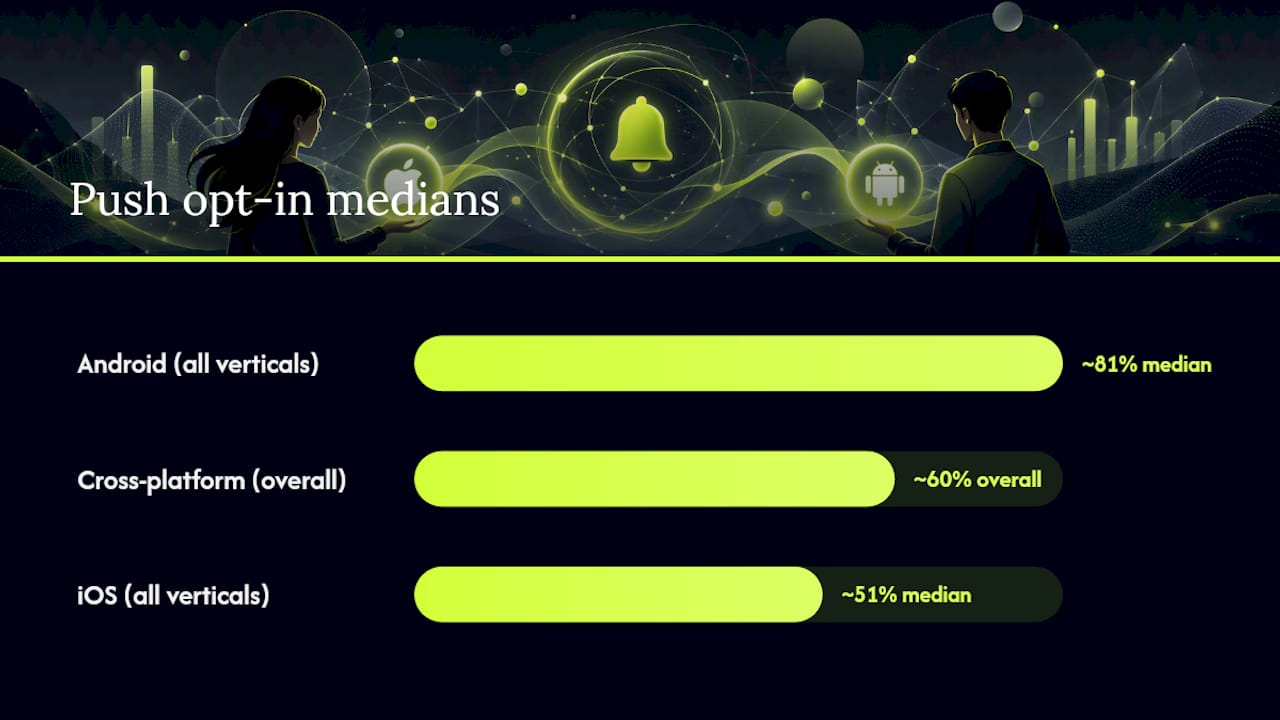
Business of Apps data puts the Android median at approximately 81% and the iOS median at approximately 51%, with an overall cross-platform push opt-in rate near 60%. Those numbers are medians, not ceilings.
| Platform / Vertical | Typical Opt-In Range |
|---|---|
| Android (all verticals) | ~81% median |
| iOS (all verticals) | ~51% median |
| Finance (Android) | A very high opt-in rate |
| Gaming (iOS) | At the lower end of the iOS opt-in range |
| Web push (desktop) | Low opt-in rates |
| Web push (mobile web) | Very low opt-in rates |
Web push rates are substantially lower than native mobile. Web push flows require a silent Notification.permission capability check before any prompt appears, and the browser's native dialog is even more abrupt than a mobile OS dialog, which explains the gap.
The funnel stages to instrument
Measuring opt-in rate as a single number hides where you are losing users. Instrument these five stages as discrete analytics events:
- Qualified session: user reached the trigger condition for the soft ask
- Soft ask shown: your pre-permission screen rendered
- Soft ask accepted: user tapped the affirmative button
- Native prompt shown: OS dialog appeared
- Permission granted + endpoint stored: permission result logged and subscription endpoint persisted to your backend
The last stage is where teams most often lose opted-in users. A race condition or missing error handler between "granted" and "endpoint stored" means the user said yes but never receives a notification. That is an implementation bug with a measurable signature: a drop between the "permission granted" event and the "endpoint stored" event in your funnel.
Pro Tip: Segment your opt-in funnel by mobile OS market share in your user base. If your audience skews heavily Android, a 5-point lift in Android opt-in rate moves more absolute users than a 10-point lift on iOS.
When and where to ask for push permission
Timing is the highest-leverage variable in opt-in rate, ahead of copy and ahead of visual design. Asking at the wrong moment, even with perfect copy, produces refusals that you cannot undo on iOS.
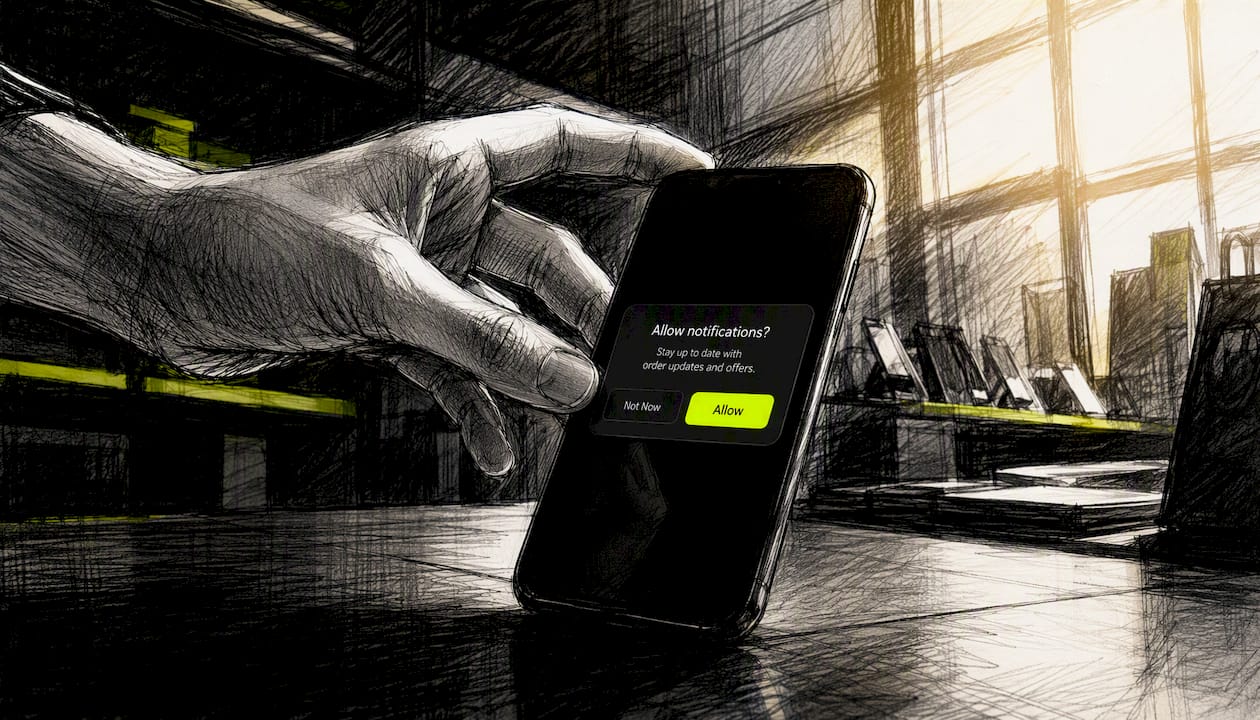
The session-based timing rule
Session 1 is for delivering value, not asking for permission. The user has not yet experienced your app and has no reason to trust that your notifications will be worth anything. Sessions 2 and 3 are where the ask converts. By that point, the user has a mental model of what your app does and can make an informed decision.
The highest-converting trigger moments, in rough priority order:
- After a first key action (first purchase completed, first piece of content saved, first workout logged)
- After a content consumption milestone (finished an article, completed a level, watched a video)
- Before a relevant event (upcoming order delivery, price drop on a saved item, game event starting)
- On a return visit (user came back voluntarily, which signals engagement)
- During a natural pause (between screens, after a task completes, not mid-flow)
What to avoid is equally important. Do not ask during onboarding when the user is already processing multiple permissions and UI concepts. Do not interrupt an active task. Do not stack the notification ask immediately after a location or camera permission request.
UX patterns that lift acceptance
- Show a mock notification screenshot in your soft-ask screen. Users who can see what a notification looks like convert at higher rates than those who read a text description.
- Label the decline button "Not now" rather than "No" or "Never." "Not now" implies the door stays open; "No" signals finality and primes the user to tap "Don't Allow" on the system prompt too.
- Use a single, specific benefit statement in the headline. "Know the moment your order ships" outperforms "Stay up to date."
- Keep the soft-ask screen to one action per screen. No secondary offers, no links to your privacy policy mid-prompt.
Pro Tip: Personalize the soft-ask headline based on what the user just did. An e-commerce user who just added an item to their cart responds better to "Get notified if this item goes on sale" than a generic "Enable notifications." This requires one extra event parameter in your analytics but consistently lifts soft-ask acceptance.
Copy and UI patterns that convert
The system dialog gives you no control over copy. Your soft-ask screen is where the persuasion happens, and the copy formula that works across verticals is: benefit first, mechanism second, opt-out clearly labeled.
Here are ready-to-adapt templates by vertical:
E-commerce: Messaging / social: Finance: Gaming:
Button text variants and rationale
| Affirmative button | Decline button | Why it works |
|---|---|---|
| "Enable updates" | "Not now" | Neutral, low-pressure framing |
| "Yes, keep me posted" | "Maybe later" | Conversational; "later" implies reconsideration |
| "Turn on alerts" | "Skip for now" | Action-oriented without being pushy |
| "Notify me" | "No thanks" | Direct; works well after a specific value moment |
Avoid "Allow" as your affirmative button text. It mirrors the system dialog language too closely and makes your soft ask feel redundant. The goal is to frame the choice as a benefit decision, not a permission decision.
For visuals, a mock notification screenshot showing a real, useful notification from your app outperforms abstract icons or generic bell illustrations. The character limits on your notification copy matter here too: the mock should show realistic text, not a placeholder.
How to re-engage users who denied the prompt
On iOS, a user who tapped "Don't Allow" on the system dialog cannot be re-prompted by your app. The only path back is through Settings. On Android, the behavior depends on how many times the user has declined: after two denials, Android marks the permission as "don't ask again" and shouldShowRequestPermissionRationale() returns false.
That does not mean denied users are lost forever. It means your recovery strategy has to work through in-app channels, not system dialogs.
Recovery tactics that work
- Contextual in-app reminders: when a user takes an action that would clearly benefit from notifications (tracking an order, saving a wishlist item), show a small, dismissible banner explaining what they are missing. Link directly to your app's notification settings page.
- Settings deep links: on Android,
Intent.ACTION_APP_NOTIFICATION_SETTINGStakes users directly to your app's notification settings. On iOS,UIApplication.openSettingsURLStringopens the Settings app at your app's entry. Reduce the friction to re-enable by skipping the general Settings home screen. - Value-moment re-asks: time the in-app reminder to a moment when the benefit is immediately obvious. "Your order just shipped — turn on notifications to track it in real time" is far more persuasive than a generic "You have notifications turned off."
Do and don't for recovery messaging
- Do wait for a genuine value moment before showing a recovery prompt.
- Do show the prompt at most once per session and no more than once per week.
- Do include a direct deep link to notification settings, not just a text instruction.
- Don't show recovery prompts on every screen or on app launch.
- Don't use urgency language ("You'll miss important updates!") without a specific, real update to reference.
- Don't conflate notification recovery with marketing re-engagement. These are different user states requiring different messaging.
How to test opt-in changes and measure real lift
A/B testing opt-in flows requires more care than testing standard UI changes, because the system prompt is a one-time event. A user who sees the control variant and denies cannot be re-tested in the treatment variant.
Events to fire at every funnel stage
Instrument these events before you run any test:
soft_ask_shown— with properties: trigger type, session number, user segmentsoft_ask_accepted— with property: button text variantsoft_ask_dismissed— with property: dismiss method (button tap vs. swipe)native_prompt_shownnative_prompt_result— with property: granted / deniedendpoint_stored— with property: success / failure
Without all six events, you cannot distinguish a copy problem from a timing problem from an implementation bug.
A/B test design
- Holdout group size: 20–30% of eligible sessions is sufficient for most apps. Smaller holdouts reduce statistical power; larger holdouts delay reaching significance.
- Minimum sample size: aim for at least 1,000 qualified sessions per variant before drawing conclusions. For low-traffic apps, run the test for a minimum of two weeks to account for day-of-week variation.
- Single variable per test: test timing OR copy OR visual, never two at once. The most common mistake is changing the soft-ask headline and the trigger moment simultaneously, which makes the result uninterpretable.
- Guard against prompt fatigue: if your test involves showing the soft ask more frequently, cap exposure to two impressions per user before the test period ends.
Translating opt-in lifts into downstream KPIs
A 10-point lift in opt-in rate is only meaningful if it produces measurable downstream outcomes. Track these for 30 days post-opt-in:
- Push open rate for newly opted-in users vs. the baseline cohort
- Day-7 and Day-30 retention for opted-in vs. non-opted-in users
- Revenue per user for e-commerce apps, segmented by notification-driven sessions
For e-commerce specifically, the connection between opt-in rate and recovered cart revenue is direct: more opted-in users means more reachable shoppers when they abandon a cart.
Technical implementation notes for developers
Getting the permission request right at the code level prevents the most common causes of lost opt-ins.
Android checklist
- Declare
<uses-permission android:name="android.permission.POST_NOTIFICATIONS"/>in yourAndroidManifest.xmlfor apps targeting Android 13 (API 33) or higher. - Use the
ActivityResultContracts.RequestPermissionlauncher (or the Jetpack ComposerememberLauncherForActivityResultequivalent) rather than the deprecatedrequestPermissions()callback. - Call
shouldShowRequestPermissionRationale()before showing the system prompt. If it returns true, show your rationale UI first. If it returns false and you have not yet asked, proceed. If it returns false and you have already asked once, the user has selected "Don't ask again" — stop prompting and switch to the in-app recovery flow. - Check
areNotificationsEnabled()fromNotificationManagerCompaton app resume to detect users who disabled notifications in Settings after granting them in-app.
iOS checklist
- Request authorization using
UNUserNotificationCenter.requestAuthorization(options:)only after your soft-ask screen has received a positive response. - Call
UNUserNotificationCenter.getNotificationSettings()on app foreground to check current authorization status before showing any recovery UI. - Register for remote notifications with
UIApplication.registerForRemoteNotifications()immediately after authorization is granted, and persist the device token indidRegisterForRemoteNotificationsWithDeviceToken.
Web push checklist
- Check
Notification.permissionsilently on page load. Do not show any prompt UI if the value is already "granted" or "denied." - Use a soft-ask pattern before calling
Notification.requestPermission(). The browser's native dialog cannot be re-triggered after a denial in most browsers. - Store the push subscription object server-side immediately after
PushManager.subscribe()resolves. A failed or missing persistence step is the most common cause of web push opt-in data loss.
Privacy and consent best practices
Consent is not just a legal checkbox. Users who understand exactly what they are consenting to opt out less frequently, which means your privacy copy is also a retention lever.
Disclosure copy principles
Keep disclosure language specific and short. "We'll send you order updates, price drop alerts, and occasional promotions. You can change this anytime in Settings" is more trustworthy than a generic "We may send you notifications about our products and services." Specificity signals that you know what you are sending and have thought about whether it is worth the user's attention.
Consent logging architecture
Append-only consent logs are the standard pattern for auditability. Each record should capture:
- Timestamp of the consent event
- The exact disclosure text shown (versioned, so you can prove what the user saw)
- The user's response (granted / denied / dismissed)
- The platform and app version
Never mutate a consent record. If the user changes their preference, append a new record rather than overwriting the old one. This architecture supports both internal audits and any regulatory inquiry about what a specific user consented to and when.
Preference segmentation
Segmenting notification topics (transactional, promotional, social, system) and letting users opt into each independently reduces aggregate opt-out rates. A user who opted in for order updates but not promotions is a more engaged recipient than one who opted in for everything and then muted all notifications after the first promotional blast. SMS targeting principles apply here too: the more precisely you match notification type to user intent, the higher your engagement rate on every message you send.
How StorePush fits into an e-commerce opt-in strategy
The tactics in this article apply broadly to any mobile app. For e-commerce specifically, there is a category of shopper that no opt-in flow reaches: the visitor who browses, adds to cart, and leaves before your app ever has a chance to ask for permission.
StorePush addresses that gap directly. Using native iOS App Clips, it can send push notifications to shoppers' lock screens without requiring an email address, phone number, or app installation. That means cart and browse abandonment recovery works even for the majority of visitors who never reach your opt-in prompt.
Key integration and outcome points:
- Platform integrations: Shopify, WooCommerce, BigCommerce, and custom storefronts
- No user data required: recovery works without email or phone collection
- Dashboard analytics: revenue attribution, funnel tracking, CTR heatmaps, and event-based triggers give you the same measurement discipline this article recommends for native opt-in flows
- Complements your opt-in strategy: users who do opt in through your native flow become a higher-value segment; StorePush handles the rest
The opt-in strategy most teams get backwards
Most teams treat the soft ask as a design problem and the system prompt as the real event. That framing is backwards.
The system prompt is a formality. By the time it appears, the user's decision is already made. The soft ask is where the actual persuasion happens, and the single highest-ROI experiment you can run is not a copy test on the soft ask, it is a timing test. Moving the soft ask from session 1 to session 2 or 3 consistently produces larger lifts than any headline rewrite, because the user's willingness to grant permission is almost entirely a function of how much value they have already received from your app.
The second thing teams get wrong is treating opt-in rate as a single metric. It is a funnel. The numbers look identical at the top level but require completely different fixes. Instrument the funnel before you run a single A/B test, or you will optimize the wrong stage.
StorePush recovers the shoppers your opt-in flow never reaches
Every opt-in strategy has a ceiling: the visitors who leave before they ever see your prompt. For e-commerce stores, that is the majority of traffic. StorePush recovers abandoned carts without requiring email addresses, phone numbers, or app installs, using native iOS App Clips to reach shoppers directly on their lock screens.

If you run on Shopify, WooCommerce, BigCommerce, or a custom storefront, setup takes minutes. The built-in dashboard gives you the same funnel visibility this article recommends: revenue attribution, CTR heatmaps, and event-based triggers so you can measure exactly what each recovered session is worth.
Book a demo to see how StorePush fits alongside your existing opt-in strategy.
Sources
The recommendations in this article draw from platform documentation, benchmark research, and UX implementation guides. Here is where to verify each major claim:
- Push Notifications Statistics (2026) - Business of Apps
- Notification runtime permission | Jetpack Compose | Android Developers
- Notification permission for opt-in notifications | Android Open Source Project
- Push Notification Permission: Opt-In Guide | Tencent Push
- Frontend Permission UX & Subscription Flows for Web Push