The highest-performing approach to push notification personalization combines behavioral triggers, contextual send timing, and fresh data tokens instead of static name-swaps. If you're only inserting {{first_name}} and calling it personalized, you're leaving money on the table: a substantial portion of online shopping carts get abandoned worldwide, according to Statista, and generic broadcast pushes barely dent that number.
Start here, this week: For practical examples on e‑commerce messaging and automation, check out the Hangr blog.
- Identify three behavioral signals worth acting on (cart added, browse session over 90 seconds, price-drop on a viewed item).
- Build one triggered workflow around your highest-value signal, cart abandonment usually wins first.
- Run it for a 7-day test window before you touch a second campaign.
Customer found that segmented, behavior-driven pushes can generate several times the engagement of generic broadcasts. That gap is where your next quarter's growth lives.
Key Takeaways
Push notification personalization works best when behavioral triggers, contextual timing, and fresh data tokens replace static broadcasts, and it fails when urgency copy outruns the accuracy of the data behind it.
| Point | Details |
|---|---|
| Start with behavioral triggers | Cart and browse abandonment triggers outperform static attribute segments and should be built first. |
| Set fallback values for every token | A token like {{last_cart_item}} needs a default so messages never break on missing data. |
| Use a tight attribution window | Count recovered revenue within 24 to 48 hours of a push tap to keep reporting honest. |
| Cap frequency to protect opt-in rates | Limit sends to one or two per user per day across all campaigns combined. |
| Consider StorePush for contact-free recovery | StorePush re-engages cart abandoners via lock-screen App Clips without needing an email or phone number, with dashboard revenue attribution built in. |
Table of Contents
- Why Push Notification Personalization Matters for Your Bottom Line
- Core Personalization Techniques: From Segments to Recommendations
- Cart Abandonment, Browse Abandonment, and Other High-Impact Campaigns
- Writing Push Copy People Actually Tap
- Handling Permissions and Privacy the Right Way
- Building and Measuring a Personalization Program That Scales
- When Your Store Needs a Dedicated Push Recovery Tool
- What I've Learned Running Push Recovery Campaigns
- Recover More Carts Without Chasing Emails You'll Never Get
- Sources
Why Push Notification Personalization Matters for Your Bottom Line
Personalization isn't a nice-to-have feature you bolt on after launch. It's the difference between a push channel that gets muted and one that recovers real revenue. Customer.io reports personalized pushes can drive significantly higher engagement than generic sends, and a field experiment published via SSRN found tailored push notifications outperformed non-personalized ones in real app environments, not just lab conditions.
The metrics that actually tell you whether it's working:
- Opt-in rate — the percentage of visitors who grant push permission in the first place.
- Open rate — how many delivered pushes get tapped.
- Click-through rate (CTR) — clicks relative to delivered messages, your clearest relevance signal.
- Conversion rate — purchases completed after a push click.
- Recovered revenue — dollar value of orders attributed to push within your set window.
- Opt-out rate — your early warning system for message fatigue or irrelevance.
Attribution windows matter more than most marketers realize. If someone taps a cart-recovery push and buys within 24 hours, that's a clean attribution. Stretch the window past 72 hours and you start crediting push for purchases the customer would have made anyway. A tight 24 to 48 hour window for cart and browse abandonment gives you honest numbers you can defend to finance. As a baseline, aim to recover a low single-digit percentage of abandoned carts through push alone. Anything meaningfully above that means your triggers and timing are working; anything below suggests your segmentation or copy needs attention.
Core Personalization Techniques: From Segments to Recommendations
Five technique categories cover almost everything you'll build. Master them in this order, because each one raises the ceiling on what the next can do.
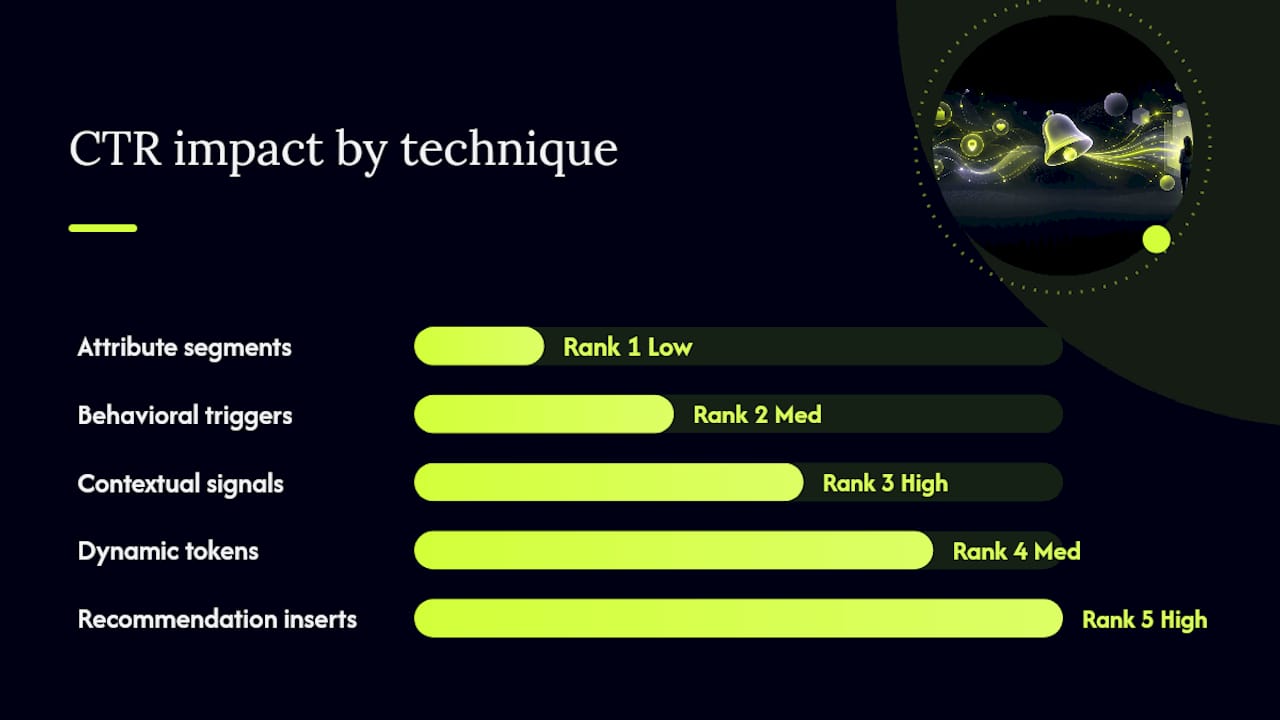
Attribute segments group users by static or slow-changing data: location, device, past purchase category, loyalty tier. Simple to set up, but they're the weakest lever on their own.
Behavioral triggers fire based on what someone just did: added to cart, viewed a product three times, abandoned checkout. PushPilot's four-level personalization framework places behavioral triggers well above static attributes for CTR impact, and for good reason. They're responding to intent, not history.
Contextual signals layer in real-time context: time since last session, weather, current inventory, local store hours. This is where "we noticed you left something behind" becomes "come back before it sells out."
Dynamic tokens pull live data into your message body. A few you'll use constantly:
{{first_name}}— basic but still worth a fallback like "there" if the field is empty.{{last_cart_item}}— the specific product name left in cart.{{last_session_minutes_ago}}— powers urgency copy like "you were just here."{{cart_value}}— lets you tier your urgency or offer by order size.
Recommendation inserts pull in related or complementary products, often via a live feed rather than a static token. Pushwoosh's Connected Content fetches JSON from a backend at send time, so the recommendation reflects current inventory, not what was true when the campaign was built.
On implementation: segments and behavioral triggers live in your audience/trigger layer, tokens and conditional content live in the message builder itself. Microsoft's Customer Insights documentation walks through selecting a data source, adding a token, and layering conditions so the same message adapts per recipient without you building five separate campaigns.
Pro Tip: Every token needs a default value. A push that reads "Come back for your {{last_cart_item}}" breaks completely when that field is null. Set fallback copy for every token before you launch, not after your first support ticket.
Cart Abandonment, Browse Abandonment, and Other High-Impact Campaigns
Five use cases deliver the bulk of push-driven revenue recovery. Here's how to structure each one.
Cart abandonment. Trigger: item added to cart, no purchase within 30 to 60 minutes. Signal to use: {{last_cart_item}} and {{cart_value}}. Cadence: one push at 30 to 60 minutes, a second at 24 hours if unopened. Sample copy: "Your [item] is still in your cart. Complete your order before it's gone." Deep-link directly to the cart, not the homepage.
Browse abandonment. Trigger: viewed a product twice or spent over 90 seconds on a product page without adding to cart. Sample copy: "Still thinking about [item]? Here's a closer look." Lower urgency than cart abandonment, since intent is softer.
Lifecycle and milestone nudges. Trigger: signup anniversary, loyalty tier upgrade, first-purchase anniversary. Sample copy: "You've been with us a year. Here's something on us." Cadence should be quarterly at most; overuse and it reads as noise.
Limited-time offers. Trigger: flash sale start, inventory dropping below a threshold. Sample copy: "Only a few left in your size. Sale ends tonight." Use real scarcity data, never fabricated countdowns.
Location-based re-engagement. Trigger: proximity to a physical store, or local weather changes affecting relevant products. Sample copy: "It's cooling down near you. Shop the new arrivals."
Relative lift expectations vary by list quality and industry, but cart abandonment consistently outperforms the others because intent is highest. Cap each user at one to two pushes per day across all campaigns combined, stacking triggers without a frequency rule is the fastest way to spike opt-outs.
Writing Push Copy People Actually Tap
Good push copy does three things: states the benefit, creates a reason to act now, and gets out of the way fast. Character limits are tighter than email subject lines, so every word has to earn its place.
Do this:
- Lead with the benefit or the specific item, not your brand name.
- Use one clear call to action per message.
- Deep-link straight to the cart, product page, or offer, never the homepage.
- Test send times against each user's own activity pattern rather than a single company-wide hour.
Avoid this:
- Manufactured urgency ("Only 2 left!") when inventory data doesn't back it up.
- Over-personalization that feels invasive, referencing exact browsing minutes or precise location can read as surveillance rather than service.
- Sending outside a recipient's local waking hours. Timezone handling isn't optional.
- Ignoring frequency fatigue signals, a rising opt-out rate on a segment means back off, not double down.
Before any deep-linked campaign goes live, run through a short checklist: confirm the link opens the exact product or cart state referenced in the copy, test query parameters on both iOS and Android, and confirm the flow works for guest checkout, not just logged-in sessions. A broken deep link doesn't just cost one conversion, it teaches that user to ignore your next ten pushes. For copy that's running long, a character limit reference is worth keeping open while you write.
Handling Permissions and Privacy the Right Way
Personalization only works if people opt in, and opt-ins only stick if you respect them. Timing the permission request matters more than the wording: ask after a user has shown intent (viewed multiple products, started checkout) rather than the instant they land on your site.
Practical guidelines that hold up:
- Use a soft, in-product prompt before the native OS permission dialog, explain the value first, then ask.
- Collect the minimum data needed to personalize the message you're actually sending, not everything you might someday use.
- Set a data freshness policy: session and cart data older than a few days should stop triggering "just now" style urgency copy.
- Follow iOS and Android push guidelines on opt-out visibility, an easy unsubscribe path isn't just compliance, it's what keeps your list clean.
- Log opt-out reasons when the platform allows it, that data tells you which campaigns are burning trust.
Pro Tip: A progressive prompt (asking for push permission only after someone has engaged twice) consistently converts better than asking on page load. Impatience at the permission stage costs you subscribers before you even get to personalize anything.
Building and Measuring a Personalization Program That Scales
Getting from "we send one cart abandonment push" to a full personalization program takes a specific build order. Skip steps and you'll spend more time debugging broken tokens than analyzing results.
Data and integration checklist:
- Track these events at minimum: session start/end, add to cart, cart value, product view, purchase completion.
- Map each event to a token (
{{last_session_minutes_ago}},{{last_cart_item}},{{cart_value}}) with a documented fallback value for each. - Confirm your platform integration (Shopify, WooCommerce, BigCommerce, or a custom storefront webhook) fires these events in near real time. OneSignal's segmentation documentation shows how event-based segments update automatically as new behavior comes in, which is the mechanism that keeps triggers accurate without manual list refreshes.
A/B tests worth running first:
- Generic copy vs. token-personalized copy on the same trigger.
- Deep-link to exact product vs. generic link to homepage.
- Immediate send (within 30 minutes) vs. delayed send (2 hours) on cart abandonment.
- One push per day cap vs. two per day cap on frequency-sensitive segments.
Give each test at least a week and enough volume to see a stable pattern before calling a winner, a two-day test on a low-traffic segment tells you almost nothing.
Measurement approach: Define your KPIs before launch, not after. Use a 24 to 48 hour attribution window for cart and browse abandonment specifically, and calculate uplift by comparing a personalized segment's conversion rate against a holdout group that receives generic or no push. Report recovered revenue as attributed order value within that window, and be explicit about the window length whenever you share the number internally.
Pre-launch QA checklist:
- Every token has a tested fallback value.
- Deep links work on both logged-in and guest checkout flows.
- Unsubscribe/opt-out flow functions and is easy to find.
- Send times respect recipient timezones, not server timezone.
When Your Store Needs a Dedicated Push Recovery Tool
If your email capture rate is low, or your checkout abandons before you ever get a phone number or email address, general push tools built for logged-in app users won't help you. That's a specific gap: most visitors who abandon a cart never hand over contact information at all, which means email and SMS recovery flows never even get triggered.
This is the exact problem StorePush was built to solve. It uses native iOS App Clips to deliver lock-screen push notifications to shoppers who abandoned a cart or browsing session, without requiring an email address, phone number, or app install. StorePush integrates with Shopify, WooCommerce, BigCommerce, and custom storefronts, and its dashboard tracks revenue attribution, funnel drop-off, and CTR heatmaps so you can see exactly which triggers are converting.
For engineering, the integration checklist is short: connect the storefront hook that fires on cart and session events, confirm the event payload includes product ID, cart value, and session timestamp, and map those fields to your message tokens. Most stores can get a first triggered campaign live within days, not months, once the storefront connection is in place.
What I've Learned Running Push Recovery Campaigns
The biggest mistake I keep seeing isn't under-personalization, it's over-personalization without the data to back it up. A push that says "You were on this page 4 minutes ago" reads as impressive until the timestamp is wrong, and then every future message from that brand gets ignored. The fix is boring but effective: test your tokens against stale data before you trust them with urgency copy. Fresh, accurate signals beat clever copy every time.
Recover More Carts Without Chasing Emails You'll Never Get
Most personalization advice assumes you already have an email or phone number to work with. StorePush skips that requirement entirely: it re-engages abandoning shoppers directly on their lock screen through iOS App Clips, which means you can start recovering carts from visitors who never gave you a way to contact them otherwise. That's the gap most email and SMS recovery flows can't close, since most abandoning visitors leave zero contact details behind.
StorePush plugs into Shopify, WooCommerce, BigCommerce, or a custom storefront, and its dashboard shows revenue attribution and CTR by campaign from day one. If cart abandonment is costing you sales you can't currently follow up on, book a demo and see how the integration maps to your storefront's existing checkout flow.
Sources
- Customer
- Push Notification Personalization in 2026: What's Real and What's Just {{first_name}} — PushPilot Blog
- Create push notifications - Customer Insights (MicrosoftDocs GitHub)