Browse abandonment push notifications work, but only when they follow strict guardrails: in-stock filtering, cart exclusions, and capped send frequency. Skip those, and you're just spamming lock screens. StorePush and similar providers approach this with native App Clips, so you can recover lost sales without ever collecting an email or phone number. Start small: launch a three-message automation with a 20-minute wait window and watch it for a week before scaling.
TL;DR:
- Sending browse abandonment notifications should be limited to in-stock products and canceled once the shopper adds to cart or purchases, to avoid wasting efforts.
- Target only engaged viewers who spent a few seconds on a product and exclude recent buyers, carted items, and out-of-stock products to improve relevance.
- Timing the first notification around 20 minutes after viewing and spacing subsequent reminders over one or two days helps maintain relevance without annoying customers.
- Personalization should focus on behavior, such as viewed items and stock levels, rather than personal data, with scarcity cues like low stock informing messaging.
- Measure campaign success with click-through rate, conversion rate, revenue attributed to pushes, and lift over control groups, using event-based tracking for accurate attribution.
Table of Contents
- How Browse Abandonment Push Flows Work (And How They Differ From Cart Recovery)
- Who Should You Target and When Should You Send?
- What Creative Elements Actually Increase Click-Through Rate?
- How Do You Measure and Attribute Recovered Revenue?
- Your Quick-Start Checklist for a Safe Pilot
- What Marketers Get Wrong About Browse Abandonment
- Recover Lost Browsers Without Collecting a Single Email
- Where to Learn More
- Sources
- FAQ
How Browse Abandonment Push Flows Work (And How They Differ From Cart Recovery)
A browse abandonment push fires when a shopper views a product page and leaves without adding anything to their cart. That's the key distinction from cart abandonment: cart flows target shoppers who took action and stalled at checkout, while browse flows target shoppers who never got that far. You're re-engaging intent, not recovering a stalled transaction.
The automation logic is straightforward on paper but easy to botch in practice. A view event triggers a timer. If the shopper doesn't act within that window, the system pulls product data (usually the most recently viewed or highest-value item) and sends a push. Get the guardrails wrong, and you'll notify someone about a product they already bought.
Standard guardrails, according to StorePush's browse abandonment documentation, include:
- Send only in-stock products. A push for a sold-out item is a wasted send and a credibility hit.
- Cancel the sequence the moment a shopper adds an item to cart or completes a purchase.
- Cap reminders per shopper per week, regardless of how many products they browse.
- Refresh the featured product if the shopper views something new before the first push fires.
Browse abandonment needs tighter sequencing than cart recovery because the intent signal is weaker. Someone who added an item to cart has already made a decision. Someone who just looked around hasn't, so the messaging and cadence have to work harder without feeling pushy.
Who Should You Target and When Should You Send?
Not every product view deserves a push. Effective targeting starts with filters that separate genuine intent from casual browsing, and it ends with cadence rules that keep you off a shopper's "block this app" list.
Build your include list around these signals:
- Shoppers who viewed a product for at least a few seconds, not just a quick scroll-through.
- Category or price-band filters, so you're not pushing a $12 item to someone shopping in your $200+ range.
- First-time visitors with high-intent behavior (multiple product views in one session) alongside returning visitors who've browsed before but never purchased.
Your exclusion list matters just as much:
- Anyone who added the viewed item to cart, even if they haven't checked out.
- Shoppers who purchased anything in the last 24 to 48 hours.
- Products that are out of stock or set to "notify me when available" only.
- Anyone who received a browse abandonment push within your defined cooling-off window, typically the past few days.
On timing, StorePush's implementation guidance points to a default first wait of around 20 minutes after the product view. That's long enough to let a shopper finish browsing but short enough to stay relevant. Follow-up reminders usually space out over the following day or two, capped at two or three total touches per session.
Pro Tip: Set your cooling-off window before launch, not after you get complaints. A shopper who gets three pushes in one afternoon will disable notifications faster than one who gets none.
What Creative Elements Actually Increase Click-Through Rate?
The best browse abandonment push looks less like an ad and more like a nudge. It has a product image, a short headline, one clear call to action, and the price if it's competitive or discounted. Cram in more than that and you lose the format's biggest advantage: it's read in under two seconds off a lock screen.
Personalization drives the click, but it has to work without personal data. StorePush's App Clips approach means you're personalizing based on behavior, not identity: what someone viewed, which category it falls in, and whether stock is limited. That's enough signal to make a message feel relevant.
Elements worth testing in every campaign:
- The exact product image the shopper looked at, not a generic category shot.
- A headline that references the item directly ("Still thinking about it?") rather than a generic "Come back!" line.
- Scarcity cues when they're true: "Only 3 left" outperforms a made-up urgency claim every time.
- A single, unambiguous CTA button, not two competing options.
On incentives, don't default to a discount for every send. Personalization trend research suggests testing authentic, low-friction personalization against generic reminders before assuming a price cut is what moves the needle. Save the discount for the second or third touch, after a plain reminder has had a chance to work on its own. For more granular tactics, StorePush's personalization breakdown covers which signals tend to outperform others.
How Do You Measure and Attribute Recovered Revenue?
You need four numbers to know if a browse abandonment campaign is working: click-through rate, conversion rate among notified users, total revenue recovered, and lift compared to a holdout control group that receives no push at all. Skip the control group and you're guessing at causation.
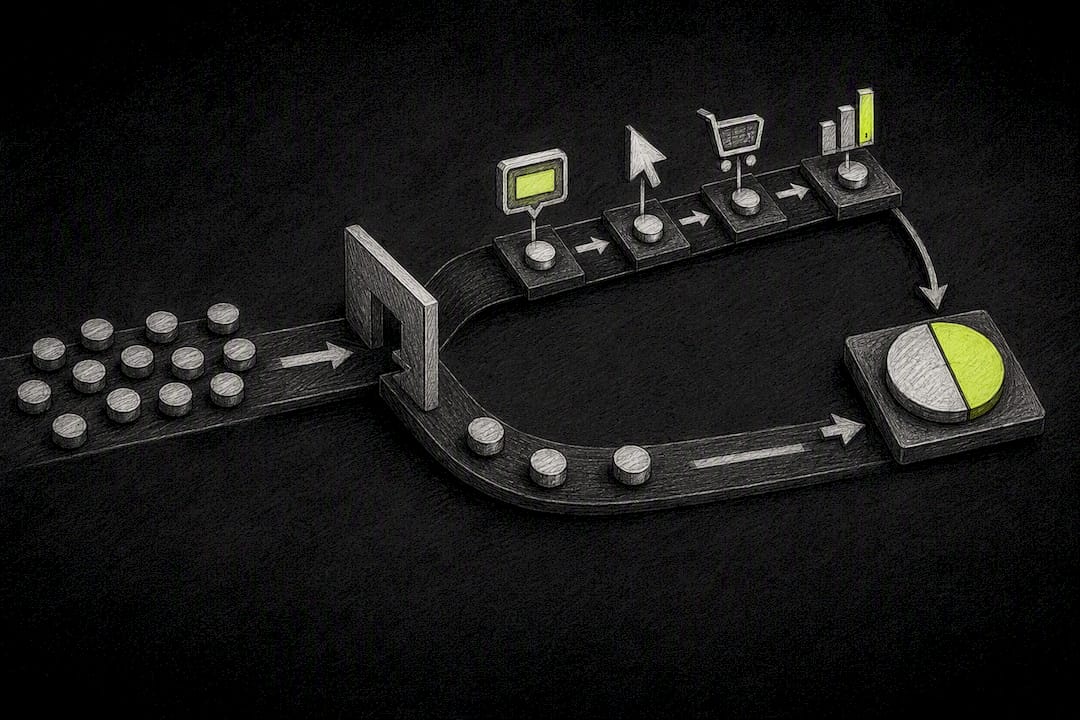
Attribution works through event-based tagging. Every push click carries a UTM or in-platform event tag that ties back to the original product view, so revenue gets credited to the notification rather than lumped into generic "direct" traffic. A dashboard that tracks funnel steps (view, push sent, push clicked, purchase) gives you a clean line from send to sale.
Metrics worth tracking on every campaign:
- Click-through rate on the push itself.
- Conversion rate among users who clicked, separated from your site-wide baseline.
- Revenue recovered, attributed specifically to push-triggered purchases.
- Lift versus a control group that received zero pushes during the same period.
Statistic Callout: Marketing automation checklists recommend running a holdout control from day one and reviewing KPIs daily during the ramp period, rather than waiting weeks to check results.
Run three experiments in your first month: a holdout control to establish baseline lift, a timing test (15 minutes versus 30 versus 60), and a creative test (plain reminder versus scarcity messaging). Watch for diminishing returns on the third reminder. If click-through drops sharply between message two and three, cut the sequence short rather than pushing a fourth touch.
Your Quick-Start Checklist for a Safe Pilot
Before you launch anything, confirm three technical pieces are in place: your push provider is integrated with your storefront (Shopify, WooCommerce, BigCommerce, or a custom build), your product feed has a live in-stock flag, and you're tracking view and purchase events at the product level.
From there, follow this sequence:
- Build the automation trigger off product-view events with no subsequent cart add.
- Set your first wait window, typically 20 minutes, and space two additional reminders over the following one to two days.
- Write three distinct messages: a plain reminder, a scarcity or stock-based nudge, and an incentive-led final touch.
- Configure every exclusion rule (cart adds, recent purchases, out-of-stock items, recent recipients) before your first test send.
- QA the full sequence on both iOS and Android devices to confirm images, pricing, and links render correctly.
Launch with a holdout control group so you can measure true lift, not just raw click volume. Watch your first-week KPIs daily. If unsubscribe or opt-out rates spike, that's your signal to slow cadence immediately rather than wait for the campaign to finish.
What Marketers Get Wrong About Browse Abandonment
The biggest mistake is treating browse abandonment like a numbers game: more sends, more revenue. It's the opposite. Over-notifying is the fastest way to kill a channel that depends entirely on shoppers keeping notifications turned on. I'd rather see a store send two well-targeted messages a week than five generic ones.
Multi-product sessions trip up a lot of setups. If someone viewed four items, which one do you feature? Defaulting to "most recent" is easy but often wrong. Surfacing the item with the highest expected order value tends to recover more revenue, as long as it doesn't feel random to the shopper.
The guardrail teams skip most often: excluding carted items. If your browse and cart flows aren't talking to each other, you'll double-message the same shopper about the same product, which reads as sloppy no matter how good your creative is.
— Lucas
Recover Lost Browsers Without Collecting a Single Email
Every strategy in this guide assumes you have a way to reach shoppers who never gave you their email or phone number, which is most of them. StorePush solves that specific gap. It uses native iOS App Clips to put a push notification directly on a shopper's lock screen, no app install, no opt-in form, no data collection required. That means the guardrails covered above (in-stock logic, cart exclusions, capped cadence) run on infrastructure built specifically for this use case, not bolted onto an email platform.
Setup connects with common e-commerce platforms or a custom storefront, and the dashboard provides revenue attribution, funnel tracking, and click-through rate data. Most stores get a pilot running within days on a free plan. If you're ready to see how it fits your product catalog, book a demo or visit the StorePush homepage to review integration details.
Where to Learn More
For deeper implementation detail, StorePush's complete browse abandonment guide covers audience targeting and message setup step by step. Its personalization guide breaks down which behavioral signals actually move click-through rates. For opt-in mechanics on iOS and Android, see the push notification opt-in guide. Outside StorePush, the marketing automation checklist for SMBs is a solid reference for structuring any new automation pilot safely.
Sources
- Marketing Automation Checklist: Step-by-Step Guide for SMBs
- 7 Key Content Personalization Trends for Digital Marketers
FAQ
What Is a Browse Abandonment Push Notification?
It's an automated push sent to a shopper who viewed a product but left without adding it to cart, distinct from cart abandonment messages that target checkout dropoff.
How Long Should You Wait Before Sending the First Reminder?
A default wait of around 20 minutes after the product view is standard practice, giving shoppers time to keep browsing before you interrupt them.
How Many Browse Abandonment Reminders Should You Send?
Two to three reminders per session is typical, spaced over one to two days, with each message capped by weekly frequency limits to avoid over-notifying.
Do You Need a Shopper's Email to Send a Browse Abandonment Push?
No. Tools like StorePush use App Clips to deliver lock-screen notifications without collecting an email address or phone number.
How Do You Know If a Browse Abandonment Campaign Is Working?
Compare conversion rate and revenue recovered against a holdout control group that received no push, since that's the only way to isolate true lift.