
Ecommerce sites must post a clear Do Not Sell or Share My Personal Information link, honor opt-out signals like Global Privacy Control, avoid dark patterns in consent flows, and update privacy notices to reflect current data practices. Beyond that, you need to audit every vendor pixel touching your checkout and test the opt-out flow yourself. The California Attorney General's CCPA guidance and the CCPA statute set the floor. Start this week: add the Do Not Sell link, run a one-click opt-out test, and map where customer data actually goes.
TL;DR:
- Many ecommerce stores are likely to be in scope of CCPA due to ad tracking pixels and third-party integrations, even if they do not sell customer lists directly.
- The law requires a clear, accessible Do Not Sell or Share My Personal Information link, and the opt-out process must be simple and consistent across the site.
- Consent notices at collection must specify data categories, purposes, and third-party sharing, with granular manage preferences and separate privacy policy sections for California.
- You need to audit vendor integrations, build a detailed data flow map, and ensure contracts require honoring opt-out and deletion requests to prevent non-compliance.
- Using privacy-centric tools like StorePush's App Clips can reduce tracking risks and minimize vendor disclosure obligations in cart recovery efforts.
Table of Contents
- CCPA Consent Ecommerce Rules: Who's Covered and When
- What Your Notice at Collection and Privacy Policy Must Say
- How to Build a Working Opt-Out and Honor GPC Signals
- Cookies, Pixels, and When Tracking Becomes a "Sale"
- The Dark Patterns §7004 Bans, and a Test You Can Run This Week
- Your Ecommerce Compliance Playbook: Audit, Map, Contract, Fulfill
- Retargeting Without the Tracking Risk: A Practical Look
- Handling Minors and Sensitive Data in Your Store
- Selling Across State Lines: Does CCPA Follow the Customer?
- Express Consent vs. Implied Consent: What Actually Counts
- What CCPA Consent Rules Mean for Your Marketing Stack
- Compliant Consent Notices: What Good Looks Like
- Compliance Builds Trust You Can Measure
- A Privacy-Friendly Way to Recover Lost Sales
- Primary Sources Worth Bookmarking
- Sources
- FAQ
CCPA Consent Ecommerce Rules: Who's Covered and When
Not every online store falls under the California Consumer Privacy Act, but more than you'd think do. A business triggers CCPA obligations if it does business in California and meets one or more specified thresholds related to revenue, volume of consumer personal information, or revenue derived from selling or sharing personal information. That revenue threshold catches a surprising number of mid-sized Shopify and WooCommerce stores that never thought of themselves as a "data company."
Here's where it gets tricky for ecommerce specifically. You might not directly sell customer lists to anyone, but if you run Meta Pixel, Google Ads remarketing, or a customer data platform that shares behavioral data with ad networks for cross-context behavioral advertising, California regulators typically treat that as "sharing" even without money changing hands. That single distinction is the reason most stores discover they're in scope long after launch, usually when a customer sends a rights request they don't know how to handle.
The CCPA statute and its CPRA amendments lay out four core consumer rights that matter for online retail:
- Right to know what personal information you've collected, used, and shared over the prior 12 months.
- Right to delete personal information, with limited exceptions like completing a transaction or legal compliance.
- Right to opt out of the sale or sharing of personal information, including data flowing to ad tech vendors.
- Right to limit use and disclosure of sensitive personal information, such as precise geolocation or financial account details.
The critical distinction for your compliance program is that most of these rights operate on an opt-out basis, not an opt-in basis. Under CCPA, you don't need permission before collecting standard personal information. You need a working opt-out mechanism and you need to honor it the moment someone uses it.
Affirmative, opt-in consent becomes mandatory in narrower situations: processing certain sensitive personal information for purposes beyond what a reasonable consumer would expect, using automated decision-making technology (ADMT) for significant decisions, or reusing previously collected data for a materially different purpose than disclosed at collection. The CPRA resource site breaks down how ADMT opt-out rights and sensitive-data limits expanded the original CCPA framework, and it's worth reading before you finalize any consent banner copy.
One more wrinkle specific to ecommerce: third-party integrations. If your checkout uses a buy-now-pay-later widget, a reviews plugin that phones home to its own servers, or an abandoned-cart email tool that passes customer data to a marketing platform, each of those counts as a disclosure you're responsible for describing accurately. You inherited their data practices the moment you installed the app.
Pro Tip: Pull up your Shopify or WooCommerce app list right now and count how many apps have access to customer PII. Many stores discover they have numerous active integrations touching order or contact data, often including several that were not clearly authorized.
If you're unsure whether a specific data flow requires consent or just an opt-out mechanism, the safest move is to consult the regulation text directly rather than rely on a blog post summary, including your own. The statute language and the implementing regulations are the only sources that hold up if California's enforcement staff comes asking.
What Your Notice at Collection and Privacy Policy Must Say
CCPA requires a "notice at collection" at or before the point personal information is gathered, visible at checkout, account creation, and in cookie banners where data collection occurs.
The CCPA statute specifies what the notice must include:
- The categories of personal information you collect (contact details, order history, device identifiers, precise location if applicable).
- The business or commercial purpose for collecting each category.
- Whether you sell or share that information, and to which categories of third parties.
- A link or reference to your full privacy policy for the complete disclosure.
- How long you retain each category of information, or the criteria you use to determine retention.
Your privacy policy needs a dedicated California-specific section, separate from your general privacy language, laying out consumer rights, the categories of information collected and disclosed over the past 12 months, and instructions for submitting a rights request. This section gets read closely by regulators and by consumers who already know their rights, so vague language like "we may share data with partners" won't hold up. Name the categories. Name the purposes.
The Do Not Sell or Share My Personal Information link has its own placement rule: it must appear on the homepage, and it needs to be reasonably accessible from every page where personal information gets collected, typically the footer alongside your privacy policy link. Some stores try to fold it into a general "cookie settings" widget. That's allowed under CPRA's alternative opt-out link provisions, but only if the alternative method is at least as easy to use, which auditors interpret strictly.
Here's a practical disclosure checklist for the data types most ecommerce operations actually handle:
- Order and transaction data: name, address, payment metadata, purchase history.
- Analytics data: session behavior, device type, referral source, typically collected via Google Analytics or similar.
- Advertising pixels: Meta Pixel, TikTok Pixel, and any conversion-tracking script that shares identifiers with ad platforms.
- Customer service data: chat transcripts, support tickets, and any data passed to a third-party helpdesk tool.
- Loyalty or subscription data: email preferences, SMS opt-ins, and reward point balances.
Each of those categories needs a line in your privacy policy stating what it is, why you collect it, and whether it's sold or shared. If you're using a customer data platform that stitches these together into unified profiles, disclose that specifically. Regulators have flagged vague "we use analytics tools" language as insufficient when the actual practice involves cross-site tracking for ad targeting.
How to Build a Working Opt-Out and Honor GPC Signals
The regulation is explicit that your opt-out mechanism has to be easy, not a maze. California Code of Regulations §7004 requires that the process for submitting a request take the minimum number of steps, and it explicitly bars methods that are more burdensome than the process for opting back in. If your "sign up for personalized offers" toggle is a single click but your opt-out requires an account login and email confirmation, that's a compliance problem, not just a bad user experience.
Build the flow in this order:
- Add the link everywhere it's required. Footer on every page, and prominently on the homepage. Label it exactly as "Do Not Sell or Share My Personal Information" or use the approved alternative opt-out link language if you're running a unified privacy choices center.
- Build a dedicated opt-out landing page. It needs to let a consumer submit the request without creating an account, verify the request came from a real visitor (email confirmation is common), and confirm the opt-out took effect, ideally within the same session.
- Detect Global Privacy Control signals server-side. Global Privacy Control is a browser-level signal that tells your site the visitor wants to opt out automatically, without clicking anything. Your tag manager or CMP needs to check for this header on every page load and suppress non-essential tracking scripts the moment it's present.
- Log every opt-out event with a timestamp, source, and scope. Whether the opt-out came through the link, a GPC signal, or a written request, keep a record. This is your evidence if the California Privacy Protection Agency ever asks how you're handling requests.
- Suppress downstream vendor calls, not just your own scripts. An opt-out that stops your first-party analytics but still fires a Meta Pixel conversion event isn't actually honoring the request.
Pro Tip: Test your own opt-out flow from an incognito browser once a quarter. Click the link, submit the request, then open your browser's network tab and confirm that ad pixels actually stop firing on the next page load. Plenty of stores have a Do Not Sell link that looks compliant but doesn't disconnect anything on the back end.
Global Privacy Control adoption matters more than most store owners realize. Consumers using privacy-focused browsers or extensions send this signal automatically, and treating it as a valid opt-out request reduces the manual request volume your support team has to process by hand. It's a technical shortcut that also happens to be a legal requirement.
Cookies, Pixels, and When Tracking Becomes a "Sale"
Most ecommerce operators assume "sale" means literally selling a customer list to a data broker. That's too narrow a read. Under CCPA and CPRA, sharing personal information with an ad network for cross-context behavioral advertising, meaning ads targeted based on behavior across sites you don't own, typically counts as "sharing" even when no money changes hands. The mechanism, not the payment, triggers the obligation.
That reframes a lot of standard ecommerce tooling as higher risk than it looks:
- Meta Pixel and TikTok Pixel send visitor behavior to platforms that use it for ad targeting across their networks, a textbook example of sharing for cross-context advertising.
- Google Analytics with advertising features enabled can feed audience data into Google Ads remarketing lists, another sharing trigger.
- Customer data platforms (CDPs) that sync order and browsing data to multiple ad and email vendors multiply your disclosure obligations with every new integration.
- Data broker partnerships, even indirect ones through a marketing agency, count as sharing regardless of how the contract is worded.
The fix isn't ripping out your ad stack. It's sequencing when scripts fire. Most compliance failures happen because tag managers fire every pixel on page load, before the visitor has made any choice. Configure your consent management platform (CMP) to gate non-essential scripts behind the visitor's actual decision:
- Set your tag manager to load only strictly necessary and functional tags by default.
- Use your CMP's consent mode, most platforms built for CCPA and CPRA support conditional firing, to block marketing and analytics tags until the visitor either accepts tracking or fails to trigger a GPC opt-out.
- Build separate toggle categories for analytics, advertising, and functional cookies rather than one blanket accept-all checkbox. Granular consent is considered industry best practice because a single checkbox makes it harder to prove a consumer meaningfully agreed to advertising-specific tracking.
- Re-check your GPC detection logic against your CMP configuration, some CMPs default to ignoring GPC unless you explicitly enable it, which defeats the purpose.
Granular consent also pays off outside compliance. When you can measure which cookie categories visitors actually accept, you get a cleaner read on real campaign performance instead of inflated numbers built on tracking nobody agreed to. Detailed marketing analytics depends on consent data that's actually accurate, not just present.
If you're running a headless or custom storefront rather than Shopify or WooCommerce, the same rules apply, you just don't have a plugin doing the gating for you. Build the consent check into your own script-loading logic before any third-party tag reference gets injected into the page.
The Dark Patterns §7004 Bans, and a Test You Can Run This Week
Regulators built an entire section of the CCPA regulations around one problem: businesses technically offering an opt-out while designing it to fail. Section 7004 names specific patterns as prohibited, and several shows up constantly in ecommerce cookie banners:
- Double negatives. A checkbox worded "Don't sell my info? Uncheck to opt in" confuses more consumers than it protects.
- Hidden or buried reject options. An "Accept All" button in bold color next to a gray, tiny "Reject All" link is exactly the asymmetry the regulation targets.
- Confirmshaming or manufactured urgency. Language like "No thanks, I don't want to save money" attached to the opt-out choice counts as a dark pattern.
- Forced bundling. Requiring a visitor to accept marketing cookies to use basic site functionality that doesn't actually need them.
- Treating silence as consent. Closing a pop-up, scrolling past a banner, or letting a session time out does not constitute agreement to anything, under the statute's own language.
The design principle underneath all of these is symmetry. Accepting tracking and rejecting tracking need to take the same number of clicks and carry equal visual weight. If your "Accept" button is a big purple rectangle and "Manage Preferences" is a text link in 10-point gray font, that's the kind of imbalance regulators have specifically called out.
Run this test protocol on your own site quarterly:
- Click simulation. Count the clicks required to fully opt out versus fully opt in. They should match.
- Time-to-opt-out. Have someone unfamiliar with your site try to opt out cold, without guidance. If it takes them more than 60 seconds or they give up, that's a design failure.
- Broken link audit. Check that the Do Not Sell link, the privacy policy link, and the opt-out confirmation page all load correctly on mobile, not just desktop.
- Manual rights request. Submit an actual deletion or access request through your own form and time how long fulfillment takes.
- Documentation. Record the date, the tester, and the outcome of each test. This log becomes your evidence of good-faith compliance if you're ever audited.
Pro Tip: Ask someone outside your marketing team, ideally someone who's never seen the banner before, to run the click-simulation test. Internal teams unconsciously know where the reject button is. A fresh set of eyes will find the friction points regulators would find too.
Your Ecommerce Compliance Playbook: Audit, Map, Contract, Fulfill
Treat CCPA compliance the way you'd treat inventory management: an ongoing operational task, not a one-time project you finish and forget. Four recurring workstreams keep a store audit-ready.
Inventory every integration touching customer data. List every app, pixel, plugin, and API connection in your storefront. For each one, note what data it collects, whether it transmits that data to a third party, and whether that transmission counts as a sale or share under the cross-context advertising standard. Most stores find integrations they installed years ago and forgot were still active.
Build a data map and assign ownership. A data map traces where each category of personal information flows: from checkout into your order management system, from there into your email platform, from there potentially into an ad network's audience list. Assign a specific person or team responsible for deletion and opt-out fulfillment for each destination, because "someone will handle it" is how requests slip past deadlines.
- Order data flow: storefront → payment processor → fulfillment system → email marketing tool.
- Analytics flow: storefront → Google Analytics → potentially Google Ads audiences.
- Advertising flow: storefront pixel → ad platform → potentially third-party data broker.
- Support flow: chat widget → helpdesk software → possibly a CRM.
Rewrite vendor contracts to include real CCPA clauses. A data processing agreement (DPA) with each vendor should explicitly require the vendor to honor opt-out and deletion requests you pass along, restrict the vendor from using your customer data for its own independent purposes, and notify you promptly if it experiences a data event affecting your customers. If a vendor won't sign a DPA with those terms, that's a signal to find a replacement.
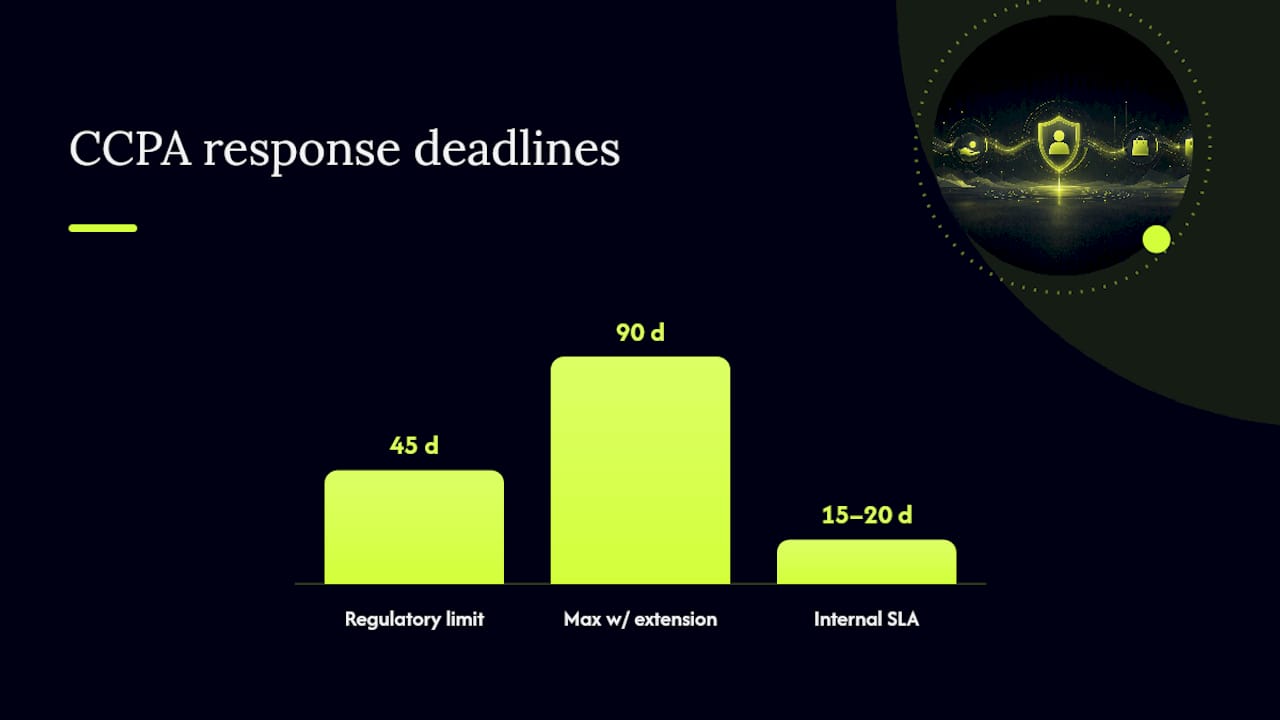
Set internal SLAs and log everything. CCPA gives businesses a defined window to respond to verified consumer requests, generally 45 days with the option for a 45-day extension. Set an internal deadline shorter than that, most operationally mature teams target 15 to 20 days, so you have buffer if a vendor is slow to confirm deletion on their end. Log every request: date received, date verified, date fulfilled, and which systems were touched.
Practical guidance on ecommerce-specific audits, including pixel inventories and consent gating sequences, is available through CPRA compliance resources built for online stores, and general operational frameworks for mapping vendor data flows cover the deletion-fulfillment mechanics in more depth than a single section can.
The most common enforcement failures trace back to three root causes: tags firing before a consumer's opt-out choice registers, Do Not Sell links that are broken or buried, and vendor contracts with no actual mechanism to purge partner-held data on request. Fix those three and you've closed most of your real exposure.
Retargeting Without the Tracking Risk: A Practical Look
Every tracker you add to your storefront is another line item in your data map, another vendor contract to manage, and another script your CMP has to gate behind consent. The obligation doesn't disappear because the pixel is small or the vendor is popular.
That's the practical case for re-engagement approaches that don't depend on third-party pixels or stored contact data in the first place. StorePush works through native iOS App Clips, sending push notifications directly to a shopper's lock screen without collecting an email address, phone number, or requiring an app install. No cookie, no persistent identifier synced to an ad network, no data flowing to a demand-side platform for cross-context targeting.
That architecture matters for your compliance surface, not just your conversion numbers. Consider what shrinks when a re-engagement channel doesn't rely on stored PII or third-party sharing:
- Fewer vendor DPAs to negotiate, since there's no email service provider or SMS platform holding customer contact records for this specific channel.
- Fewer opt-out obligations to track, because a channel that never collected an identifier has nothing to "sell" or "share" in the CPRA sense.
- Less pixel firing to audit, since App Clip based push doesn't depend on the same tracking scripts that trigger cross-context advertising rules.
- Simpler notice-at-collection language, since you're not describing a data flow that doesn't exist for this channel.
If you want to measure the difference concretely, run a before-and-after audit: count third-party pixel calls and vendor data transfers tied to your current abandoned-cart recovery stack, then compare that against a push-based approach that never needed the visitor's contact information to begin with. The gap in vendor surface area tends to be the clearest signal.
None of this replaces your Do Not Sell link, your notice at collection, or your GPC detection logic. Cookieless retargeting reduces one category of exposure among several. For teams weighing where to focus limited engineering time, cookieless retargeting playbooks and comparisons of privacy-friendly re-engagement approaches walk through the tradeoffs against traditional email and SMS recovery flows in more depth.
Handling Minors and Sensitive Data in Your Store
If your storefront sells anything a minor might purchase, or if your checkout collects sensitive personal information like precise geolocation, health-adjacent products, or financial account numbers, the consent standard shifts from opt-out to affirmative opt-in.
For consumers under 16, CCPA requires opt-in consent before you can sell or share their personal information. If the consumer is under 13, that consent must come from a parent or guardian, not the minor. Practically, this means an ecommerce site knowingly serving a teen or younger audience needs to age-gate before any sharing-related tracking fires, not rely on a general-purpose cookie banner built for adult shoppers.
Sensitive personal information carries its own limit-of-use right, separate from the general opt-out. Categories include Social Security numbers, precise geolocation, and information about health conditions or sexual orientation. If your store sells products in categories like supplements, intimate apparel, or anything tied to a medical condition, review whether checkout fields collect data that falls into this bucket. Consumers get the right to restrict your use of that data to what's necessary for the transaction itself, and your consent flow needs a distinct control for it, separate from the general Do Not Sell toggle.
The safest operational rule: default to the stricter standard whenever your audience or product category is ambiguous. Opt-in consent that turns out to be legally optional costs you a slightly longer checkout flow. Skipping opt-in consent that turns out to be legally required costs considerably more.
Selling Across State Lines: Does CCPA Follow the Customer?
CCPA applies based on the consumer's residency, not your business's location and not where the transaction technically closes. If your store ships nationwide and a California resident buys from you, that transaction and the personal information collected around it fall under CCPA obligations, even if your warehouse is in Ohio and you've never set foot in California.
This surprises a lot of store owners who assume the law only applies to California-based companies. It doesn't. The threshold tests, revenue, data volume, or percentage of revenue from selling personal information, apply to your business as a whole, but the rights themselves attach to the individual consumer's California residency. A customer entering a California shipping or billing address is enough to trigger the obligation for that transaction.
Practically, this means most stores can't cleanly segment "California traffic" from everyone else and apply different rules. The simplest, and most common, approach is to apply CCPA-compliant consent flows to your entire US audience rather than building geo-targeted logic that shows a different checkout experience to shoppers based on IP address or billing zip code. Geo-targeting a compliance experience is technically possible but adds engineering overhead and creates edge cases, like a Californian temporarily traveling out of state, that geo-detection handles poorly.
International shoppers outside the US generally fall outside CCPA's scope, since the law is tied to California residency specifically, not global data protection standards. If you ship internationally, other regimes like the EU's GDPR may apply instead, and those carry different, often stricter, consent-first requirements that deserve separate legal review.
Express Consent vs. Implied Consent: What Actually Counts
CCPA's default posture is opt-out, meaning your store can generally collect and use standard personal information without asking permission first, as long as you disclose it and honor opt-out requests when they come in. That's sometimes called implied consent in casual usage, though the statute itself doesn't use that framing; it's more accurate to say the law presumes collection is permitted subject to disclosure and opt-out rights.
Express, affirmative consent is a narrower, higher bar. It applies when you want to use sensitive personal information beyond what's reasonably necessary for the transaction, when you're deploying automated decision-making technology for a significant decision about the consumer, or when you want to use previously collected data for a new purpose materially different from what you originally disclosed.
The practical test for your store: does the checkbox or toggle require an active, unambiguous action from the visitor, distinguishable from simply browsing or completing checkout? A pre-checked box doesn't satisfy this standard. Neither does treating a closed pop-up or an abandoned session as agreement, a point the statute addresses directly regarding what does not constitute valid consent. Whenever you're building a consent mechanism for something in the express-consent category, use a clearly labeled, unchecked box requiring an intentional click, and log the timestamp of that action.
What CCPA Consent Rules Mean for Your Marketing Stack
Your email and retargeting programs are where CCPA consent requirements bite hardest, because both channels depend on data flows that regulators now scrutinize directly. Email marketing itself isn't restricted the same way sharing is, collecting an email address at checkout for order confirmations and offering an opt-in for a newsletter is standard practice and doesn't require CCPA-specific consent beyond your existing CAN-SPAM obligations. The complication starts when that email list gets uploaded to an ad platform for lookalike audience targeting. At that point, you've moved from simple email marketing into sharing personal information for cross-context advertising, and the opt-out rights apply to that specific use.
Retargeting campaigns face the most direct impact. A visitor who opts out or sends a GPC signal needs to stop appearing in your remarketing audiences going forward, which means your ad platform's audience sync has to respect that signal, not just your own website's cookie banner. Test this specifically: opt out on your site, then check whether that visitor's identifier still gets pushed to your ad platform's custom audience the next day. Plenty of stores discover a sync job running on a schedule that ignores same-day opt-outs entirely.
The upside is that granular consent data, tracking who actually agreed to advertising cookies versus who didn't, gives your marketing team a cleaner read on which campaigns are working, since attribution isn't inflated by visitors who never consented to being tracked in the first place.
Compliant Consent Notices: What Good Looks Like
The best CCPA consent banners share a few visible traits, and they're worth studying because most templated cookie banner plugins default to something less compliant.
A compliant banner shows three clearly labeled options with equal visual weight: accept all, reject all, and manage preferences, none of them highlighted in a way that nudges the visitor toward accepting. The "manage preferences" option opens granular toggles, separated by category (analytics, advertising, functional), not a single all-or-nothing switch. The banner doesn't disappear or count as dismissed if the visitor scrolls past it or clicks elsewhere on the page, it stays until an actual choice is registered.
At checkout, the notice at collection appears as a short, plain-language line near the payment fields, something like "We collect your order and contact details to process this purchase and offer support. See our Privacy Policy for details," with a direct link rather than a wall of legal text competing with the buy button.
The Do Not Sell or Share link sits in the footer using that exact label or an approved alternative like a unified "Your Privacy Choices" link, consistent across every page rather than appearing only on select pages. Confirmation matters too: after a visitor opts out, the interface should show a visible confirmation, not silence that leaves them wondering if the click registered at all.
Compliance Builds Trust You Can Measure
Most ecommerce operators treat CCPA compliance as a cost center, something legal makes them do that slows down the marketing team. That framing gets the priority order backward. Start with the opt-out link and the test flows before touching your bigger tech stack decisions, because those two items carry the highest enforcement risk and the lowest implementation cost. A broken Do Not Sell link is the kind of thing an attorney general's office finds in minutes.
The trust angle isn't just a nice narrative either. A visitor who opts out and actually sees tracking stop is a visitor who's more likely to trust your brand with their payment information next time. Consumers increasingly notice when a "privacy choices" link is theater versus real. Treating compliance as a conversion asset rather than a legal tax changes how your team prioritizes the work.
Set a quarterly cadence: audit vendor pixels every three months, retest your opt-out flow after any storefront redesign, and review your privacy policy annually or whenever you add a new integration that touches customer data. Stores that treat this as a recurring task rarely get caught flat-footed. Stores that treat it as a one-time project usually do.
— Lucas
A Privacy-Friendly Way to Recover Lost Sales
Every pixel you strip out of your compliance scope is one less vendor contract, one less consent category, and one less thing that can break during an audit. StorePush gives you a re-engagement channel that skips that exposure from the start. It reaches shoppers' lock screens through native iOS App Clips, no email, no phone number, and no app download required, which means there's no stored contact record and no third-party ad network sync tied to that channel.
That's a meaningfully smaller footprint than email or SMS recovery tools that depend on collecting and storing customer identifiers you then have to disclose, protect, and delete on request. StorePush starts with a free plan to test on your own store, with a Pro tier at $50 per month plus a 5% commission on revenue the platform recovers. If you're rebuilding your cart-abandonment stack around a lighter compliance footprint, book a demo and see how the App Clip flow fits into your current checkout.
Primary Sources Worth Bookmarking
Keep these five sources close when drafting policy language or defending an audit. Blog summaries, including this one, are a starting point, not a substitute for the primary text.
- California Attorney General's CCPA guidance: the official enforcement authority's plain-language explanation of consumer rights and business obligations.
- CCPA statute and CPRA amendments (PDF): the actual legal text defining rights, thresholds, and notice requirements.
- §7004 of the California Code of Regulations: the specific rules on consent methods and dark-pattern prohibitions.
- The CPRA resource site: summaries of expanded rights, including ADMT opt-outs and the California Privacy Protection Agency's role.
- Global Privacy Control: the technical standard behind the opt-out signal your CMP needs to detect.
Sources
- California Consumer Privacy Act (CCPA) — California Attorney General
- California Consumer Privacy Act (statute) — effective January 1, 2026 (PDF)
- § 7004. Requirements for Methods for Submitting CCPA Requests and Obtaining Consumer Consent — California Code of Regulations
- The CPRA resource site
- Global Privacy Control (GPC)
FAQ
Does CCPA require opt-in consent for ecommerce cookies?
No, CCPA generally operates on an opt-out model for standard cookies and personal information, not opt-in. Affirmative consent is required only for sensitive personal information uses beyond the transaction, automated decision-making technology, or repurposing data for a new use, per the CCPA statute.
What counts as a "sale" of data for an online store?
A sale or share includes transferring personal information to a third party for monetary or other valuable consideration, and it also covers sharing data with ad networks for cross-context behavioral advertising even without a direct payment. Pixels like Meta Pixel and remarketing-enabled analytics tools typically fall into this category.
Do I have to honor Global Privacy Control signals?
Yes, treating a detected Global Privacy Control signal as a valid opt-out request is the expected standard, and your consent management platform should suppress non-essential tracking automatically when it detects the signal.
How fast do I have to respond to a deletion request?
The CCPA generally allows 45 days to respond to a verified consumer request, with an option to extend by another 45 days when reasonably necessary. Most operationally mature ecommerce teams target an internal deadline of 15 to 20 days to leave buffer for vendor confirmations.
Can StorePush help reduce my CCPA compliance scope?
StorePush's App Clip based push notifications don't require collecting a customer's email or phone number, which removes one category of stored personal information and third-party vendor sharing from your cart-recovery workflow. It won't replace your Do Not Sell link or notice-at-collection obligations, but it can shrink the tracking surface tied specifically to abandoned-cart re-engagement.