Email and push notifications aren't rivals fighting for the same job. Email wins on reach and depth, holding customer relationships with detailed, permanent content. Push wins on immediacy, catching shoppers at the exact moment they're deciding whether to buy or bail. The short rule: route time-sensitive, high-intent moments (abandoned carts, flash sales, back-in-stock alerts) to push, and send everything that needs room to breathe, like newsletters and receipts, through email.
TL;DR:
- Push notifications deliver high visibility for urgent, time-sensitive messages like abandoned cart recoveries within the first hour, achieving nearly 100 percent reach.
- Email remains essential for deep, content-rich communications such as newsletters, receipts, or product guides, especially when permanence and detail are needed.
- Push offers a conversion rate roughly four times higher than email in cart recovery scenarios, but its opt-in rate on iOS hovers around 50 to 60 percent.
- Routing strategies include sending push first and following up with email after 4 to 6 hours if no response, maximizing high-intent engagement.
- For anonymous shoppers who never provide an email, native app clips or push-first tools like StorePush enable recovery without prior email collection.
Table of Contents
- Email vs Push: What Each Channel Actually Is
- Push Notifications vs Email Marketing: A Side-By-Side Comparison
- When to Use Push vs Email for Ecommerce
- Push and Email Benchmarks: What Numbers Should You Expect
- Opt-In, Frequency, and Personalization Best Practices
- The Push-First Recovery Tactics We See Working
- A Simple Framework for Prioritizing Channel Work
- How StorePush Helps You Recover the Carts Email Never Sees
- Sources
- FAQ
Email vs Push: What Each Channel Actually Is
Before you can route messages intelligently, you need to know what you're routing and through what pipes.
Push notifications are short alerts delivered directly to a device's lock screen or notification center, bypassing the inbox entirely. On the technical side, they travel through Apple Push Notification service (APNs) for iOS or Firebase Cloud Messaging (FCM) for Android and web push. A shopper has to grant permission first, either through a browser prompt for web push or a native OS permission dialog for app-based push.
Email marketing runs through an Email Service Provider (ESP) like Klaviyo, Mailchimp, or similar platforms that manage list hygiene, sending infrastructure, and deliverability. Every message lands in an inbox (or a spam folder), creates a permanent, searchable record, and requires an email address plus explicit or implied opt-in.
Both channels carry legal and technical baggage marketers can't skip:
- Push requires OS-level permission prompts, and Apple and Google both restrict how and when you can re-ask after a decline.
- Email in the United States falls under the CAN-SPAM Act, which mandates unsubscribe links and accurate sender information.
- ESP deliverability depends on proper authentication: SPF, DKIM, and DMARC records signal to inbox providers that your email isn't spoofed.
Push Notifications vs Email Marketing: A Side-By-Side Comparison
The gap between these channels isn't philosophical. It shows up in hard numbers across cost, reach, and conversion behavior.
| Dimension | Push Notifications | Email Marketing |
|---|---|---|
| Cost and ROI | Low per-message cost, no data storage overhead | Low per-send cost, but requires list-building investment |
| Reach prerequisites | Device/browser opt-in, OS permission grant | Valid email address, opt-in or existing relationship |
| Deliverability | Bypasses inbox filters, lands on lock screen | Subject to spam filters, sender reputation, authentication |
| Open rate / CTR | High visibility, moderate tap-through | Lower open visibility, engaged clicks on relevant sends |
| Content capacity | Short text, single image, one call to action | Full HTML, images, long copy, multiple links |
| Best-for / use case | Abandoned cart, flash sale, back-in-stock | Newsletters, receipts, onboarding, deep product content |
| Frequency tolerance | Low, 2 to 5 sends weekly recommended | Higher, daily sends tolerated with segmentation |
Cost and reach. Push carries almost no per-message cost once a platform is set up, but it depends entirely on opt-in, and opt-in rates on iOS have historically hovered around 50 to 60 percent. Email's reach prerequisite is lower friction (you likely already have an address from checkout), and U.S. email usage statistics show near-universal market penetration, which is why email still carries the broadest audience coverage of any digital channel.
Deliverability. Push bypasses inbox filters entirely, landing directly on a lock screen with visibility close to 100 percent, even when actual tap-through is modest. Email has to survive spam filters, sender reputation checks, and increasingly aggressive inbox categorization from providers like Gmail.
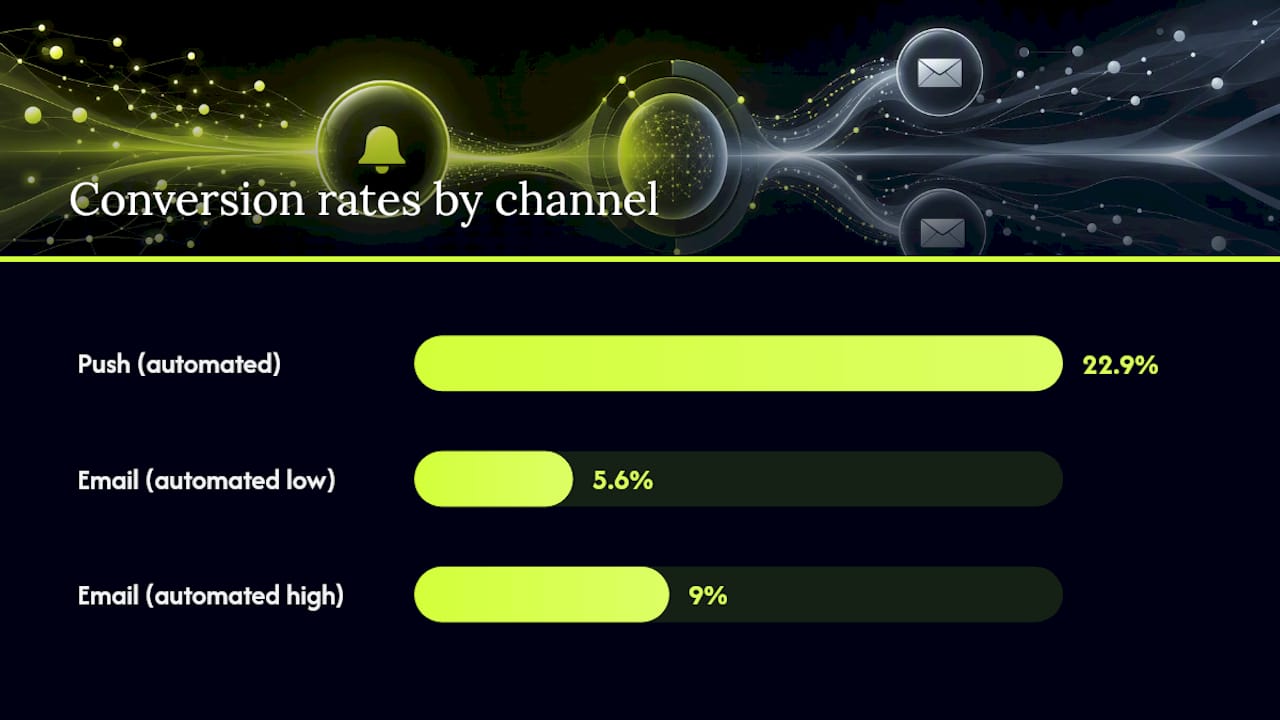
Open rate and CTR. This is where the data gets interesting. Behavior-triggered push flows have been reported converting at roughly 22.9 percent for automated push versus 5.6 to 9 percent for comparable automated email flows in similar cart-recovery scenarios. That gap exists because push interrupts in the moment; email waits to be opened.
Content capacity. A push notification gives you roughly one sentence and a call to action. Email gives you the whole story: product specs, images, testimonials, and multiple links. A back-in-stock alert works fine as a push. A quarterly product deep dive needs email's real estate.
When to Use Push vs Email for Ecommerce
Timing is the entire game here. The same message sent through the wrong channel at the wrong moment either gets ignored or feels like spam.
Push wins when the moment is fleeting:
- Abandoned cart recovery within the first hour, while purchase intent is still warm
- Flash sales and limited-time discounts where urgency drives the click
- Back-in-stock alerts on items a shopper specifically viewed
- Live shipping or order-status updates
Email wins when the content needs depth or permanence:
- Welcome flows that introduce a brand's story and values
- Order receipts and invoices customers may need to reference later
- Newsletters covering multiple products, stories, or promotions
- Feature deep dives, buying guides, or educational content
A practical routing pattern many teams use: send push first, then follow with email if there's no response within 4 to 6 hours. This catches the anonymous, high-intent shopper on push while giving the channel a fallback for permission gaps or missed notifications, an approach production teams commonly build into their messaging stacks.
Run a quick checklist before you pick a channel: How time-sensitive is this message? How much content does it need? What permission do you actually have (email address, push opt-in, both, or neither)?
Pro Tip: If you only have push permission and no email address, don't wait to "collect data first." Tools built on native App Clips can send a recovery push to an anonymous cart abandoner without ever asking for an email, which matters because most abandoners never give you one anyway.
Push and Email Benchmarks: What Numbers Should You Expect
Setting realistic targets starts with knowing what "good" looks like for each channel, because the KPIs that matter shift depending on message type.
For behavior-triggered flows like abandoned cart recovery, industry benchmarking has put automated push conversion around 22.9 percent, compared to 5.6 to 9 percent for equivalent automated email sequences, according to WPBeginner's analysis of Omnisend data. That's not a small edge. It's a multiple.
Benchmark snapshot: Push notifications bypass spam filters and land with near-full visibility, while email remains the highest-reach channel overall for total messaging revenue, according to Mobiloud's channel comparison.
A few complications worth flagging before you build dashboards around these numbers:
- iOS privacy changes (Mail Privacy Protection and similar features) have made email open-rate data increasingly unreliable as a true engagement signal.
- Push "delivered" metrics can look inflated since delivery to the lock screen doesn't guarantee the shopper saw or acted on it.
- Click-through rate matters more than open rate for both channels now, since opens are the noisier signal.
Prioritize CTR and downstream conversion over raw open or delivery rates for both channels. For abandoned cart specifically, track revenue-per-recipient rather than just conversion percentage, since a smaller audience converting hard can outperform a large audience converting weakly. A/B test send timing first (immediate vs 30-minute vs 1-hour delay for push) before you test copy. Timing moves the needle more than wording in behavior-triggered messages.
Opt-In, Frequency, and Personalization Best Practices
Getting permission is only step one. Keeping it is the harder, longer game, and most brands lose that game through sheer overuse.
- Delay the permission ask. Progressive permission strategies, where you request push access after a shopper has already engaged (viewed a product twice, added to cart) rather than the instant they land on your site, consistently outperform immediate system prompts.
- Cap your push frequency. Most brands land in the 2 to 5 sends per week range for push before opt-outs start climbing; email tolerates more frequent contact, especially with proper segmentation.
- Segment by behavior, not just demographics. Push personalization works best around real-time triggers (cart contents, browsing history); email personalization works best around lifecycle stage and purchase history, which supports broader retention strategy work.
- Build a fallback rule into your preference center. If a push notification goes unopened for a set window, say 6 hours, automatically route the same offer to email. This is standard in mature messaging routing architectures.
Pro Tip: Give shoppers an explicit reason for the permission request ("Get notified the second this size is back") instead of a generic "Allow Notifications?" prompt. Context-specific asks convert noticeably better than blind system prompts.
The Push-First Recovery Tactics We See Working
Most of the SERP advice on push versus email skips the biggest blind spot: what do you do about the shopper who never gave you an email address in the first place? That's the majority of your abandoners.
Push-first recovery flips the traditional funnel. Instead of waiting for an email capture that may never happen, native iOS App Clips let a store re-engage an anonymous visitor directly through a lock-screen push, no email, no phone number, no app download required.
A few implementation notes worth knowing before you build this into your stack:
- Send the first recovery push within the first hour of abandonment, while purchase intent is still fresh; waiting until the next day drops conversion sharply.
- Track recovered revenue as a distinct attribution bucket in your analytics dashboard, separate from organic or paid conversions, so you can see the real incremental lift.
- Use CTR heatmaps to see which cart contents or offers actually drive taps, then adjust messaging cadence accordingly.
- Pair this with add-to-cart triggers to catch shoppers even earlier in the funnel, before they reach checkout.
— Lucas
A Simple Framework for Prioritizing Channel Work
When you're deciding where to invest engineering or budget, run every message through TAP: Time-sensitivity, Amount of content, Permission state.
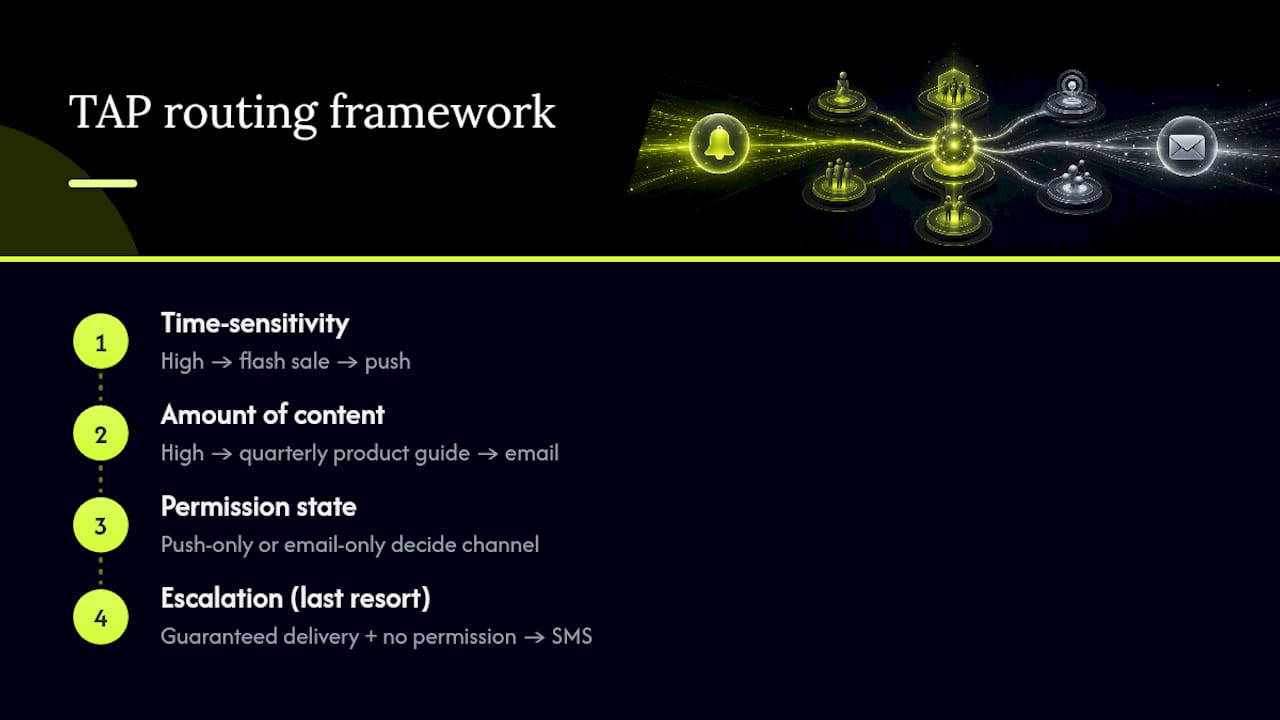
A flash sale expiring in two hours is high time-sensitivity, low content, and often push-only permission, which means build push infrastructure first. A quarterly product guide is low time-sensitivity, high content, and email-only permission, which means it belongs in your newsletter, not your notification stack. If a message needs guaranteed delivery and neither channel has permission, that's your signal to escalate to SMS, but only as a last resort given its cost and intrusiveness.
How StorePush Helps You Recover the Carts Email Never Sees
Every abandoned-cart tactic built around email assumes you captured an email address before the shopper left. Most stores never get that far. StorePush is built for the gap traditional recovery tools miss entirely: it sends lock-screen push notifications to anonymous cart abandoners through native iOS App Clips, no email, no phone number, no app install required. If your store runs on common e-commerce platforms or a custom storefront, such tools can plug in and start tracking event-based triggers, funnel drop-off, and CTR heatmaps immediately.
This fits best for ecommerce merchants who've already invested in email flows but keep watching the majority of visitors leave without ever entering their inbox pipeline. Book a demo to see how push-first recovery attributes revenue on your own storefront, or visit the StorePush product page to see the full integration details.
Sources
- Push Notifications vs Email: All You Need to Know
- Push Notifications vs Email: Which Is Better? — WPBeginner
- Statista — USA email usage / reach
- Push Notification vs Email — Suprsend
- Deciding when and how to use email vs. push notifications — OneSignal
FAQ
What is the 3 email rule?
The "3 email rule" is a common lifecycle guideline suggesting a welcome or recovery sequence use roughly three touchpoints (an initial send, a reminder, and a final nudge) spaced over several days rather than one single message, though exact spacing varies by brand and offer.
What are the downsides of push notifications?
Push depends entirely on device-level opt-in, which historically runs around 50 to 60 percent on iOS, and over-sending quickly triggers opt-outs, so most brands cap frequency at 2 to 5 messages weekly. Push also carries limited content space, no permanent record, and is device-dependent, so a shopper who switches phones or clears notifications loses the connection entirely.
Is it better to fetch or push email?
For real-time engagement, push-based delivery (where the server sends data immediately) beats fetch-based polling (where the app checks periodically), since push notifications arrive without delay and don't drain battery life through constant checking.
Should push messages be on or off?
Push should stay on for time-sensitive, high-intent moments like abandoned carts, flash sales, and back-in-stock alerts, where immediate visibility drives conversion. For anonymous shoppers who never provide an email address, a push-first approach through tools like StorePush can recover carts that would otherwise sit outside any lifecycle flow entirely.