
Send your first abandoned cart email 1 to 4 hours after checkout gets ditched, follow up around the 24-hour mark, and send a final message by 72 hours. Stop there. That's the baseline. But it's a starting point, not a rulebook. Cart value and product type should shift those windows, and the only way to know your ideal timing is to test the first send before touching anything else.
TL;DR:
- Sending the first abandoned cart email within one to four hours maximizes conversion, with rapid timing especially critical for impulse purchases.
- For high-value or considered items, delaying the first email to three to six hours allows shoppers more time to decide without feeling watched.
- Limiting the sequence to two or three emails prevents diminishing returns and reduces the risk of unsubscribes or spam complaints.
- Trigger-based automation based on elapsed time since abandonment outperforms calendar-based scheduling, especially when timed relative to the abandonment event.
- Push notifications through native app clips complement email recovery efforts by re-engaging anonymous or browse-only visitors within roughly eight hours.
Table of Contents
- What Is the Best Abandoned Cart Timing Framework?
- How Many Abandoned Cart Emails Should You Send?
- What Should Each Abandoned Cart Email Include?
- How Do You Test and Measure Cart Recovery Timing?
- When Should You Stop Sending Abandoned Cart Emails?
- How Should You Segment Abandoned Cart Timing?
- How Do You Set Up an Abandoned Cart Email Flow?
- Can Push Notifications Recover Carts That Email Can't?
- What's the Fastest Way to Test Your Own Timing?
- When Push Notifications Round Out Your Recovery Stack
- Sources
- FAQ
What Is the Best Abandoned Cart Timing Framework?
The 1-4-24-72 model isn't arbitrary. It's built around how fast purchase intent decays once someone closes the tab. Recovery potential drops sharply within 72 hours, which is why the entire sequence lives inside that window. Wait too long on the first email and the shopper has already bought from a competitor, forgotten why they wanted the item, or simply moved on with their day.
Here's the reasoning behind each touchpoint:
- 1 to 4 hours (first email): The shopper still remembers the product, the price, and why they almost bought it. This is your highest-conversion window because intent hasn't cooled.
- ~24 hours (second email): Enough time has passed that a gentle nudge with added value, like social proof or a mild incentive, feels helpful rather than pushy.
- ~72 hours (third and final email): This is the last realistic shot before recovery odds fall off a cliff.
That said, the 1-4 hour window isn't one-size-fits-all. A $30 phone case and a $900 mattress do not deserve the same clock.
Statistic Callout: Cart abandonment rates commonly sit well above 60% across e-commerce categories, which means even small improvements in timing translate into real revenue at scale. If your store processes 1,000 abandoned carts a month, shaving even a few percentage points off that abandonment rate through smarter timing is not a rounding error. It's meaningful dollars.
For impulse purchases (accessories, snacks, low-cost apparel), tighten the first send to 30 to 60 minutes. These shoppers decide fast and forget fast. A quick nudge while the item is still fresh in their mind often outperforms the standard 1-4 hour window.
For considered purchases (furniture, electronics, anything north of $150), stretch the first email to 3, 4, or even 6 hours. Shoppers comparing options or checking with a partner need room to think. Hitting them within 30 minutes can feel like you're watching their screen, and that instinct to back off matters more than most timing guides admit.
One more thing worth nailing down early: trigger-based sending beats calendar-based batching every time. Some marketers try to optimize for the "best hour of day" to send, holding abandoned cart emails until 10 a.m. or 7 p.m. because that's when open rates supposedly peak. This is backwards. Timing should trigger relative to the abandonment event itself, not relative to the clock on the wall. A cart abandoned at 2 a.m. that waits until "business hours" to get its first email has already bled hours of recovery potential. Set your automation to fire based on elapsed time since abandonment, full stop.
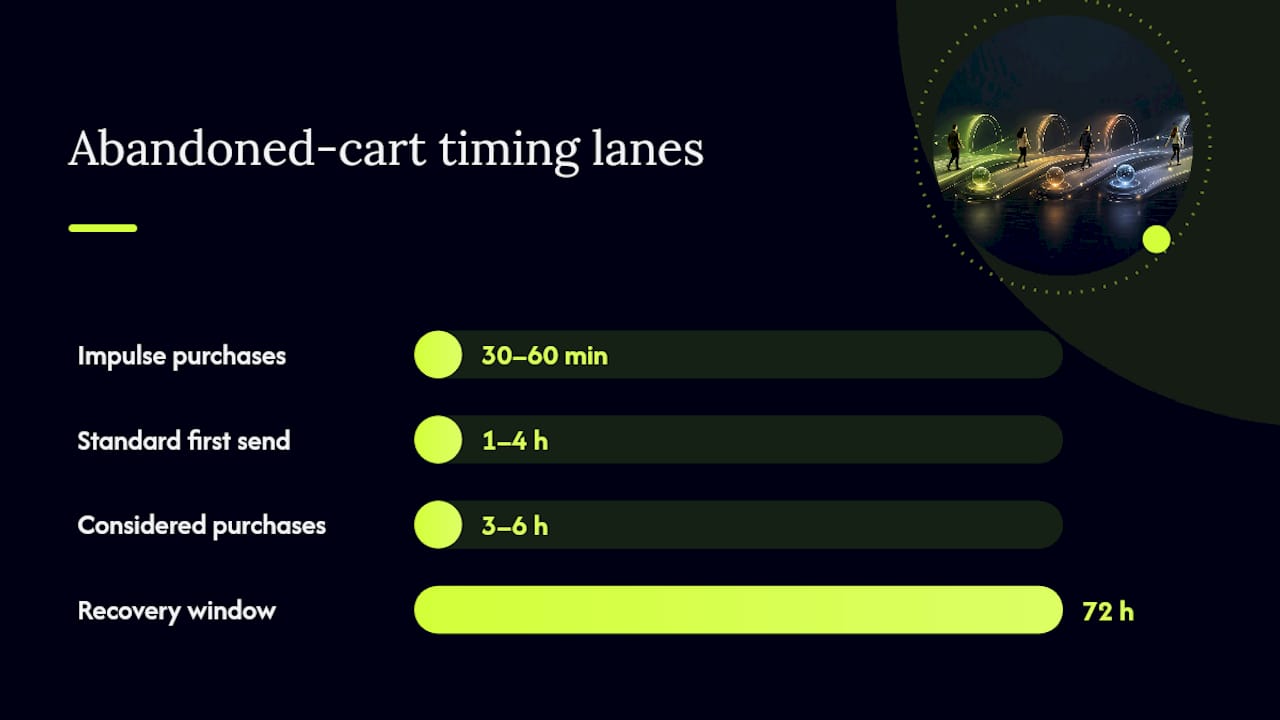
Here's a quick reference for choosing your starting cadence:
Pick a lane based on your average order value, then use it as your control group for testing; for more strategies, see our conversion rate optimization tips. You'll adjust from there, but you need a starting point before you can improve on anything.
How Many Abandoned Cart Emails Should You Send?
Two to three emails is the sweet spot. Beyond that, returns diminish fast and every additional message increases the odds someone unsubscribes or flags you as spam. Each email in the sequence should carry a distinct job:
- Email one (reminder and help): Show the cart contents, make the "complete your purchase" button impossible to miss, and address any friction like payment errors or shipping confusion. No discount yet. This email exists to remove obstacles, not to bribe.
- Email two (value and proof): Add a review, a testimonial line, or a "here's why customers love this" note. If you're going to introduce an incentive, this is often where a modest one lands best, something that reinforces value rather than screaming discount.
- Email three (final attempt): Your last real shot. This is where a stronger incentive or urgency cue makes sense, since the shopper is about to fall out of your recovery window entirely.
Spacing follows whatever cadence you picked in the framework above. Standard baseline stores run this at hour 2, hour 24, and hour 72. Fast-moving impulse categories might compress the whole sequence into 48 hours. High-AOV stores often stretch email three out to the full 72-hour mark to avoid feeling rushed. The sequence length stays the same. The spacing between messages is what flexes.
What Should Each Abandoned Cart Email Include?
Every email in your sequence needs the basics: a clear product image, the exact price, and a CTA button that says something like "Complete My Order" rather than a vague "Shop Now." Beyond that baseline, the content should shift with each send.
- First email: Lead with help, not sales pressure. If your checkout has known friction points, a failed card, a confusing shipping calculator, address them directly. A help-first tone in the opening message reduces the instinct to delete and move on.
- Second email: Add a review snippet, a star rating, or a line about how many other customers bought the same item recently. This is also where a light incentive, like free shipping above a threshold, tends to land better than a blunt percent-off.
- Third email: Time for your strongest offer, but protect your margin. A dollar-off code ($10 off) often preserves more margin than a blanket percent-off (15% off), especially on lower-ticket items where percentage discounts eat disproportionately into profit.
- Personalization cues: If the shopper browsed on mobile, keep the email mobile-first with a single-column layout. If they came from a paid social ad, echo that ad's messaging so the email feels like a continuation, not a cold restart.
- Cross-sells: Mention a complementary product once, if at all. Overloading a recovery email with upsells dilutes the one job it has: getting the original cart across the finish line.
Pro Tip: Test dollar-off versus percent-off on the same product category before assuming one works better. A $10 discount on a $40 item feels generous; a $10 discount on a $200 item feels like an afterthought. Match the incentive type to your price point, not a company-wide default.
How Do You Test and Measure Cart Recovery Timing?
Change one variable at a time, and start with the first email's send delay. Practitioner guidance consistently points to first-email timing as the highest-leverage lever in the whole sequence, more impactful than subject lines, more impactful than discount size.
Run a simple split: half your abandoned carts get a 1-hour first email, the other half get a 4-hour first email. Keep everything else, subject lines, incentives, second and third email timing, identical between groups. Isolating one variable is the only way to know what actually moved the number.
Track these metrics for each variant:
- Recovery rate: Orders completed within your attribution window divided by total carts abandoned.
- Revenue per recipient: Total recovered revenue divided by emails sent, which normalizes for list size.
- Open and click rates: Early indicators before the recovery rate fully materializes.
- Unsubscribe rate and spam complaints: Your deliverability guardrails. Rising numbers here mean you're sending too often or too aggressively.
Set your attribution window at 0 to 72 hours from abandonment, matching your stop rule, so you're not accidentally crediting a purchase that happened a week later to an email that ran out of relevance days earlier. Run each test for at least two full weeks or until you've got enough abandoned carts per variant to trust the result, then apply the winning first-email timing as your new control before testing the next variable, like second-email spacing.
When Should You Stop Sending Abandoned Cart Emails?
After 72 hours or three emails, whichever comes first, stop. Recovery potential falls off sharply past that window, and continuing to email someone who's mentally moved on does more harm than good.
Watch for these signals that you should shorten your sequence even further:
- Unsubscribe rate climbing above your normal baseline on cart recovery sends specifically, not your full list average.
- Spam complaints ticking up, which can quietly tank your sender reputation for every future campaign, not just recovery emails.
- Recovery rate on email three consistently near zero for a given segment, a sign that segment simply doesn't respond to a third touch and you're better off dropping it.
Once you've hit your stop point, email isn't your only option. Retargeted ads can keep the product visible without adding inbox fatigue. SMS works for shoppers who opted in and tend to respond faster than email. For anonymous visitors who never gave you contact info at all, push notifications can re-engage people your email list was never going to reach in the first place.
How Should You Segment Abandoned Cart Timing?
Timing isn't one-size-fits-all across your catalog. Segmenting by average order value and product type tends to outperform a single blanket cadence:
- Under $50 (impulse tier): Move fast. 30 to 60 minute first email, tighter overall sequence.
- $50 to $150 (moderate tier): Standard baseline works well: 1 to 4 hours, 24 hours, 72 hours.
- $150+ (considered tier): Give shoppers room to think. Push the first email to 3 to 6 hours minimum.
- Device and channel: Mobile browsers and paid social traffic often show faster decision windows than desktop or organic search traffic, so a quicker first touch can help there too.
- Returning customers: Shoppers who've bought from you before tend to decide faster. Shortening their cadence slightly, compared to first-time visitors, often improves recovery without feeling aggressive.
How Do You Set Up an Abandoned Cart Email Flow?
Getting the technical setup right matters as much as the timing strategy itself. Here's the sequence:
- Define your abandonment trigger. Decide whether "abandoned" means cart-add without checkout, checkout-start without completion, or a failed payment. Each trigger point changes when your clock starts.
- Configure trigger-based automation, not scheduled batch sends, and set your attribution window to match your stop rule (72 hours).
- Build templates for each of the three emails, matching the content guidance above: help-first, then proof and value, then final incentive.
- QA everything before launch: test the restore-cart link, confirm any coupon code actually works, check mobile rendering, and verify product images load correctly across email clients.
- Roll out on a small cohort first, measure recovery rate and deliverability signals for two weeks, then scale to your full customer base.
Pro Tip: Test your restore-cart link on an actual phone, not just a desktop preview. A surprising number of "high-converting" email templates break the cart-restore flow on mobile Safari specifically, which quietly kills recovery rate for a huge chunk of traffic.
Can Push Notifications Recover Carts That Email Can't?
Email and SMS only work if someone hands over their contact information first, and most abandoners never do. That's where push notifications and Apple App Clips come in: they can reach shoppers who left without giving you an email address or phone number at all.
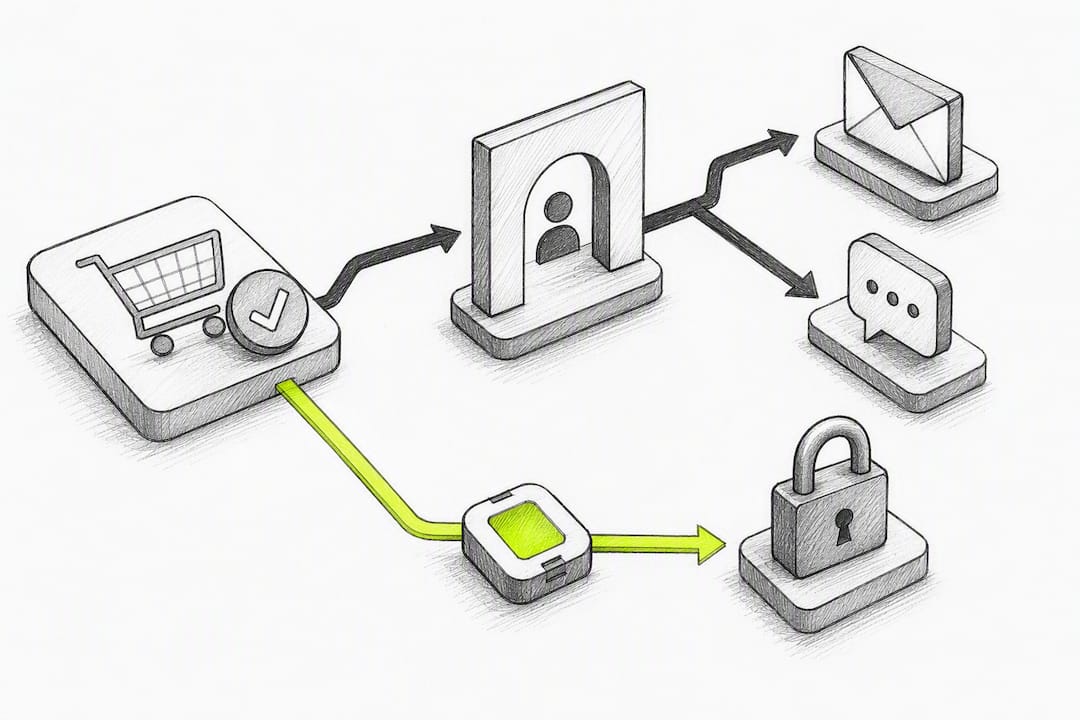
A push notification tool can deliver lock-screen push messages through native App Clips, built specifically to re-engage shoppers traditional recovery tools can't touch, without requiring signup or an app install. Re-engagement windows can be as fast as roughly 8 hours after a visitor leaves.
Treat push as a complement to your email sequence, not a replacement. Email still does the heavy lifting for shoppers who opted in. Push fills the gap for anonymous visitors and browse abandoners who'd otherwise disappear entirely.
What's the Fastest Way to Test Your Own Timing?
Run a two-week A/B test: 1-hour first email against a 4-hour control, everything else held constant. Watch recovery rate and unsubscribe signals closely, not just clicks. The goal isn't squeezing out the last percentage point. It's finding a cadence that recovers real revenue without making customers feel chased.
— Lucas
When Push Notifications Round Out Your Recovery Stack
Most cart recovery advice assumes you've already got an email address to work with. But if a shopper never reaches checkout, never enters an email, and never installs your app, traditional recovery tools have nothing to send to. Certain tools deliver lock-screen push notifications through native Apple App Clips without requiring signup, app download, email, or phone number. This fits stores with high anonymous browse traffic, low email opt-in rates, or a need to re-engage faster than a 1-hour email can realistically move. Such tools work alongside existing email sequences rather than instead of them, covering shoppers traditional email lists might never capture. If browse abandonment is quietly costing you more than checkout abandonment, it's worth seeing how StorePush handles that traffic at Storepush.
Sources
- Abandoned Cart Emails: Best practices & examples (Shopify)
- Cart abandonment rate worldwide (Statista)
- How to reduce cart abandonment (Stripe)
FAQ
How long should you wait before sending an abandoned cart email?
Send the first email within 1 to 4 hours of abandonment for most stores, tightening to 30 to 60 minutes for impulse or low-cost items. High-AOV or considered purchases can wait 3 to 6 hours since those shoppers often need more time to decide.
What's a good cart abandonment rate?
Industry benchmarks commonly place average cart abandonment well above 60%, so a rate in that range doesn't necessarily mean something is broken. What matters more is whether your rate is trending down as you fix checkout friction and tighten your recovery timing.
How do you fix cart abandonment?
Start with root causes: unexpected shipping costs, forced account creation, and slow checkout pages are among the biggest drivers, and fixing those directly reduces how many carts get abandoned in the first place. Recovery emails and push notifications, including options like StorePush for anonymous visitors, work best as a complement to those fixes, not a substitute for them.
How many emails should be in an abandoned cart flow?
Two to three emails is the practical baseline, since returns diminish sharply beyond a third message and additional sends raise unsubscribe risk. The first should focus on reminders and help, the second on social proof and light incentives, and the third on a final, margin-conscious offer.
What is StorePush and how much does it cost?
StorePush is a push notification tool that re-engages shoppers through native Apple App Clips without requiring an email address or phone number. It offers a Free plan and a Pro plan at $50 per month, plus a 5% usage commission on attributed recovered revenue, with full pricing details available at Storepush.