An attribution window for push is the time limit you set after a delivery or a click during which a resulting purchase still gets credited to that notification. For most ecommerce stores, a common starting point is a short click-through window for impulse products and a longer click-through window for considered purchases, with a short view-through window for both. Whatever you pick, report click credit and view credit as separate columns. Blending them is where attribution reports quietly start lying to you.
TL;DR:
- Using a 30-day attribution window for push often shows more revenue than a 7-day window, especially when the window starts at delivery rather than click.
- Default platform settings, such as 24-hour push open windows or 7-day click windows, rarely match the actual customer purchase cycle, requiring custom calibration.
- Separating click-through and view-through credit is crucial because a click proves intent, while a view is weaker evidence and should be considered in a separate column.
- Analyzing your own order data and calculating P90 or P95 values helps determine the optimal attribution window that captures most real conversions without over-crediting.
- Proper push attribution relies on reliable instrumentation, like unique click IDs and server-side beacons, to prevent credit leakage into "direct" traffic.
Table of Contents
- What an attribution window means for push notifications
- Where to configure attribution windows in your stack
- Click-through vs. view-through: which one deserves more weight?
- How to pick the right window using your own order data
- Instrumentation that keeps push credit from leaking into "direct" traffic
- Testing and validating your window before you commit to it
- Reporting rules that keep cross-platform comparisons honest
- Where most teams get push attribution wrong
- How StorePush handles attribution and incrementality for you
- Sources
What an attribution window means for push notifications
An attribution window is the defined stretch of time after an interaction during which a sale can still be traced back to it. For push, that interaction is either a delivery (the notification landing on a lock screen) or a click. Change the window and you change which channel gets the credit line on your P&L, even if actual customer behavior didn't move at all.
Push behaves differently from email or paid social in one important way: the clock can start at delivery, not just at click. That matters because OneSignal's documentation confirms a push click qualifies for full attributed credit, while a delivered-but-unlocked notification can still earn "influenced" credit depending on how the window is configured.
- A 30-day window will almost always show more push-driven revenue than a 7-day window.
- Longer windows favor channels that plant an early seed (push, email); shorter windows favor the last nudge (paid search, retargeting).
- Push windows can start at delivery, click, or app open, depending on the vendor.
Where to configure attribution windows in your stack
Most platforms bury this setting a few clicks deep, usually under Settings, Attribution, Analytics, or Conversion Metrics. If you've never touched it, you're running on the vendor's factory setting, and that setting was picked for the average customer, not yours.
Typical defaults look like this:
- Push opens: often a 24 hour window, full stop, regardless of purchase cycle.
- View-through / impression credit: frequently 24 hours as well, sometimes bundled with click credit into one number.
- Other channels for comparison: Trivas notes Meta commonly defaults to 7-day click, 1-day view, while Google Ads and GA4 lean toward 30-day click windows for path reconstruction.
None of these defaults were built around your customers' actual buying rhythm. They're a starting point, not a verdict. A skincare brand with a 3 day repurchase habit and a furniture store with a 6 week consideration cycle should never be running the same 24 hour window just because it shipped that way.
Click-through vs. view-through: which one deserves more weight?
A click-through window starts the moment someone taps your notification. A view-through window starts the moment the notification is delivered, whether or not it's ever opened. The two aren't equally trustworthy, and treating them as interchangeable is one of the fastest ways to overstate push performance.
A click is proof of intent. A delivery is just proof your notification existed on a screen. That's why view-through credit is considered weaker evidence and belongs in its own column, never folded into your headline conversion number.
Recommended starting ranges:
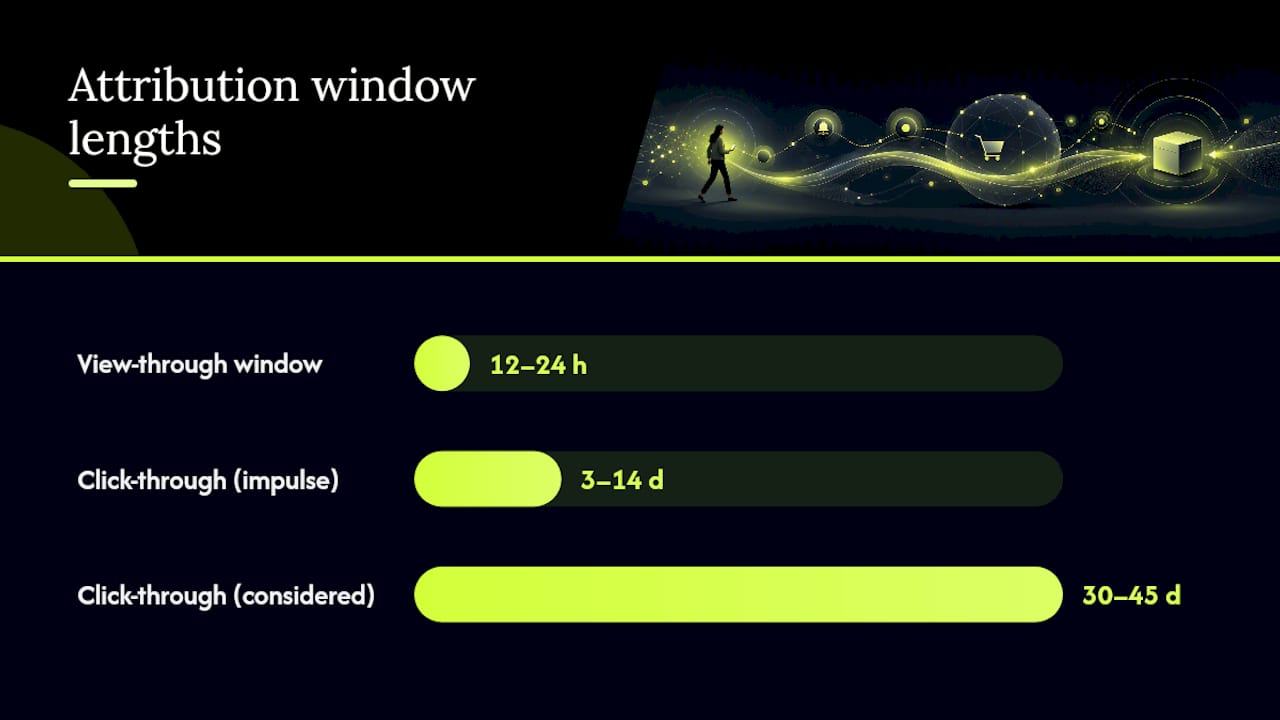
- View-through window: 12 to 24 hours. Any longer and you're crediting push for purchases the shopper may have made for entirely unrelated reasons.
- Click-through window, impulse products: 3 to 14 days.
- Click-through window, considered purchases: 30 to 45 days, matching the longer research cycle these categories require.
How to pick the right window using your own order data
Skip the guesswork. Your order history already contains the answer; you just have to pull it out.
- Export the time gap between each push click (or delivery, if you're measuring view-through) and the resulting order, for every conversion in the last 60 to 90 days.
- Calculate the distribution of that gap, then find your P90 and P95 values. That's the window length that captures roughly 85% to 95% of real conversions without stretching credit into irrelevance.
- Test candidate windows side by side, 7, 14, 30, 45, and 90 days, and watch whether your channel ranking actually shifts or stays stable across them.
- Run the new window in parallel with your old one for at least two to three weeks before fully switching, and write down why you chose it.
Pro Tip: If your P90 and P95 numbers are wildly far apart, that's usually a sign you're mixing two different purchase behaviors, like restock orders and first-time buyers, into one dataset. Split them and calculate separately.
Most stores discover their real number sits nowhere near the vendor default. A supplement brand with a 30 day replenishment cycle might find its P90 lands at 34 days, not the 24 hour window its push platform shipped without of the box.
Instrumentation that keeps push credit from leaking into "direct" traffic
Bad instrumentation is the silent killer of push attribution. If your setup can't reliably tie a click to an order, your reports will quietly reclassify real push revenue as direct traffic, and you'll never know it happened.
The fix, borrowed from documented push instrumentation practices, comes down to a few concrete engineering steps:
- Mint a unique click id (cid) for every notification at send time, and embed it in the notification's data payload, similar to how AppsFlyer embeds OneLink or af keys into push payloads for mobile re-engagement.
- Fire a server-side beacon with the
keepaliveflag the instant the click registers, before the browser even shifts focus or opens a new window. - Persist that cid to first-party storage so it survives the trip, then join it to the order row at checkout.
- Handle the service worker's
focusversusopenWindowbehavior explicitly. UsepostMessageto hand the cid to an already-open tab, since a navigation-less focus event can otherwise attribute nothing at all. - Never rely solely on UTM parameters or
document.referrer. Both break the moment a shopper's browser strips referrer data or a service worker reuses an existing tab.
Pro Tip: Stitch anonymous click ids to known customer profiles at login. Otherwise, a shopper who clicks on their phone and buys on desktop later looks like two unrelated events instead of one attributable journey.
Testing and validating your window before you commit to it
A window that looks correct on a dashboard can still be wrong in practice. The only way to know for sure is to test it against reality, not against another report.
- Run a holdout or pause test: stop push to a segment for a set period and measure the actual revenue drop, then compare that real number against what your platform claims push generated during the same stretch.
- Run two windows in parallel for several weeks and track whether channel share, touchpoint coverage, and average touchpoints per order shift meaningfully between them.
- Set a decision threshold in advance. If channel rankings stay stable across a 7 day and 30 day window, you've found a safe range. If the ranking flips depending on the window, you're not measuring incrementality, you're measuring an artifact of your settings.
This kind of holdout structure mirrors the campaign tracking discipline most performance marketers already apply to paid channels, and push deserves the same rigor.
Reporting rules that keep cross-platform comparisons honest
Every platform runs its own clock. Meta's 7-day click default and Google Ads' 30-day default are not the same yardstick, and putting both numbers on one slide without a label invites a bad decision.
- Label every platform-native window explicitly on any report you share, and where possible, route raw touchpoint data into a warehouse and apply one consistent attribution logic across channels.
- Always show click-through and view-through credit in separate columns, and distinguish "influenced" revenue from "attributed" revenue rather than folding both into a single number.
- Revisit your chosen windows on a quarterly cadence, or immediately after a pricing change or new product line shifts your typical purchase cycle.
Where most teams get push attribution wrong
The most common mistake isn't picking the wrong window, it's never questioning the one you inherited. Teams trust vendor defaults and blend view and click credit into a single misleading number. StorePush's approach leans on carrying a click id through every send, running incrementality tests against holdouts, and keeping view windows conservative. This month's fix: add a 24 hour view column to your report and run a 7 versus 30 day click sensitivity test.
— Lucas
How StorePush handles attribution and incrementality for you
Building all of this from scratch, click ids, service worker edge cases, holdout logic, eats weeks most ecommerce teams don't have. StorePush was built to carry that weight for you: every push carries a persistent click id, clicks get beaconed server-side, and the dashboard maps clicks directly to orders without asking shoppers for an email or phone number first.
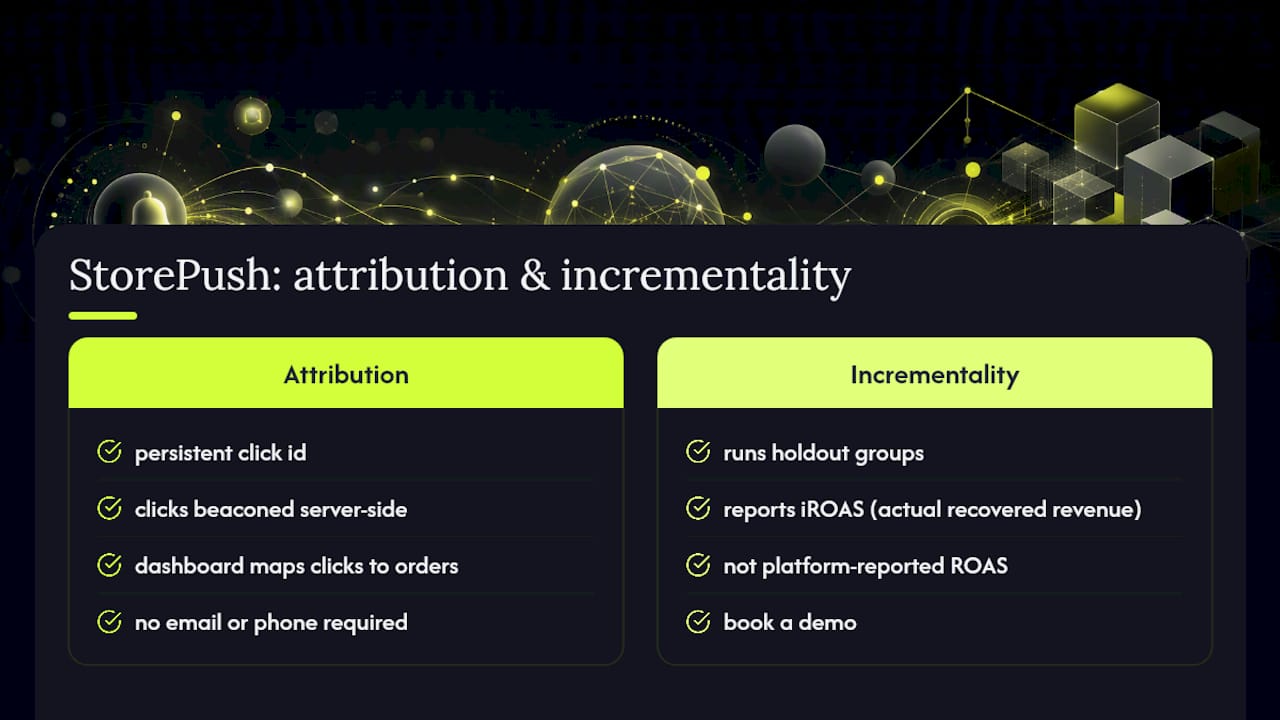
StorePush also runs incrementality testing against holdout groups, so you're not left trusting a platform-reported ROAS number, you get an actual iROAS figure grounded in what revenue push truly recovered versus what would have happened anyway. If you want to see how that instrumentation and reporting work on your own storefront, book a demo or explore how StorePush fits into your current stack.
Sources
- What is an attribution window in marketing? What marketers need to know | HubSpot
- Conversion metrics | OneSignal documentation
- Attributing conversions to push clicks | Web Push Notifications
- Measuring push notification re-engagement campaigns | AppsFlyer
- Attribution lookback windows: how to configure them right | mbuzz