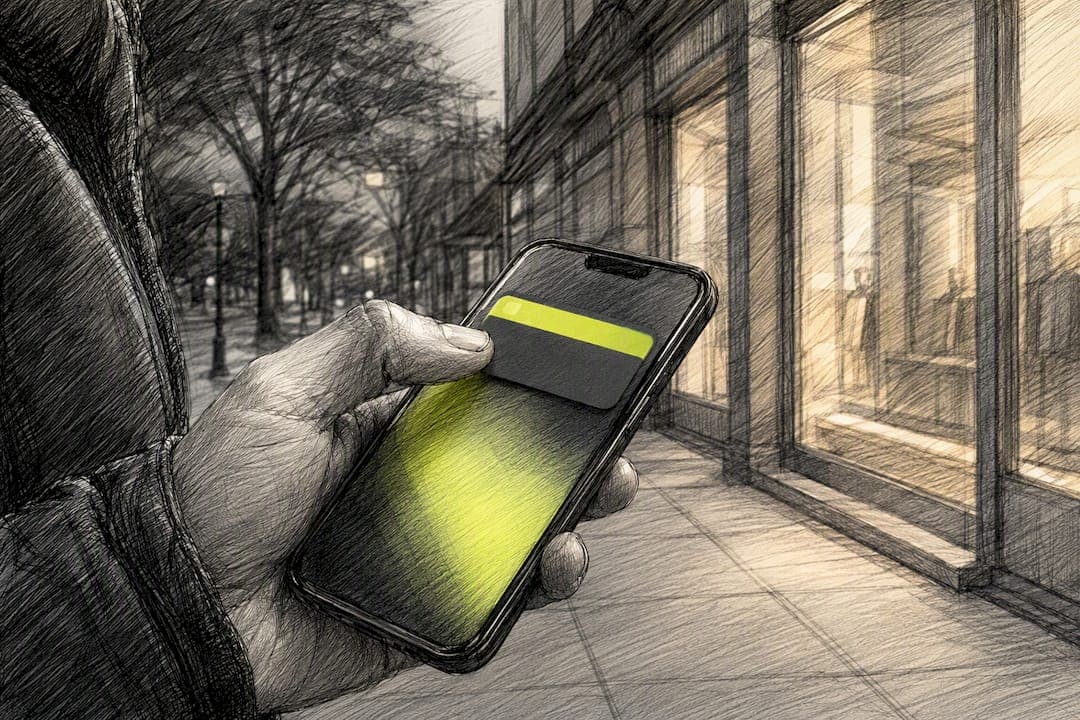
Behavioral push notifications are messages triggered by something a real shopper just did (abandoning a cart, watching a price drop, breaking a streak) instead of a calendar date on a marketing plan. The rule that matters most: send only when the behavior itself creates clear, actionable value for that person. Everything else follows from three levers: pick the right trigger, personalize and deep-link into the exact next step, and enforce hard caps so you never burn the channel's trust.
TL;DR:
- Sending triggered push notifications within 30 to 60 minutes of cart abandonment significantly increases recovery chances, especially when combined with personalized deep links.
- Use specific behavioral triggers, such as price drops immediately after a change and streak warnings before reset times, to maximize engagement.
- Limit non-transactional pushes to one per day per user with a minimum four-hour gap and respect quiet hours to maintain trust and avoid opt-outs.
- Focus on fewer, well-targeted triggers with strong suppression rules, as they outperform broad, multiple triggers that lack discipline.
- StorePush uses native app clips to re-engage anonymous visitors at the lock screen, avoiding the need for contact information and adhering to privacy obligations.
Table of Contents
- Why Behavioral Push Notifications Work: The Psychology Behind the Tap
- When Should You Send a Triggered Push Notification?
- How Do You Segment Users for Personalized Push Messages?
- What Are the Best Practices for Push Notification Frequency?
- Copy, Deep Links, and Templates You Can Use Today
- Which KPIs Actually Tell You a Push Campaign Is Working?
- What Do StorePush and Practitioners Get Right About Behavioral Triggers?
- How Should You Handle Privacy and Data Compliance With Behavioral Push?
- How Do You Track Behavior Across Devices for Push Targeting?
- How Should Push Fit Into Your Broader Marketing Mix?
- What the Data Actually Tells You to Prioritize
- Turn Behavioral Push Into Recovered Revenue With StorePush
- Sources
- FAQ
Why Behavioral Push Notifications Work: The Psychology Behind the Tap
A shopper's attention is a scarce resource, not a renewable one. You get maybe a half-second glance at a lock screen before a thumb swipes it away, and a generic "Check out our new arrivals!" loses that half-second every time against a message that reflects something the person just did. That's the core mechanic behind why triggered push outperforms broadcast: it arrives during a "value moment," the narrow window where the user's own behavior has already primed them to care.
Timing also reinforces habit. A streak reminder sent the moment a user's daily habit is at risk works because it catches them while the behavior is still fresh in working memory, not two days later when the context has evaporated.
Trust compounds or erodes with every send. A notification that's accurate and relevant teaches the user to keep the channel on; a wrong or lazy one teaches them to mute you.
- Cart abandonment sits at a level that makes recovery messaging one of the highest-leverage tactics in e-commerce, according to Statista's global tracking of online shopping cart abandonment.
- Trigger-driven sends often produce 2 to 4 times the open rate of promotional broadcasts.
- The biggest misread on this data isn't tactical, it's a mindset one: teams assume more volume means more engagement, when the fix is usually fewer, sharper triggers.
Behavioral push notifications work because they borrow attention the user already gave you, through their own action, instead of asking for fresh attention cold.
When Should You Send a Triggered Push Notification?
The signal has to come before the send, not the other way around. Below are the behavioral triggers that consistently earn a tap, paired with the operational rules that keep them from becoming noise.
- Abandoned cart: fire 30 to 60 minutes after the last app session with items still in the cart.
- Price drop: trigger the moment a watched item's price changes, not on a nightly batch job.
- Streak at risk: send a few hours before the user's habitual "reset" time, based on their own history.
- Social events: a friend joins, a shared list gets an update, someone reacts to their content.
- Restock or low stock: tied to an item the user actually viewed or saved, never a general "back in stock" blast.
Default cohort send-time windows (like "send at 7 p.m. for all users") are a decent starting point, but AI-driven send-time optimization that learns each user's peak window lifts open rates meaningfully once you've collected 7 to 14 days of per-user history. Until then, lean on vertical benchmarks rather than guessing.
Platform quotas cap how aggressive you can get regardless of how good your triggers are. Some wallet and pass platforms enforce a documented limit of 3 notification-triggering messages per device in a 24-hour window, specifically to protect deliverability across the whole ecosystem. Web push has its own timing constraint: the Notification Triggers API in Chrome lets you schedule a notification against a condition (a TimestampTrigger, for instance) so the browser can deliver it even without an active connection, which solves a real reliability gap in the standard Push API.
Pro Tip: Build your suppression logic before your trigger logic. It's far easier to launch five smart triggers on top of solid quiet hours and minimum-gap rules than to retrofit restraint after users start muting you.
How Do You Segment Users for Personalized Push Messages?
Behavioral segmentation starts with events, not demographics. A 34-year-old in Ohio tells you almost nothing useful; a user who viewed a product three times but never added it to cart tells you exactly what message to send next.
- Viewed but didn't add to cart — segment for a soft nudge highlighting the specific product, not a generic sale.
- Added to cart but didn't check out — segment for urgency or incentive framing, timed to the abandonment window.
- Repeat purchaser of a category — segment for restock or new-arrival alerts in that exact category.
- Dormant for 14+ days after high activity — segment for a win-back message referencing their last viewed item.
For personalization tokens, start simple: first name, the specific product name, and time-sensitive details like "2 left in your size" or "price drops in 3 hours." Skip anything that feels like surveillance. If a user never told you their location and never opted into location tracking, a message that name-drops their neighborhood reads as creepy rather than clever, even if the data is technically accurate.
New users complicate this because you don't have behavioral history yet. Default to vertical benchmarks (typical abandonment windows, typical browse-to-buy timing for your category) until the account accumulates enough sessions to personalize on its own data. Forcing personalization before you have signal usually produces the wrong recommendation, which does more damage to trust than a generic message would.
What Are the Best Practices for Push Notification Frequency?
Frequency discipline is what keeps a high-performing channel from decaying into a muted one. The rules below are conservative on purpose, because the cost of over-sending (silent opt-outs, uninstalls) is steeper than the cost of under-sending.
- Cap non-transactional behavioral or promotional sends at one per day, per user, as a default ceiling.
- Enforce a minimum four-hour gap between any two behavioral pushes to the same device.
- Respect quiet hours (typically late evening through early morning, adjusted to the user's local time zone).
- Always exempt true transactional messages (order confirmations, shipping updates) from promotional caps.
Platform-level ceilings back this up: some pass and wallet platforms cap notification-triggering sends at 3 per device per 24 hours, which is a useful outer bound even for teams building their own send logic from scratch.
Silent opt-out is the signal most teams miss. A widely used rule of thumb treats five consecutive unopened sends as an implicit opt-out, and the fix isn't to send harder, it's to suppress that user from Tier 2 and Tier 3 campaigns immediately and let only high-value Tier 1 triggers (like an active cart) through.
Copy, Deep Links, and Templates You Can Use Today
Good copy front-loads the personalized detail so it survives lock-screen truncation. "Sarah, your size is back" beats "We think you'll love this" every time, because the value is legible in the first three words. Match every CTA to a single in-app destination. A push that says "See your cart" but opens the home screen wastes the tap you just earned.
That routing precision has real teeth: notifications with a precise deep link into the exact in-app state convert at roughly 2 to 3 times the rate of ones that dump the user on the home screen. Building that mechanism yourself means storing device tokens, wiring event triggers to a delivery service like FCM or APNs, and handling retries reliably, which is the unglamorous engineering work behind every "smart" notification you've ever tapped.
Templates worth stealing, organized by trigger type:
- Abandoned cart: "Your cart's about to expire, [Name]. Still want the [Product]?"
- Abandoned cart, incentive: "[Name], here's 10% off to finish checking out on [Product]."
- Price drop: "[Product] just dropped to $[Price]. Grab it before it's back up."
- Streak at risk: "You're on a [X]-day streak. Don't lose it tonight."
- Milestone: "You just hit [Milestone]! Here's something to celebrate with."
- Social proof: "12 people bought [Product] in the last hour."
- Restock: "[Product] is back. You looked at it last week, here's your shot."
- Browse nudge: "Still deciding on [Product]? Here's what other buyers said."
- Win-back: "It's been a while, [Name]. Here's what's new in [Category]."
- Transactional: "Your order shipped. Track it here."
Before any template goes live, run it through a short checklist: A/B test the copy variant, confirm the CTA text matches the actual destination screen, and manually verify the deep link opens the correct product or cart state on both iOS and Android.
Which KPIs Actually Tell You a Push Campaign Is Working?
Track four numbers in sequence, because each one diagnoses a different failure point: delivered, opened/tapped, converted (the actual post-tap action), and mute or opt-out rate. A campaign with a healthy open rate but weak conversion usually has a deep-link or landing-state problem, not a copy problem.
- Instrument deep-link conversion separately from generic app opens, then track it against D7 and D30 retention by cohort.
- A/B test send-time windows and suppression thresholds the same way you'd test copy, one variable at a time.
- Rising mute or opt-out rates on a specific trigger type are your rollback signal. Iterate on copy or timing first; roll back the trigger entirely only if opt-outs keep climbing after two rounds of fixes.
Reliable measurement depends on the instrumentation being right from day one, which is worth confirming against your analytics setup before you scale any single trigger.
What Do StorePush and Practitioners Get Right About Behavioral Triggers?
StorePush is built around one specific behavioral moment: the shopper who abandons a cart or browse session and leaves without giving up an email or phone number. Instead of waiting on data collection that never happens for most visitors, it uses native iOS App Clips to put a re-engagement push directly on the lock screen, which maps cleanly to the trigger-first approach this whole guide argues for.
The lesson worth repeating from practitioner-level coverage of this space, including posts from Lucas on triggered messaging and revenue recovery, is that the trigger and the message are inseparable. Get the trigger right and a mediocre message still converts; get it wrong and no amount of copywriting saves the send.
Teams evaluating any anonymous-recovery approach should weigh integration effort, the depth of funnel analytics, and how the commission or pricing model lines up with actual recovered revenue.
How Should You Handle Privacy and Data Compliance With Behavioral Push?
Behavioral targeting runs on first-party signals: what a user viewed, added to cart, or clicked inside your own app or storefront. That's a fundamentally different privacy posture than third-party tracking, but it still carries real obligations.
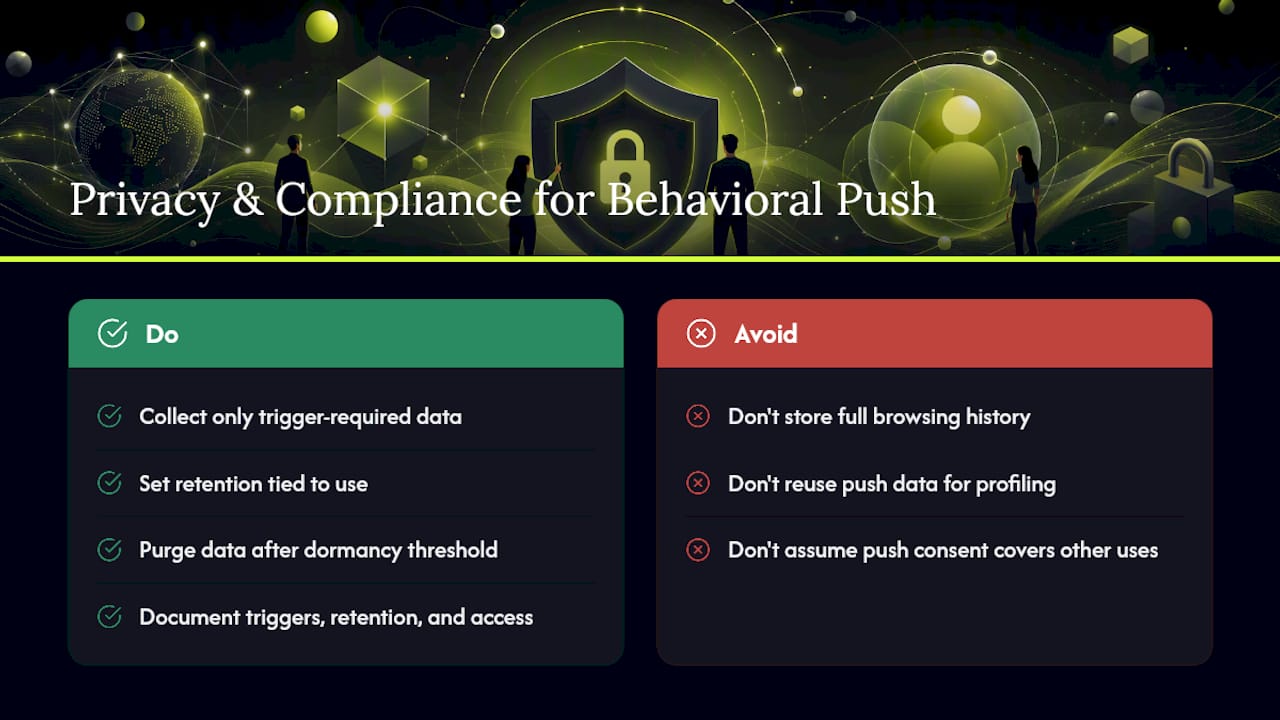
Collect only what a specific trigger needs. If you're sending cart-abandonment pushes, you need cart contents and a device token, not a full browsing history warehouse. Store behavioral event data with a retention window tied to its actual use, and purge it once a user goes dormant past whatever threshold your segmentation logic uses.
Consent has to match the channel. Push permission on iOS and Android is itself a consent gate, but that doesn't cover every downstream use of the behavioral data feeding those pushes. If you're layering in cross-channel personalization (using push behavior to influence email or SMS content, for example), check whether your regional obligations require separate consent for that secondary use. Regulations like the GDPR in the EU and the CCPA in California draw a hard line between using data to fulfill a transaction and using it for broader profiling, and the line matters even when you're not collecting an email address at all.
The App Clip model StorePush uses sidesteps a chunk of this risk simply by not collecting personal identifiers like email or phone number in the first place. Less stored personal data means less compliance surface, though it doesn't remove the obligation to handle whatever behavioral signals you do collect responsibly. Whatever stack you run, document what triggers what, how long you keep it, and who inside your organization can access raw behavioral logs.
How Do You Track Behavior Across Devices for Push Targeting?
The same shopper often appears as three different "users" to your analytics: a phone session, a desktop browse, and a tablet checkout attempt. Behavioral push targeting breaks down when those identities stay siloed, because the trigger fires on incomplete information.
Cross-device stitching typically relies on a logged-in account ID as the anchor, with device tokens (one for each phone, tablet, or browser) linked underneath it. When a user adds an item to cart on desktop and opens your app on mobile an hour later, the trigger logic needs to see that as one continuous session, not two unrelated events, or you risk sending a redundant push, or worse, none at all.
For anonymous visitors who never log in, stitching gets harder and the ethical bar gets higher. Probabilistic matching across devices for people who haven't identified themselves invites exactly the kind of "how did they know that" reaction that erodes trust. This is part of why the App Clip approach StorePush uses treats each abandoned session on its own terms, using a lock-screen push tied to that specific device and session, rather than trying to stitch an anonymous shopper's identity across five different touchpoints.
Practically, prioritize getting cross-device tracking right for logged-in, high-intent behaviors (cart, wishlist, price alerts) before you invest in solving it for anonymous browse behavior. The return on accurate targeting is much higher where the user has already shown commitment.
How Should Push Fit Into Your Broader Marketing Mix?
Push notifications work best as one instrument in a small orchestra, not a solo act. A cart-abandonment sequence that starts with a push at the 30 to 60 minute mark, follows with an email at 24 hours, and closes with a retargeting ad at 72 hours. It covers three different attention windows without hammering the same channel three times.
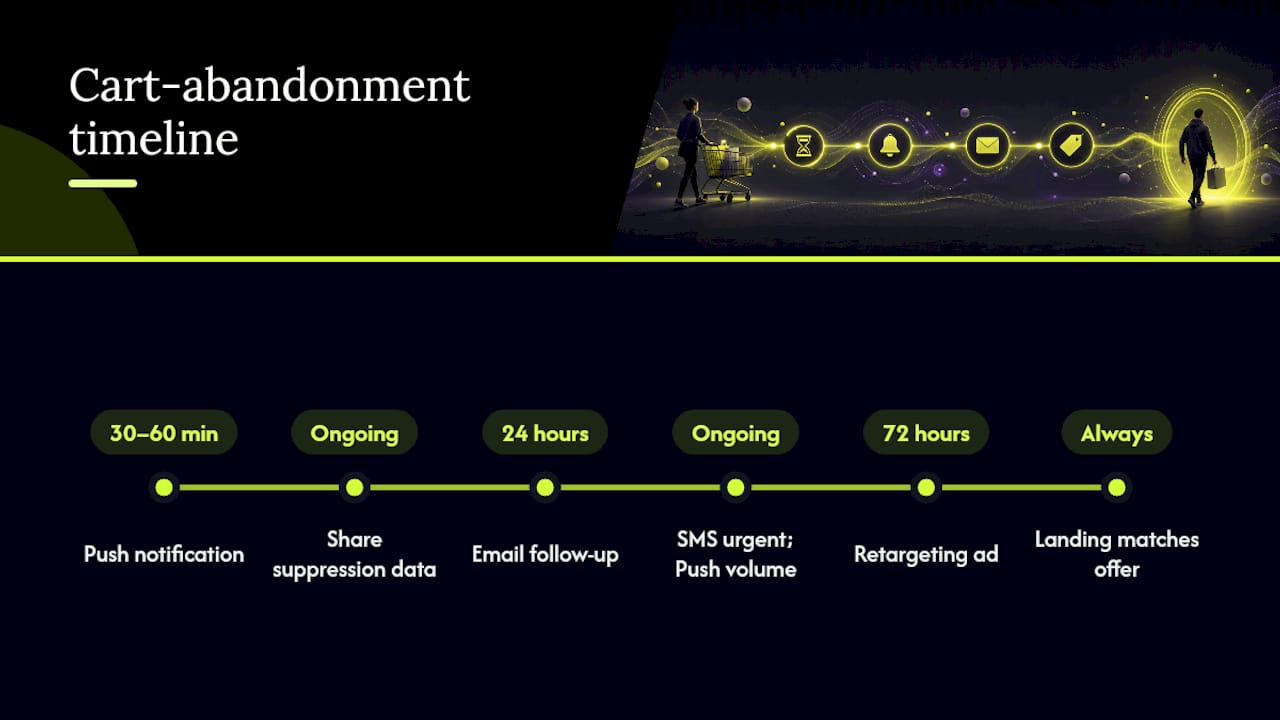
The coordination matters more than the individual channel choice. If your email platform and your push provider don't share suppression data, you'll message the same abandoned cart from two directions in the same hour, which reads as sloppy rather than persistent. Marketing automation platforms built to track user actions across channels exist specifically to solve this coordination problem, routing the right trigger to the right channel based on what already fired.
SMS and push should generally split by urgency rather than duplicate each other. Reserve SMS for the highest-value, most time-sensitive triggers (a cart worth over a certain threshold, a flash sale closing in an hour) and let push carry the higher-volume, lower-friction behavioral load. Layer in on-site messaging for users who are actively browsing, since a push notification competing with an open session on the same device is redundant by definition.
The throughline across every channel: consistency. If your push copy promises a 10% discount, the linked landing page needs to reflect that discount immediately. A channel handoff that breaks the promise made in the notification does more damage to trust than skipping the notification entirely.
What the Data Actually Tells You to Prioritize
Most teams treat behavioral push as a feature checklist: add a trigger here, personalize a token there, ship it. The research points somewhere more specific. The gap between a mediocre triggered campaign and a genuinely high-performing one almost never comes down to how many triggers you've built. It comes down to restraint on the ones you've already shipped.
The conventional advice tells marketers to add more triggers, more segments, more personalization tokens. What the open-rate and mute-rate data actually supports is the opposite instinct: fewer, sharper triggers with real suppression logic behind them outperform a sprawling trigger library that nobody's pruned in months. A five-trigger setup with airtight caps and accurate deep links will beat a twenty-trigger setup with none of that discipline, every time.
If you're starting from zero, prioritize in this order: get one high-confidence trigger (cart abandonment is usually it) working end to end with a verified deep link, then build your suppression rules, then expand to a second trigger. Building five triggers before you've confirmed even one deep link actually converts is how teams end up with impressive-looking dashboards and declining open rates six months in.
— Lucas
Turn Behavioral Push Into Recovered Revenue With StorePush
Most of what this guide covers assumes you already have an email or phone number to trigger against. StorePush solves the harder problem: the 90%+ of visitors who abandon a cart or browse session without ever handing over contact information. Using native iOS App Clips, it puts a lock-screen push directly in front of that shopper, no app install, no email capture form standing between the trigger and the send.
If you're evaluating fit, check three things: how it integrates with your storefront (Shopify, WooCommerce, BigCommerce, or a custom build), how deep the funnel and CTR analytics go for attributing recovered revenue, and how the subscription-plus-commission pricing lines up against what you're currently losing to silent cart abandonment. You can book a demo to see how a real trigger maps onto your own checkout flow before committing to anything.
Sources
- Understanding push notifications for Apple and Google Wallet passes — PassKit Help
- Push notifications research and statistics — Business of Apps
- Push Notification Strategy 2026: Opt-In & Retention — VMobify
FAQ
What Are Some Examples of Behavioral Push Notifications?
Common examples include abandoned cart reminders, price-drop alerts on watched items, streak-at-risk nudges, restock notifications for saved products, and win-back messages after a period of inactivity.
Should Push Notifications Be Turned On or Off?
Push notifications are worth keeping on when they're behaviorally triggered and capped sensibly, since trigger-driven sends produce 2 to 4 times the open rate of generic broadcasts; users tend to disable them only when frequency or relevance breaks down.
Can Hackers Send Push Notifications?
Push notifications require valid credentials with a delivery service like FCM or APNs, so a legitimate attacker would need to compromise your app's backend or those credentials rather than send arbitrary pushes from outside your system, which is why securing device tokens and API keys matters as much as your trigger logic.
What Are the Top Push Notification Services?
The right service depends on whether you need in-app broadcast messaging, transactional delivery, or anonymous re-engagement; for e-commerce teams specifically trying to recover carts from visitors who never shared contact information, StorePush addresses that gap through lock-screen App Clips rather than traditional email or SMS retargeting.
How Many Behavioral Push Notifications Should You Send Per Day?
Cap non-transactional behavioral or promotional pushes at one per user per day, with at least a four-hour gap between sends, and treat five consecutive unopened notifications as a signal to suppress that user from lower-priority campaigns.