Yes, you can send lock-screen recovery pushes to iOS shoppers without ever collecting an email or phone number. The mechanism is Apple's App Clip, and it grants ephemeral push permission that typically lasts eight hours before it expires. You'll need a separate bundle ID and its own APNs credentials to make it work, and for anything beyond that first window, you're looking at other owned channels or a path into your full app.
TL;DR:
- App clips can send ephemeral push notifications to shoppers without collecting personal data, but only within an eight-hour session window.
- Setting up involves creating a separate app clip target, generating dedicated APNs credentials, and testing across multiple devices and iOS versions.
- Effective push messaging should include clear product names, simple calls to action, and timing pushes within the first three hours after cart abandonment.
- Attribution relies on server-side matching of unique cart tokens or discount codes, not device identifiers, to measure recovery success.
- App clips are ideal for one-time conversions but less suited for repeat purchases, which require full app engagement and long-term retention strategies.
Table of Contents
- How App Clips Enable Lock-Screen Push for Anonymous Shoppers
- How to Set Up App Clip Push for Cart Recovery
- Writing Push Copy That Works Inside an 8-Hour Window
- How to Attribute Recovered Revenue to App Clip Pushes
- When to Use a Full App Instead of an App Clip
- What Actually Moves the Needle Here
- Pilot App Clip Push Recovery With StorePush
- Sources
How App Clips Enable Lock-Screen Push for Anonymous Shoppers
An App Clip is not a shrunken version of your app. It's a purpose-built sliver of it, capped under 100MB, designed to launch almost instantly without a trip to the App Store. A shopper taps a link or scans a code, the clip loads a single product or checkout screen, and that's it. No install, no account, no data collection.
The permission model is what makes this useful for cart recovery. Instead of asking for standard push access (which most people ignore or decline), an App Clip can request ephemeral push permission, a lighter-weight prompt tied to that single session. Grant it, and the merchant can send push messages to that shopper's lock screen for roughly eight hours before the permission lapses, unless the shopper installs the full app and grants standard push.
That window comes with real constraints. App Clips can't use a Notification Service Extension, which means no images, no video, no rich media, and no custom action buttons on the notification itself. Every message is plain text competing for attention on a crowded lock screen.
You have several ways to get a shopper into that clip in the first place:
- Smart App Banners on your mobile site
- QR codes on packaging, receipts, or in-store displays
- NFC tags for physical retail tie-ins
- Direct links from ad campaigns or in-app browsers
Each entry point starts the same eight-hour clock, which is why the messaging that follows has to work fast.
How to Set Up App Clip Push for Cart Recovery
Getting this running isn't a weekend hack, but it's not a full engineering rebuild either. Here's the sequence:
- Create the App Clip target in Xcode with its own unique bundle identifier, separate from your main app's ID, and configure Associated Domains so the clip can be invoked from your storefront URLs.
- Generate a dedicated APNs key or certificate for that bundle ID. Your push provider needs to register the clip separately from the parent app because the two don't share credentials.
- Enable
NSAppClipRequestEphemeralUserNotificationin the App Clip's Info.plist. This is the flag that triggers the lightweight permission prompt instead of the standard one. - Test the 8-hour lifecycle on real devices. Expiry behavior has shifted slightly across iOS releases, so don't assume last year's testing notes still hold.
- Wire up your triggers, whether that's a Smart App Banner, a QR code on packaging, or an ad landing page, and pass a cart token or checkout parameter through the URL so you can match sessions to orders later.
- Connect to your storefront. On Shopify and BigCommerce, this usually means a checkout app or webhook that fires a discount code or cart token at the moment the clip opens. WooCommerce merchants typically handle this through a custom plugin hook tied to the cart or checkout endpoint.
Pro Tip: Run your QA on at least three device models and two iOS versions before launch. Ephemeral permission expiry has enough edge-case variance that a single test device will give you false confidence.
Real-world examples of this pattern already exist. Shopify's own engineering team has documented building an App Clip that surfaces order details and requests push permission mid-session, which is a solid blueprint if you're building in-house rather than using a packaged tool.
Writing Push Copy That Works Inside an 8-Hour Window
Because there's no rich media and no custom buttons, the entire job falls on your first line of text. Name the item. Make the ask obvious. That's the whole formula.
A push that says "Still thinking about the Nomad Backpack? It's still in your cart" outperforms a generic "You left something behind" every time, because it removes the guesswork. Add a single clear call to action like "Tap to finish checkout" and you've used your limited real estate well.
Timing matters just as much as wording:
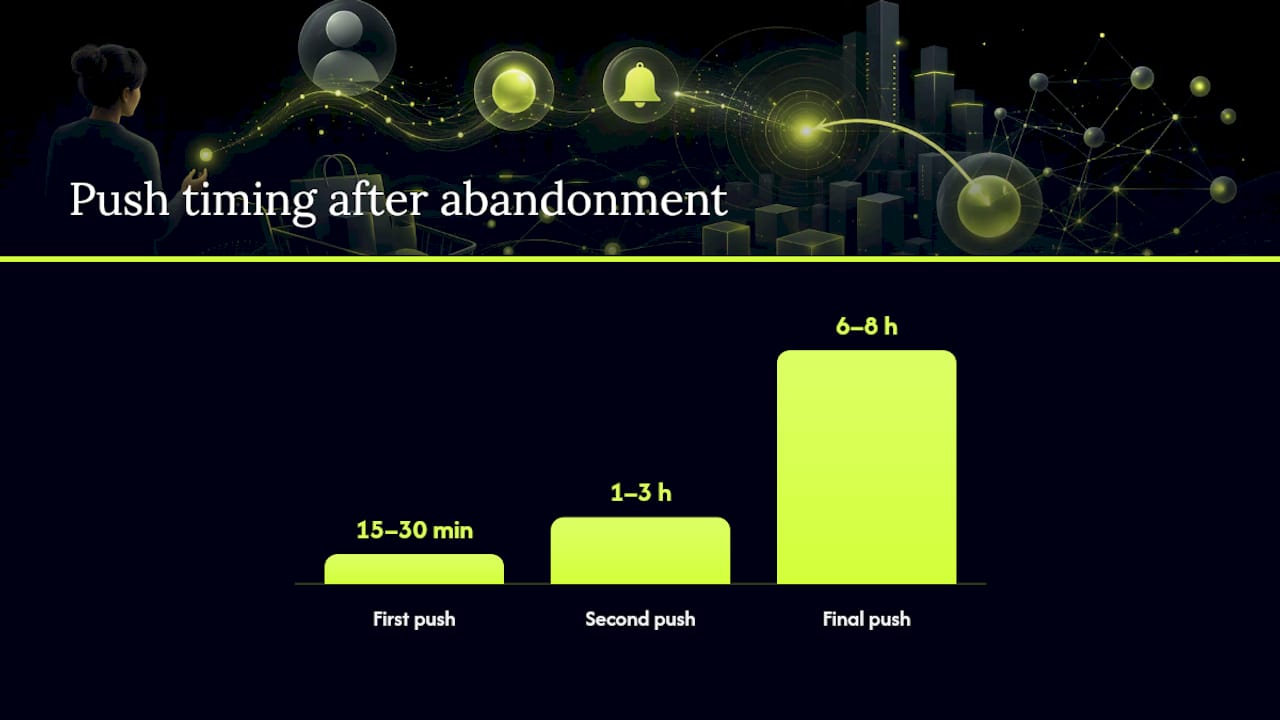
- First push at 15 to 30 minutes after abandonment, while intent is still warm.
- Second push at 1 to 3 hours, often paired with a small, time-limited incentive.
- Final push within 6 to 8 hours, before the ephemeral permission window closes for good.
Test timing and incentive presence against each other, not just one variable at a time. A discount that shows up too early trains shoppers to abandon on purpose; a discount that arrives too late misses the window entirely.
One in ten browsing sessions on mobile e-commerce sites ends in cart abandonment without any follow-up at all, which is exactly the gap App Clip pushes are built to close. Keep your copy under roughly 120 characters where possible; anything longer gets truncated on the lock screen and buries your CTA. For character-count specifics by device, StorePush's push notification character limit cheat sheet is worth bookmarking.
How to Attribute Recovered Revenue to App Clip Pushes
Attribution here works differently than it does inside a full app. There's no persistent device identifier, no long-lived session, just an eight-hour clip instance and whatever token you attach to it.
The reliable method is server-side matching. Issue a unique cart token or discount code the moment the App Clip opens, embed it in the push payload metadata, and match that token against the eventual order ID on your backend. This sidesteps the device-identifier limitations entirely.
Track these KPIs to know if it's actually working:
- Recovered revenue, tied specifically to orders matched by cart token
- Push open rate, the percentage of sent pushes that get tapped
- Click-through rate from the notification to the checkout screen
- Handoff-to-install rate, how many clip users convert to full app installs
- Incremental conversion versus a holdout group that received no push at all
That holdout group is the piece most merchants skip, and it's the one that tells you whether the push caused the recovery or just happened to coincide with it. Run a minimal test: split abandoned sessions, push half, hold back half, compare recovered revenue after 48 hours. For deeper measurement design, Creator Guard's analytics guide covers the broader framework for building these kinds of holdout tests.
When to Use a Full App Instead of an App Clip
App Clips win at one thing: getting a single, immediate purchase across the line. They're deliberately lightweight, single-task experiences, and that focus is what makes them fast enough to convert inside an eight-hour window.
That same focus is their ceiling. Ephemeral permissions expire. There's no background processing, no rich push, and the clip itself gets deleted automatically after a period of inactivity. None of that makes for a durable relationship with a repeat customer.
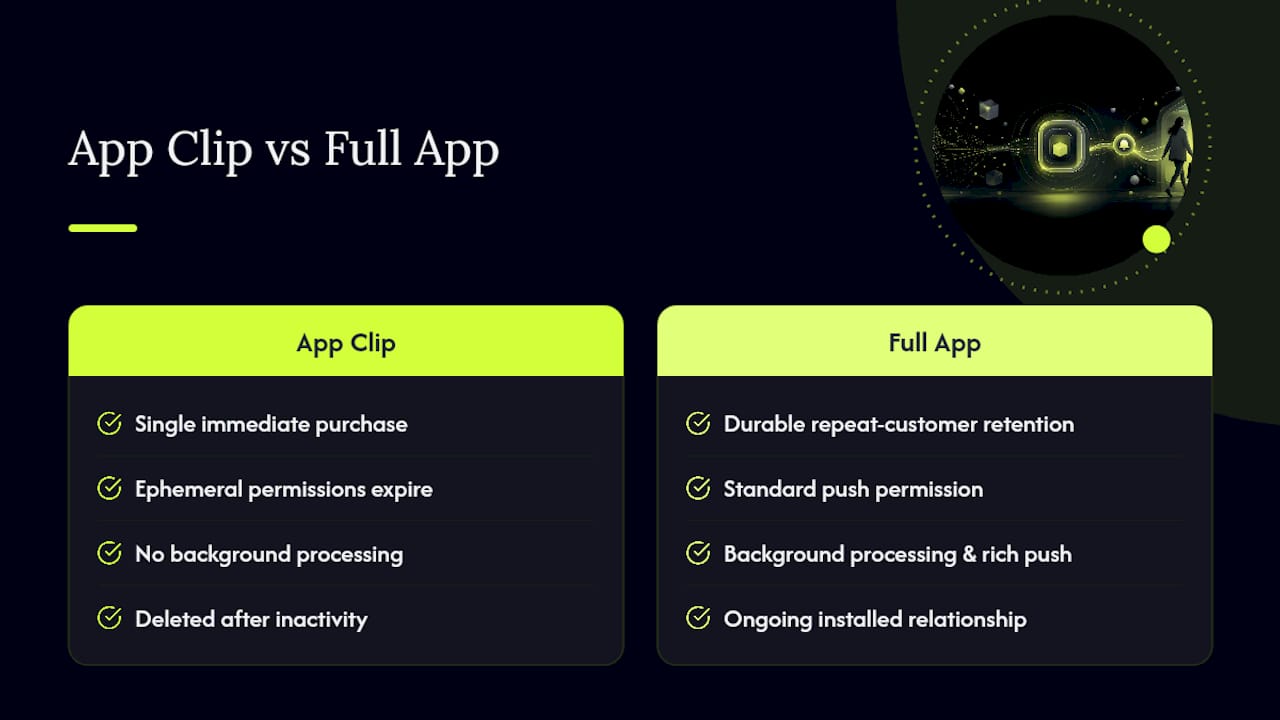
If your business depends on repeat buyers, subscriptions, or a rich lifecycle marketing program, a full app with standard push permission is where the real retention value lives. The smartest setup treats App Clips as the front door for one-time recovery, then measures which recovered shoppers are worth nudging toward installing the full app. Reserve that nudge for your highest-value buyers, not everyone who taps a link once.
What Actually Moves the Needle Here
Most cart-recovery advice treats push notifications as a monolith, as if a browser push prompt and an App Clip push are interchangeable tools. They're not. iOS shoppers largely ignore or deny browser push prompts on mobile Safari, which is a big part of why web push notifications underperform on iOS for e-commerce specifically. App Clips sidestep that friction entirely because the permission ask happens inside a task the shopper already started.
The mistake I see merchants make isn't technical. It's treating an eight-hour ephemeral window like it's a full marketing channel. It isn't, and expert guidance on App Clip strategy backs this up: the win is the recovered sale, not a new subscriber relationship. Chase the sale, measure it honestly against a holdout group, and let your full app earn the long-term retention job separately.
If you want to test the concept without committing engineering weeks to it, run this two-step experiment: enable a single App Clip trigger on your highest-intent product page this week, then send a short three-message push sequence to abandoned sessions and measure recovered revenue against a holdout group after 48 hours. That's enough signal to know if the approach earns a bigger rollout.
— Lucas
Pilot App Clip Push Recovery With StorePush
StorePush is the direct path to everything this article just walked through, minus the weeks of Xcode work. It's built specifically to send App Clip–based lock-screen pushes without collecting a single email or phone number, and it plugs into Shopify, WooCommerce, BigCommerce, or a custom storefront with minimal engineering lift on your end. You get a dashboard that handles the attribution matching we just described, complete with revenue tracking, CTR data, and funnel views, so you're not building token-matching logic from scratch.
Pricing runs on a subscription plus a commission tied to recovered revenue, which means the tool only earns more when it actually recovers sales for you. If the eight-hour window and setup checklist above sound worth testing on your own store, book a demo and see what a pilot looks like for your product catalog.
Sources
- iOS: App Clip Support — OneSignal documentation
- App Clip Strategy: Lightweight Slices Beat Downloads — BuildMVPFast
- AppsFlyer: App Clips measurement and analytics overview
- Shopify Engineering: building an App Clip with React Native