Merchant-facing price-drop alerts are lock-screen push notifications, sent through App Clips or native app push, that ping shoppers when a product they viewed gets discounted. The fastest way to launch them is a deeplinked App Clip push that lands the shopper directly in their cart, no email address or phone number required. Done right, this recovers carts and re-engages browsers who would otherwise vanish for good.
TL;DR:
- Sending a push notification within minutes to one hour maximizes the chance of recovering a cart or re-engaging interest before the shopper loses context or makes a purchase elsewhere.
- Focus on direct deeplinks to the specific product or cart, as routing to the homepage significantly reduces conversion rates and undermines recovery efforts.
- Using App Clip ephemeral push notifications allows reaching shoppers without full app installation or email collection, but the message must include product image, name, current price, and discount for maximum effectiveness.
- Segmenting and timing follow-up messages based on shopper behavior and cart value improves recovery rates, with more aggressive sequences for high-value carts.
- Tracking consistent metrics such as delivery, open, click-through, and conversion rates, along with attribution, is essential for validating the true impact of price drop alerts.
Table of Contents
- Why Price Drop Alerts Work for Cart Recovery
- Timing and Cadence: When to Send Each Message
- What Should a Price Drop Notification Say?
- How Do App Clips Enable Ephemeral Push Notifications?
- Measuring What Actually Matters
- Getting Opt-In Right Without Losing Trust
- Your Two-Week Pilot Checklist
- What Merchants Consistently Get Wrong
- Start a Price Drop Alert Pilot With StorePush
- Where to Go Deeper
- Sources
- FAQ
Why Price Drop Alerts Work for Cart Recovery
A shopper who added something to a cart or lingered on a product page has already told you what they want. They just need a reason to finish. A price drop is that reason, and it removes the biggest objection in ecommerce: cost hesitation.
Push beats email on the metric that matters most here: immediacy. An email can sit unread in a promotions tab for days. A lock-screen notification shows up the moment it fires, whether the shopper opens it or not. That visibility gap is why practitioner data on abandoned cart recovery sequences shows multichannel sequences, push within the hour, email a few hours later, recovering meaningfully more than a single-channel campaign.
Use price-drop push when:
- The shopper viewed or carted an item within the last 24 hours
- The discount is real and specific, not a vague "sale" banner
- You can route the click straight to the discounted item, not the homepage
Timing and Cadence: When to Send Each Message
Speed is the whole game in the first push. Wait too long and the shopper has already bought the item somewhere else, or forgotten why they cared.
- First push: within minutes to one hour of the price drop or cart abandonment. This is when intent is highest and attention span is shortest.
- Follow-up email: 4 to 6 hours later for anyone who didn't convert on the push, reinforcing the same offer with a bit more detail.
- Final incentive: around the 24-hour mark, reserved mainly for high-value carts where a small additional nudge, free shipping, a modest extra discount, can tip the decision.
Segment the cadence by behavior, not just time. A shopper who abandoned a $200 cart deserves a tighter, more aggressive sequence than someone who merely browsed a $15 item once. Browsers can wait for the next scheduled price drop; cart abandoners need the full three-touch sequence to have a real shot at recovery.
What Should a Price Drop Notification Say?
Lock-screen space is small, so every word has to earn its place. The strongest price-drop notifications include four elements: a product image, the product name, the current price, and the discount amount or percentage. Skip any one of these and the message reads as generic, which practitioner reporting consistently links to weaker response than personalized, product-specific alerts.
Keep the copy itself short, ideally under 10 words in the visible text, and let the image and price do the persuading. Always pair the message with a clear call to action and a deeplink straight to the cart or product page, never the storefront homepage.
A few creative variants worth testing:
- Price-first: "$20 off your saved item. Now $59."
- Product-first: "Your Nike Air Max just dropped in price."
- Urgency-based: "Price drop ends tonight on your saved item."
- Direct comparison: "Was $79. Now $59. Still in your cart."
Pro Tip: Run price-first and product-first as a genuine A/B split before picking a default template. Some catalogs respond better to a bold number; others respond better to brand or product recognition. Guessing wastes your best inventory of high-intent traffic.
For deeper personalization tactics beyond these four basics, see push notification personalization strategies built specifically for revenue recovery.
How Do App Clips Enable Ephemeral Push Notifications?
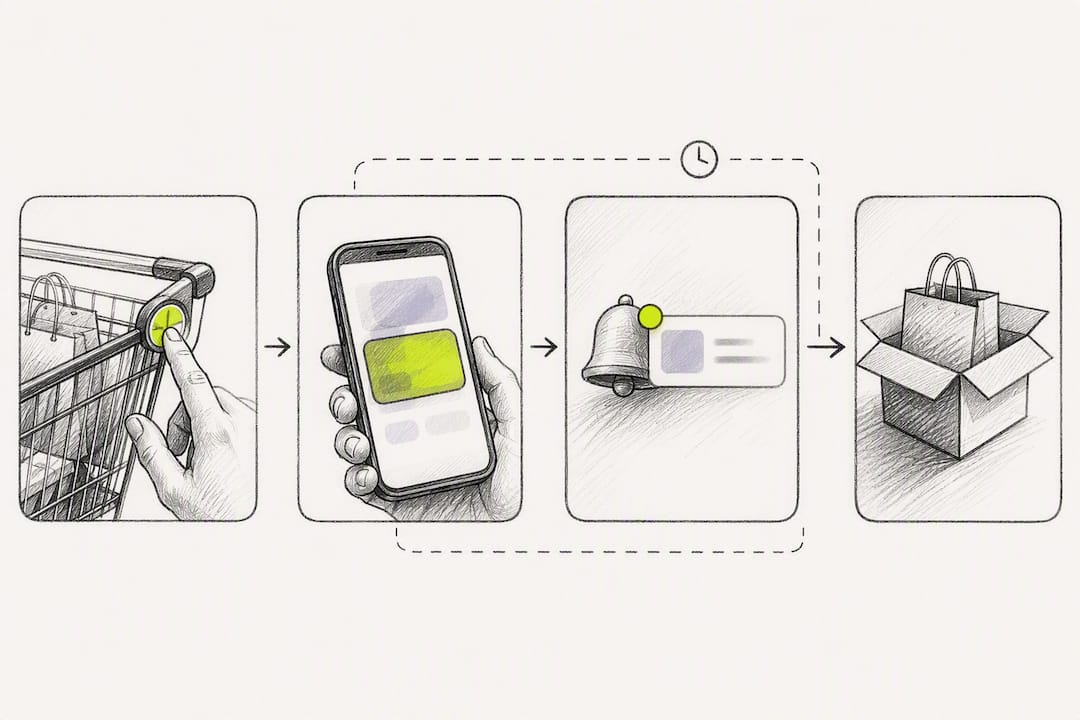
App Clips let a shopper receive push notifications without installing your full app or handing over an email address. Apple's App Clips documentation explains that once a shopper launches an App Clip, that experience can request an ephemeral notification window, meaning you get a limited runway, not permanent access, to reach them.
That window lasts for a limited number of hours after launch. Apple's WWDC session on App Clips walks through the exact configuration: setting the NSAppClipRequestEphemeralUserNotification key in the App Clip's Info.plist. Once granted, Settings shows the permission with a note that it "will turn off in 8 hours," which is exactly the honesty Apple wants merchants to build into the experience.
Setup checklist for your storefront integration:
- Add the ephemeral notification key to your App Clip's Info.plist configuration
- Capture the product ID, cart ID, and current price at the moment of the App Clip session
- Trigger the price-drop alert automatically when your pricing engine updates that SKU
- Build every deeplink from a stable cart identifier, not a generic product URL
| Setup Element | Purpose | Fallback if Unavailable |
|---|---|---|
| App Clip ephemeral push | Reach shoppers without email or app install | Native app push (if app exists) |
| Cart ID deeplink | Route directly to the exact cart | Product page deeplink |
| Storefront trigger (Shopify, WooCommerce, BigCommerce) | Fire alert on price change event | Manual campaign trigger |
| Cross-channel routing | Keep destination consistent across push, email, SMS | Single-channel push only |
Deeplinking guidance from Airbridge confirms that routing shoppers to the exact cart or product, instead of a homepage, is one of the single biggest levers for conversion in any recovery flow. If App Clip push isn't feasible for a given segment, fall back to web push, email, or SMS, but keep the destination link identical across every channel so a shopper who clicks two different messages still lands in the same place.
Measuring What Actually Matters
Track five numbers, and track them the same way every week: delivery rate, open rate, click-through rate, conversion rate, and recovered revenue. Average order value on recovered carts is worth watching separately, since price-drop alerts sometimes pull in lower-margin purchases if the discount is too aggressive.
Attribution gets messy fast if you don't plan for it up front. Best practices to avoid double-counting or losing credit entirely:
- Attach a unique cart token to every deeplink so a purchase can be traced back to the exact notification
- Use a short attribution window, 24 to 48 hours, rather than crediting anything that converts within a week
- Run a holdout group that receives no price-drop push at all, so you can measure true lift instead of assuming every recovered sale came from the alert
- Report weekly during a pilot, then move to monthly once the program stabilizes
Without a holdout, you're measuring correlation, not causation, and that gap is exactly where merchants overstate a program's real impact.
Getting Opt-In Right Without Losing Trust
App Clips change the opt-in equation because the notification permission is tied to a short, physical interaction rather than a persistent app install. That lowers friction dramatically. WWDC's App Clip session shows this ephemeral model reaching shoppers who would never have downloaded a full app, which is exactly the audience most recovery programs lose today.
Frame the permission prompt around the specific benefit, not a vague "stay updated" ask. Something like "Get notified if this price drops" sets an honest, narrow expectation.
- Ask for permission at the moment of clearest value, not immediately on App Clip launch
- Never send unrelated marketing through a permission granted for price alerts
- Make opting out as easy as the original prompt, one tap, no hidden menus
Pro Tip: Treat the eight-hour ephemeral window as a feature, not a limitation. Shoppers trust time-boxed permissions more than open-ended ones, and that trust shows up in your opt-in rate.
Your Two-Week Pilot Checklist
- Pick one product segment. Choose a category with frequent price changes and decent cart volume, not your entire catalog.
- Define trigger rules. Set the exact discount threshold (say, 10% or more) that fires an alert automatically.
- Build the message template. Lock in image, product name, price, and discount copy before launch, using one of the creative variants above.
- Enable App Clip ephemeral notifications and confirm every deeplink resolves to the correct cart or product.
- Run a holdout group alongside the live pilot so you have a true lift number, not a guess.
- Set go/no-go criteria in advance, for example a minimum lift in recovered revenue, before deciding whether to scale beyond the pilot segment.
What Merchants Consistently Get Wrong
The most common mistake isn't the discount, it's the destination. Too many merchants build a great price-drop message and then route the click to their homepage, forcing the shopper to re-find the item they already wanted. Always deeplink to the exact cart or product.
The second mistake is reaching for a blanket storewide discount before testing a narrower price nudge on genuinely high-intent traffic. Targeted alerts to shoppers who already showed interest will usually outperform a wide, unfocused sale. Get your routing and measurement right first. Fancy creative on top of broken attribution just produces confident wrong answers.
— Lucas
Start a Price Drop Alert Pilot With StorePush
StorePush is built specifically for the mechanics covered above: lock-screen push through native iOS App Clips, no email or phone collection, no app install required from the shopper. It connects directly to Shopify, WooCommerce, BigCommerce, and custom storefronts, and the dashboard gives you revenue attribution, funnel tracking, and CTR heatmaps out of the box, so you're not building the measurement layer from scratch.
A pilot starts on a free plan, and you can move to a paid plan with a monthly fee plus a usage commission on attributed recovered revenue once the program proves itself. Visit StorePush to see current setup resources, check pricing details, and get your first App Clip price-drop alert routing correctly within your first pilot segment.
Where to Go Deeper
For the technical configuration behind ephemeral notifications, Apple's App Clips documentation and the WWDC20 session remain the definitive references. For routing strategy, review Airbridge's deeplinking guide. For budgeting a pilot, StorePush's push notification pricing breakdown and general marketing automation checklist are both useful starting points.
Sources
- App Clips - Apple Developer
- Deeplinks for E-Commerce Apps: Cart Recovery and Personalization — Airbridge
FAQ
What Are Price Drop Alerts in Ecommerce?
Merchant-facing price-drop alerts are push notifications, usually delivered through App Clips or native app push, that tell a shopper a product they viewed or carted just got cheaper.
How Fast Should I Send the First Price Drop Notification?
Send within minutes to one hour of the price change or cart abandonment, since intent and attention both fade quickly after that window closes.
Do I Need a Full App to Send These Alerts?
No. App Clip ephemeral push notifications, the approach StorePush uses, reach shoppers for up to eight hours without requiring an app install or email collection.
What Should I Track to Know if Price Drop Alerts Are Working?
Track delivery rate, click-through rate, conversion rate, recovered revenue, and average order value, and always compare against a holdout group to confirm real lift.
How Much Does StorePush Cost?
StorePush offers a Free plan at $0 per month and a Pro plan at $50 per month plus a 5% commission on attributed recovered revenue.