Yes. iOS App Clips grant merchants an 8‑hour ephemeral push notification window letting you send lock‑screen alerts to a shopper who never installed your app and never handed over an email or phone number. That window opens the moment someone taps an App Clip experience, and it closes fast. Vendors like StorePush build entire cart recovery workflows around that narrow, high‑intent window.
TL;DR:
- App Clip notifications are limited to an eight-hour window after activation, making them ideal for urgent, same-day cart recovery and quick engagement.
- Proper setup requires matching target_content_id URLs precisely, provisioning separate APNs credentials, and integrating with store triggers like cart abandonment or in-store QR codes.
- Notification timing should focus on critical moments: cart rescue within 90 minutes, low-stock alerts within an hour, and final checkout reminders at six to seven hours.
- Web push notifications differ in scope and persistence, supporting ongoing engagement but facing browser support limitations, especially on iOS Safari.
- StorePush offers a managed solution that automates setup, including configuration, routing, and reporting, without requiring custom iOS development.
Table of Contents
- How Push Notifications Without an App Actually Work on iOS
- Setting Up App Clip Push Notifications: A Merchant Checklist
- What to Send During the 8-Hour Push Window
- Measuring Recovered Revenue From App Clip Notifications
- Where App Clip Push Notifications Fall Short
- Web Push Notifications as a Broader Alternative
- Which Browsers Actually Support Push Without an App
- How Opt-In Prompts Work for Browser-Based Push
- The Technical Stack Behind Web Push: Service Workers and the Push API
- Keeping Push Channels Secure When You Skip the App
- Where Push Without an App Shows Up Beyond Cart Recovery
- When App Clips Are the Right Call, and When They're Not
- Get App Clip Push Recovery Running Without Building It Yourself
- Docs and Resources for Implementing This Yourself
- Sources
How Push Notifications Without an App Actually Work on iOS
Here's the mechanic most merchants miss: when a shopper opens an App Clip, whether from a QR code on a packing slip, a link in an SMS, or an NFC tag at a pop-up shop, iOS quietly grants that App Clip the ability to send push notifications for 8 hours, with no standard permission prompt required. Apple confirms this ephemeral window directly, and it's the entire reason "push notifications without app" works as a cart recovery tactic instead of a theoretical one.
App Clips get invoked in a handful of ways and each one matters for a different recovery scenario:
- Smart App Banners and links shared through SMS or checkout abandonment triggers
- QR codes printed on receipts, packaging, or in-store signage
- NFC tags for physical retail moments (fitting rooms, checkout counters)
- App Clip Codes (Apple's branded scannable codes) for discoverability at physical locations
Once a shopper enters through any of those doors, your job is routing the notification back to the right App Clip session. That's where target_content_id comes in. Every push payload needs a targetContentIdentifier URL, and iOS resolves it using longest‑prefix matching to find the specific App Clip experience the alert belongs to, according to OneSignal's App Clip documentation. Get this wrong and the notification either fails silently or lands on the wrong experience. Get it right, and a shopper who abandoned a $140 cart at 2:14 PM gets a lock-screen nudge at 4:00 PM pointing straight back to that cart, not your homepage.
Setting Up App Clip Push Notifications: A Merchant Checklist
You don't need to be an iOS engineer to scope this project, but your development team (in-house or outsourced) will touch six distinct pieces of configuration. Here's the order that actually works:
- Build the App Clip target with the thinnest possible experience: a single product view and checkout, nothing else. Apple's own App Clip experience guidelines recommend exactly this: one high-intent task, no onboarding friction.
- Add the Push Notifications capability to the App Clip target and set the
NSAppClipRequestEphemeralUserNotificationflag in your Info.plist. This is the switch that unlocks the 8-hour window. - Provision a separate APNs credential for the App Clip's bundle ID. Your push provider dashboard (Pushwoosh, OneSignal, or similar) needs its own App Clip entry, distinct from your main app's entry, as Pushwoosh's App Clip integration docs lay out.
- Set and test
target_content_idvalues so they match your App Clip experience URLs exactly. Test this before launch. A mismatched prefix is the single most common reason merchants report "notifications that never arrive." - Map your storefront triggers (cart abandonment, checkout start, browse abandonment) to the App Clip invocation method that fits, then integrate with your checkout flow so the App Clip pulls live cart data.
- Wire it into your platform. Shopify and WooCommerce merchants typically need a lightweight app or script to fire the App Clip link at the right moment; this is precisely the integration layer StorePush handles so your team skips steps 2 through 5 entirely.
Pro Tip: Test your target_content_id routing on a real device before you launch, not the simulator. iOS handles ephemeral push permissions differently in simulated environments, and a routing bug that looks fine in testing can quietly fail on live traffic.
What to Send During the 8-Hour Push Window
Once the clock starts, brevity and urgency both matter more than they would in an email. You're not writing a newsletter, you're writing a lock-screen alert competing with texts from someone's spouse.
Four notification types earn their place in this window:
- Cart rescue, sent 30 to 90 minutes after abandonment, while intent is still warm
- Low-stock alerts, sent within the first hour if inventory is genuinely limited
- Price-drop or discount nudges, held for later in the window as a last-chance lever
- Checkout reminders, sent at the 6 to 7 hour mark as a final push before the session expires
StorePush's own guidance on lock-screen notification design recommends staying well under standard notification character limits since App Clip alerts render on a lock screen where longer copy gets clipped mid-sentence. Lean on Apple Pay for the actual checkout step. One-tap payment inside the App Clip removes the last friction point, and account creation should wait until after the sale, exactly the sequencing Apple's own developer documentation recommends for any high-intent App Clip task.
| Notification Type | Send Window | Goal |
|---|---|---|
| Cart rescue | 30 to 90 minutes | Recover warm intent |
| Low stock alert | Within 1 hour | Create urgency |
| Price drop | 3 to 5 hours | Convert price-sensitive shoppers |
| Final checkout reminder | 6 to 7 hours | Last chance before expiration |
A few templates to test immediately: "Your cart's still here. Complete checkout in one tap." Or: "Only 3 left in your size. Grab it before it's gone." Short. Specific. No pun intended, but the point is to get to the point.
Measuring Recovered Revenue From App Clip Notifications
None of this matters if you can't prove it worked. Attribution starts with capturing the App Clip session ID the moment a shopper enters, then attaching that ID to whatever conversion event fires afterward, whether that's a completed order or a revenue line item in your storefront's backend.
The practical mechanism is a URL parameter or server-side token passed through the App Clip invocation link itself, so when a purchase completes, you can trace it back to the specific notification that triggered the session. Four numbers should show up on any dashboard you're evaluating:
- Recovered revenue, the dollar total tied directly to push-triggered sessions
- Recovered orders, the count of completed purchases from that channel
- Click-through rate, how many notification recipients actually opened the App Clip
- Time to convert, how long between notification delivery and completed checkout
StorePush's dashboard reports each of these at the funnel level, which matters because a 40% CTR with a 2% conversion rate tells a very different story than a 10% CTR with a 25% conversion rate. One says your copy works but your checkout doesn't; the other says the opposite.
Where App Clip Push Notifications Fall Short
The 8-hour window is a feature and a constraint at the same time. Miss it, and the shopper's session simply expires; there's no extending it retroactively. That means this channel works for urgent, same-day recovery and struggles for anything you'd normally handle with a multi-day drip sequence.
A few other limits worth planning around before you commit engineering time:
- No Notification Service Extension support, which rules out rich media like images or custom sounds in the alert itself
- Tighter payload size limits than standard app push notifications
- Constrained background processing, so anything beyond a lightweight checkout task will strain the experience
If a shopper later installs your full app, session migration needs deliberate handling so their cart doesn't reset to empty; Apple's WWDC session on App Clip experience design covers the recommended state-handoff pattern. On privacy, App Clips sidestep the need to collect email or phone numbers, but that convenience doesn't remove the responsibility to handle session tokens and cart data securely on your backend.
Web Push Notifications as a Broader Alternative
App Clips solve the iOS-specific piece of this puzzle, but they're one branch of a larger category: sending alerts to a person's device without requiring a native app install at all. Web push notifications, delivered through a website rather than an App Clip or installed app, are the other major branch, and they've been part of the browser landscape for close to a decade at this point.
The appeal is similar to what draws merchants to App Clips in the first place: no app store approval process, no install friction, and a direct line to a visitor's device using nothing but a domain and a browser permission grant. Where the two approaches diverge is scope and durability. Web push subscriptions, once granted, don't expire after 8 hours the way App Clip ephemeral access does. They persist until the shopper revokes permission or clears browser data, which makes web push better suited to ongoing re-engagement rather than the urgent, same-day recovery App Clips are built for.
For merchants running a mixed storefront strategy, the two aren't mutually exclusive. A shopper on desktop Chrome is a web push candidate; a shopper who scanned a QR code on their iPhone at checkout is an App Clip candidate. The channel should follow the device and the moment, not a blanket policy applied to every visitor.
Which Browsers Actually Support Push Without an App
Coverage varies more than most merchants assume, and the gaps sit almost entirely on one platform. Chrome, Firefox, and Edge have supported web push notifications on desktop for years, with broad, consistent behavior across Windows and macOS. Android follows the same pattern: Chrome and most Android browsers support push notifications without any app install required.
Apple's Safari is where the story gets complicated. Safari on macOS added web push support a few years back, but Safari on iOS held out far longer, and even now the experience carries real restrictions that don't apply on desktop. That gap is precisely why App Clips exist as a separate, iOS-native solution: they were built to hand merchants a reliable lock-screen channel on the one platform where web push has historically underdelivered.
The practical takeaway for a merchant running paid traffic to a mobile storefront: check where your traffic actually lands before betting your recovery strategy on browser-based push alone. A site with 70% mobile Safari traffic needs a fundamentally different plan than one where desktop Chrome dominates. Testing your own analytics for device and browser split takes ten minutes and will tell you more than any generic compatibility chart.
How Opt-In Prompts Work for Browser-Based Push
Getting permission for web push notifications runs through a browser-native prompt, the small banner asking "Allow notifications?" that appears when a site requests permission. Unlike the ephemeral access App Clips get automatically, standard web push requires an explicit yes from the visitor before anything can be sent.
Timing that prompt well is most of the battle. Firing it the instant someone lands on a page produces low opt-in rates and a fair amount of irritation, since the visitor has no context for why they'd want notifications from a site they just discovered. Better-performing implementations wait for a signal of intent, a completed first purchase, time spent browsing a category page, or an explicit interest signal, before asking.
Once a visitor declines, most browsers make it deliberately hard to ask again, which raises the stakes on getting that first prompt right. A soft, on-page nudge explaining the value ("Get notified when this restocks") before the actual browser permission dialog tends to outperform requesting cold, since it gives the visitor a reason to say yes before the system prompt even appears.
The Technical Stack Behind Web Push: Service Workers and the Push API
Three pieces work together to make browser-based push function without a native app: a Service Worker, the Push API, and the Notification API.
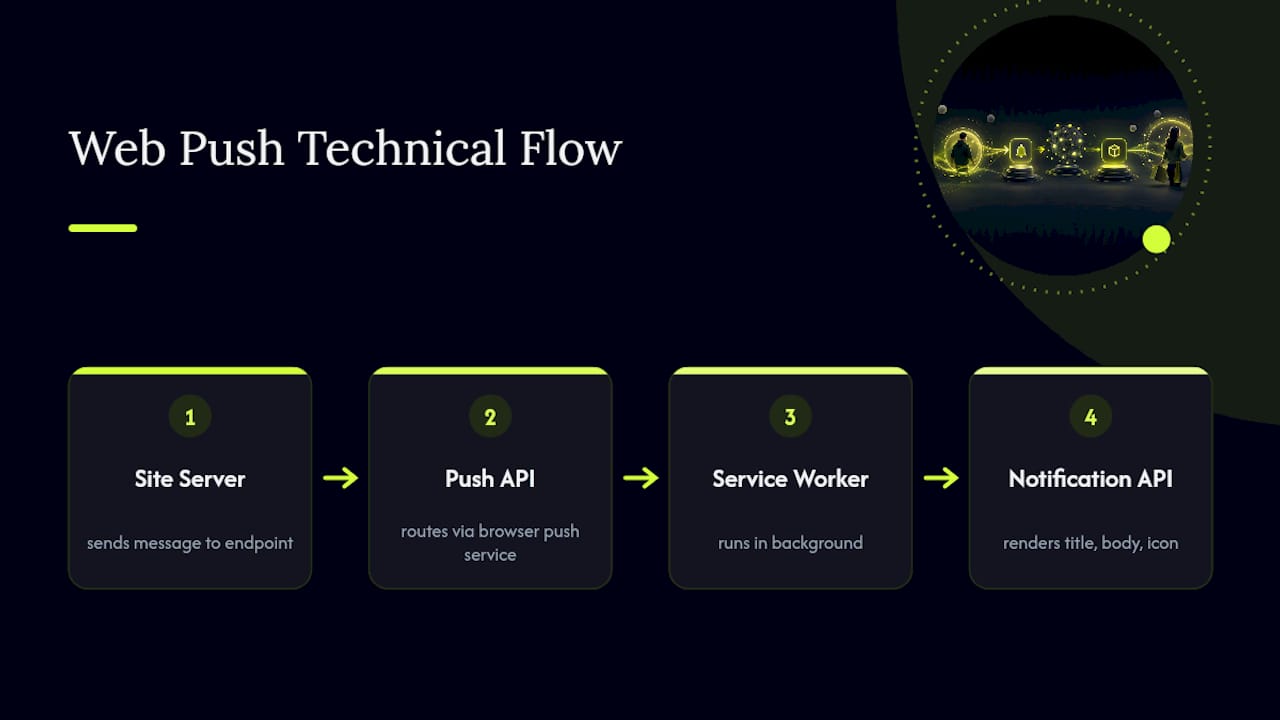
The Service Worker is a background script the browser runs independently of any open tab, which is what lets a notification arrive even after someone has closed the site entirely. The Push API handles the actual message delivery from server to browser, routing through a push service the browser vendor operates. The Notification API is the layer that actually renders the alert on screen, controlling the title, body text, icon, and any action buttons the visitor sees.
Registering a Service Worker and requesting push permission both require HTTPS, a security baseline that's non-negotiable for this entire mechanism. Once permission is granted, the site's server holds a subscription endpoint unique to that browser and device, and sends messages to it whenever a triggered event, cart abandonment, a back-in-stock alert, a price change, occurs.
None of this overlaps with how App Clip notifications get delivered. App Clips route through Apple's push infrastructure and the target_content_id matching described earlier; web push routes through the browser vendor's own push service entirely independent of Apple's system. A merchant running both channels is, in effect, maintaining two separate notification pipelines side by side.
Keeping Push Channels Secure When You Skip the App
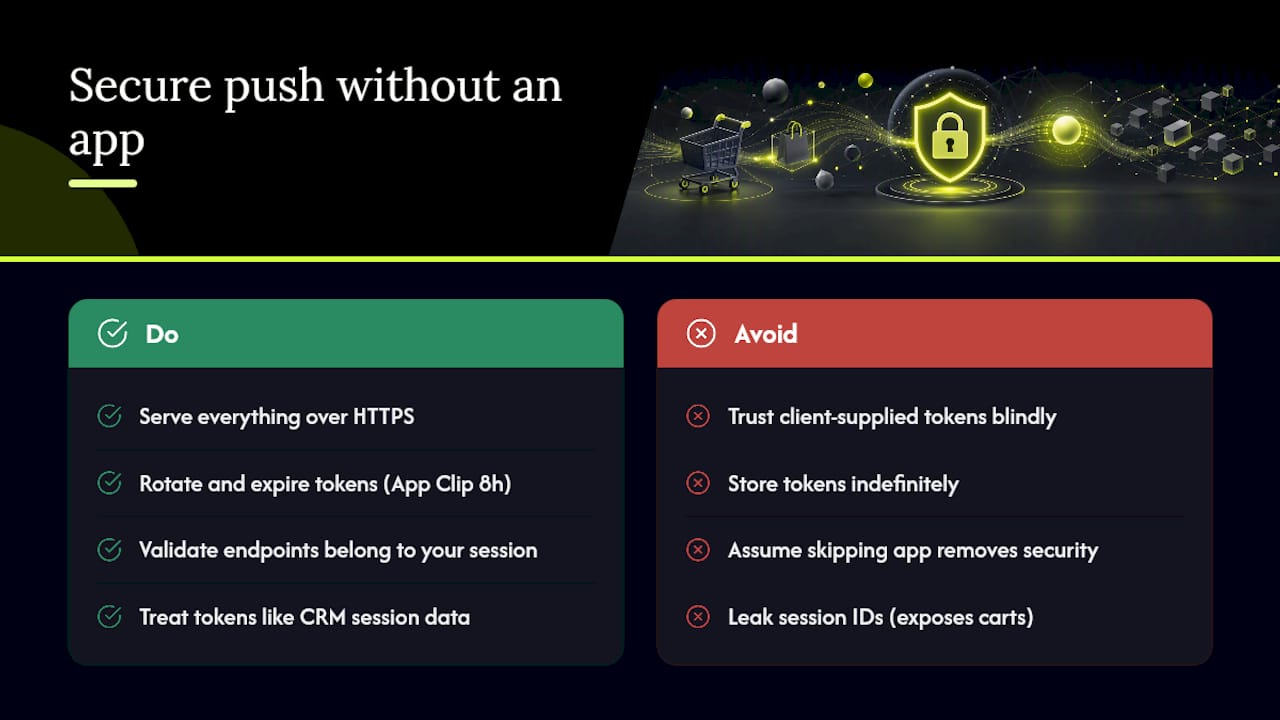
Skipping app installation removes one attack surface but doesn't remove the need for basic security discipline elsewhere. Every push channel, whether it's an App Clip session or a browser subscription, depends on a token or endpoint that identifies a specific device, and that token needs to be treated with the same care as any other piece of session data.
A few practices matter regardless of which channel you're running. Serve everything over HTTPS, since browsers refuse to register Service Workers or grant push permission without it. Rotate and expire tokens on your backend rather than storing them indefinitely, particularly for App Clip sessions where the underlying access is already time-boxed to 8 hours. Validate that any target_content_id or subscription endpoint your server sends to actually belongs to a session your platform generated, rather than trusting client-supplied values blindly.
The privacy upside of skipping app installation entirely is real: no email, no phone number, no persistent account tied to a name. But that upside only holds if the session and device identifiers doing the work behind the scenes are handled with the same rigor a traditional CRM record would get. A leaked App Clip session token or push subscription endpoint can still expose a shopper's cart contents and browsing behavior, even without a name attached to it.
Where Push Without an App Shows Up Beyond Cart Recovery
Cart recovery is the highest-value use case for e-commerce, but it's far from the only place this pattern applies. Restaurants use App Clips at table-side QR codes to let diners view a menu and pay without downloading anything. Parking systems use them at meters so a driver can pay for a spot in under thirty seconds. Event organizers use App Clips for contactless check-in at a conference or festival gate.
On the web push side, publishers use browser notifications to alert readers when a followed topic publishes new coverage. SaaS platforms use it for account alerts, a payment failure or a usage threshold, without requiring a mobile app at all. Airlines and logistics companies increasingly favor web push for flight delay and delivery alerts, since it reaches a browser tab a customer already has open rather than competing for space on their home screen.
What ties all of these together is the same principle driving App Clip cart recovery: meet the person in a moment of genuine intent, deliver one piece of information or one action, and skip the overhead of an install. The parking meter and the abandoned cart are more alike than they look. Both are moments where a person wants exactly one outcome, right now, and the fastest path to that outcome wins.
When App Clips Are the Right Call, and When They're Not
App Clip push works best for urgent, same-day recovery: a shopper who just abandoned a $200 cart, a pop-up event with foot traffic and QR codes, anyone whose intent is measured in hours, not days. Trying to stretch it into a long-term retention channel misreads what the 8-hour window is built for.
The smarter framing treats an App Clip conversion as the start of a relationship, not the end of one. A shopper who completes checkout through an App Clip has just proven real intent. That's the moment to invite a full app install, backed by the trust of a completed purchase rather than a cold ask.
Run a short pilot before committing engineering resources at scale: pick one trigger, measure recovered revenue for two to three weeks, then decide whether the channel earns a permanent place in your stack. The App Clip experience patterns worth studying are the ones that treat the checkout task, not the notification, as the real product.
— Lucas
Get App Clip Push Recovery Running Without Building It Yourself
Everything covered above, the App Clip target, the APNs credentials, the target_content_id routing, the funnel dashboard, is exactly what StorePush builds and maintains so your team doesn't have to staff an iOS project to get there. StorePush handles the App Clip orchestration end to end, connecting to Shopify, WooCommerce, and BigCommerce storefronts so cart and browse abandonment triggers fire lock-screen notifications automatically, with no email or phone number required from the shopper.
On the reporting side, you get recovered revenue, recovered orders, click-through rate, and conversion funnel data in one dashboard, without building that instrumentation yourself. If you're running paid traffic to a mobile storefront and losing carts every day the way most e-commerce sites do, book a demo to see how the setup maps to your specific storefront and traffic mix.
Docs and Resources for Implementing This Yourself
- App Clips overview — Apple Support: the source on the 8-hour ephemeral notification window
- Creating and updating App Clip experiences — Apple Developer: official guidance on single-task App Clip design
- OneSignal App Clip support documentation:
target_content_idrouting mechanics - Streamline your App Clip experience — WWDC session: session state and migration patterns
- Recover anonymous carts without email using iOS web push App Clips: StorePush's implementation walkthrough
- Ecommerce programmatic SEO rollout playbook: framework for scoping high-intent digital experiences
Sources
- App Clips - Apple Support
- OneSignal App Clip support documentation
- Creating and updating App Clip experiences — Apple Developer