Lock screen marketing means sending updates to a saved wallet pass in Apple Wallet or Google Wallet so a message shows up right on a customer's phone lock screen, no app required. It works because saving the pass registers the device for future updates, and every update fires a native push notification. The payoff: a shopper who abandoned checkout at 11 PM can see a reminder on their phone before they've even opened another app.
TL;DR:
- Wallet pass updates trigger native push notifications without requiring app installation, leading to higher engagement than traditional app or web push.
- Passing the save step as explicit consent results in a higher conversion rate, with recommended frequency of one to two meaningful updates per week.
- For e-commerce, triggering pass updates on checkout abandonment with specific product links can significantly improve cart recovery rates.
- Lock screen campaigns should focus on relevant, timely updates and avoid frequent, irrelevant messages to reduce removal rates and maintain trust.
- Compliance is simplified because saving a pass constitutes consent, but businesses must clearly state update contents and provide easy options for pass removal.
Table of Contents
- What Is Lock Screen Marketing and How Does It Work?
- Why Does Lock Screen Marketing Outperform Email and App Push?
- What Should You Send, and How Often?
- How Do You Launch Your First Wallet Pass Campaign?
- How Do You Measure Lock Screen Campaign Performance?
- What Best Practices Keep This Channel From Backfiring?
- How Does StorePush Put Lock Screen Marketing to Work for E-Commerce?
- What Privacy and Consent Rules Apply to Lock Screen Marketing?
- What Technical Limits and Compatibility Issues Should You Expect?
- What Legal Rules Govern Lock Screen Marketing Campaigns?
- When Should You Prioritize Lock Screen Marketing?
- Ready to Recover Abandoned Carts Without Collecting Emails?
- Sources
What Is Lock Screen Marketing and How Does It Work?
Lock screen marketing runs on a mechanism most marketers have used a hundred times without thinking about it: the digital boarding pass, the coffee loyalty card, the concert ticket. Any time you save one of those to Apple Wallet or Google Wallet, you've opted into a notification channel most brands never touch.
Here's the plumbing. When a customer saves a wallet pass, their device registers with Apple or Google to receive updates for that specific pass. The business updates the pass on its end, whether that's a new offer, a changed balance, or an expiration warning. The platform detects the change and pushes a notification straight to the lock screen, because pass updates trigger native push notifications the same way a calendar alert does.
That's a fundamentally different consent model than app push or web push. With app push, a user has to install an app, open it, and then tap "Allow" on a permission dialog that plenty of people reflexively decline. With web push, they need to grant browser permission, which most mobile users never see because it's buried in a menu they don't visit. Wallet passes skip both cliffs. The act of saving the pass is the consent, since adding a pass functions as the user's explicit agreement to receive updates, with no separate permission dialog required.
What that means practically: the channel converts installs to reachable users at a much higher rate than app push, because there's no second gate the customer has to clear.
The platforms give you more to work with than plain text, too. When you're building out a pass, consider using:
- Location triggers that surface the pass automatically when a customer walks near a store
- Action buttons that link directly to a product page, a coupon redemption screen, or a booking flow
- Dynamic imagery that updates with the pass, useful for showing a loyalty tier, a countdown, or a QR code
- Relevant date fields that make a pass resurface on the lock screen at exactly the right moment, like the morning of an event
None of this requires the customer to open an app or check email. The pass sits in their wallet, and the update does the work of getting their attention.
Why Does Lock Screen Marketing Outperform Email and App Push?
The lock screen is the highest-attention real estate on a phone, full stop. It's the first thing a person sees when they pick up their device, ahead of any app icon badge, any inbox, any social feed. An email competes with dozens of other unread messages and often gets buried in a Gmail tab within minutes. A lock screen notification sits there until the person unlocks their phone, which for most people happens dozens of times a day.
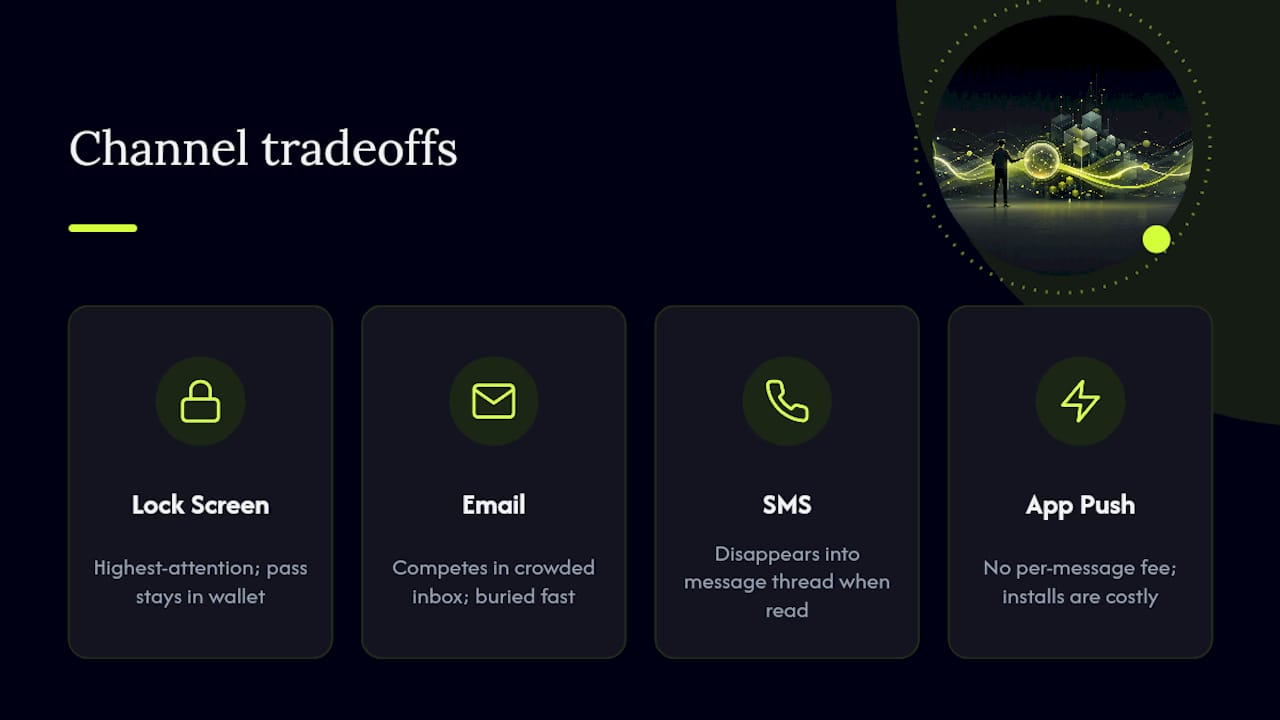
The underlying pass persists even after a notification gets dismissed or swiped away. That's a meaningful difference from a text message, which disappears into a thread the moment it's read. The pass stays in the wallet app, available for the next update, the next offer, the next reminder, until the customer actively removes it.
Timing and location add another layer most channels can't touch. A coffee shop can trigger a pass to surface a "buy one, get one" offer only when a loyal customer is within a few blocks. An e-commerce brand can fire a message the moment a cart sits abandoned for twenty minutes, rather than waiting for a scheduled email send the next morning.
The mobile shift makes this timing matter more, not less. Mobile advertising spending grew from $162.9 billion in 2020 to $254.4 billion in 2025, and privacy changes are pushing more of that budget toward first-party, contextual channels, exactly the category wallet passes fall into.
Cost shape matters, too. SMS carries a per-message fee that scales with volume and adds up fast at high send frequency. App push is free to send but expensive to acquire, since you're paying acquisition costs for an install that plenty of users never open again. Wallet pass notifications carry no per-message carrier fee and no app-install cost, since the pass installs directly from a link or a QR code scan.
What Should You Send, and How Often?
The single rule that governs everything else: every update should change something on the pass. A stale pass that never updates gives the customer no reason to keep it, and a pass that updates constantly with irrelevant noise gets removed just as fast. The sweet spot is genuine change, such as a new offer, a new balance, or an approaching expiration, paired with genuine relevance as advised by wallet-pass campaign data on how to identify your target audience.
On cadence, practitioner data on wallet-pass campaigns points to roughly one to two meaningful updates per week as the frequency that keeps removal rates low while still staying top of mind. Push past that without a clear reason, and you're training customers to swipe away and eventually delete the pass, as recommended by practitioner best practices.
Here's how that plays out by business type:
- Coffee shops and cafes update the pass with a stamp count toward a free drink, then send a location-triggered nudge when the customer is a block away and one stamp short.
- Retail stores push a flash sale notification tied to a specific SKU category the customer has browsed before, with a 48-hour expiration baked into the pass itself.
- Events and venues send a reminder 24 hours before doors open, then a follow-up the morning of, each one updating the pass with gate times or seat information.
- Restaurants trigger a happy-hour alert around 4 PM local time, timed to when foot traffic in the area typically picks up.
- Gyms and studios update a membership pass with a class reminder or a "your streak is at risk" nudge tied to attendance data.
- E-commerce stores trigger a cart-recovery message the moment a shopper abandons checkout, with the exact item and a direct link back to purchase.
Keep the message itself short. Lock screen notifications typically show one line of preview text before truncating, so lead with the offer or the deadline, not the brand name. Put the call to action in the action button rather than burying it in body copy, and test whether a dollar amount or a percentage discount pulls better for your audience, the same way you'd test subject lines in an SMS campaign.
Pro Tip: Write the notification preview text before you design the pass artwork. If the message doesn't work as one punchy line, no amount of visual polish will save it.
How Do You Launch Your First Wallet Pass Campaign?
Getting a pass in front of customers takes less setup than most marketers expect, but skipping the testing step is where campaigns quietly fail. Start with the pass itself, then move to distribution, then run a small controlled test before scaling.
For the pass build, you'll need clean artwork sized for both Apple Wallet and Google Wallet, since the two platforms render slightly differently. Include the essential fields: an offer or loyalty balance, an expiration or relevant date, a barcode or QR code if it doubles as a coupon, and a clear brand mark. Test the finished pass on an actual device before launch, since simulator previews often miss rendering issues that show up on a real lock screen.
Distribution works through a few channels:
- A QR code at the point of sale, printed on a receipt or a counter card
- A website call-to-action, ideally placed right where a customer would naturally want a reminder, like a checkout page or a booking confirmation
- Links dropped into an existing email or social post for customers who already engage on those channels
- An in-app or on-page flow, where an App Clip on iOS lets someone save a pass without installing anything at all
Once the pass is distributing, run a first-campaign experiment before committing budget. Pick a small cohort, test two creative variants side by side, and vary the send time to see whether morning or evening pulls a stronger response. A quick two-step test works well here: distribute to a small group, send one timed offer, then measure conversions in a short window afterward. That gives you a fast go or no-go signal before scaling to your full list.
For e-commerce specifically, look at Shopify Flow integrations that trigger a pass update automatically on checkout abandonment, so the recovery message fires without manual work.
How Do You Measure Lock Screen Campaign Performance?
Five numbers tell you whether a lock screen campaign is working: installs, removal rate, notification impressions, tap-through rate, and attributed revenue. Track them in that order, because each one gates the next, low installs mean nothing else matters yet, and a high removal rate poisons every metric downstream of it.
- Installs measure how many people saved the pass in the first place, your top-of-funnel number.
- Removal rate tracks how many customers delete the pass after installing it, the clearest early warning sign of message fatigue or irrelevance.
- Notification impressions count how many updates actually reached a lock screen, since some installs go stale or lose connectivity.
- Tap-through rate shows how many people engaged with the notification rather than just seeing it.
- Attributed revenue ties specific purchases back to a pass-driven notification, using the same attribution windows and click ID logic you'd apply to any other push channel.
Last-touch attribution alone tends to overstate what a channel actually drives, since it credits the final click regardless of what would have happened anyway. Cohort comparisons and incrementality testing give a more honest read, comparing a group that received the pass notification against a similar group that didn't, then measuring the actual lift in conversion.
On instrumentation, most teams join wallet-pass data with existing analytics rather than building a new stack from scratch. That means feeding pass events into a mobile measurement partner, joining them against GA or Firebase data, and reconciling revenue server-side so attributed sales match what actually landed in the order system. Review the numbers weekly for the first month of a campaign, then shift to monthly once cadence and creative have stabilized. If removal rate climbs two weeks running, that's the signal to cut frequency before revenue numbers start sliding too.
What Best Practices Keep This Channel From Backfiring?
Three rules protect a lock screen campaign from the thing that kills it fastest, treating the pass like a broadcast channel instead of a relationship. Every send needs a reason, every reason needs a real update to the pass, and every campaign needs a ceiling on frequency.
- Change something on the pass with every message, a balance, an offer, a countdown, never just repeat the same static content.
- Cap sends at one to two per week unless there's a genuinely time-sensitive reason to go higher, like an event happening that day.
- Lead with the value in the first line of preview text, since a truncated message that buries the offer gets ignored or swiped away.
- Watch removal rate the same way you'd watch an unsubscribe rate. A rising trend usually points to cadence or relevance problems worth fixing immediately.
- Keep a plain-language note at the point of pass distribution telling customers what kind of updates to expect and how to remove the pass if they want out.
The most common mistake is treating a wallet pass like an email list, sending because you have something to say rather than because the customer needs to hear it right now. Fix that by asking, before every send, whether this specific update would make you want to keep the pass if you were the customer receiving it.
Pro Tip: If you can't articulate what changed on the pass in one sentence, don't send the update yet. Go back and make the offer or the data point genuinely new.
How Does StorePush Put Lock Screen Marketing to Work for E-Commerce?
For an online store, the workflow looks like this: a shopper scans a QR code or taps a link, an iOS App Clip lets them save a pass without installing an app, and the moment they abandon checkout, a lock screen message fires with a direct link back to their cart.
A few implementation details make the difference between a campaign that recovers real revenue and one that just looks good in a dashboard:
- Trigger the pass update on the checkout-abandonment event itself, not on a fixed delay, so the message lands while the product is still top of mind.
- Include the specific SKU and a direct recovery link in the update, shortening the path back to purchase to a single tap.
- Instrument CTR heatmaps and revenue attribution windows from day one, so you can see which product categories and send times actually convert.
- Build the trigger inside a Shopify Flow for stores on that platform, keeping the abandonment logic native to the storefront rather than bolted on separately.
The App Clip approach matters because it removes the install step entirely, which is the single biggest drop-off point in any mobile re-engagement flow.
What Privacy and Consent Rules Apply to Lock Screen Marketing?
Saving a wallet pass counts as the customer's direct consent to receive updates tied to that pass, distinct from a blanket marketing opt-in. That's a narrower form of consent than a newsletter signup, and it should be treated that way. A customer who saves a coffee loyalty pass has agreed to hear about that loyalty program, not to receive unrelated promotional blasts for a different product line.
Be explicit at the point of distribution about what the pass will send. A short line near the QR code or save button, something like "Save this pass for weekly offers and balance updates," sets expectations before the customer commits. That single sentence does more to prevent removals than any amount of clever creative later.
Because no app install and no phone number or email are required to receive a wallet-pass notification, this channel sidesteps some of the data collection that triggers heavier compliance obligations elsewhere. StorePush's own approach reflects this: it re-engages shoppers without collecting email or phone data at all, which limits what personal information changes hands in the first place.
Still, treat the pass itself as personal data once it's tied to a purchase history or a loyalty balance. Give customers a clear, low-friction way to remove the pass, since forcing someone to hunt through phone settings to opt out creates exactly the kind of friction that damages trust in every channel you run, not just this one. Document what data each pass update touches, and keep that documentation current as you add new triggers or fields.
What Technical Limits and Compatibility Issues Should You Expect?
Apple Wallet and Google Wallet don't render passes identically, which means artwork and field layouts built for one platform sometimes look cramped or misaligned on the other. Test every pass design on both an iPhone and an Android device before launch rather than trusting a design tool's preview.
Older devices and outdated operating system versions can also delay notification delivery or drop location triggers entirely, since geofencing features depend on OS-level location services that vary by device generation. A pass that relies heavily on location triggers will underperform on any device where the customer has location services restricted, which is a growing share of privacy-conscious users.
Connectivity gaps cause a quieter problem: a pass update sent while a customer's phone is offline or in low-power mode can arrive late or not at all, showing up in your impressions data as a lower number than actual installs would suggest. That gap is normal and worth accounting for when comparing installs against notification impressions.
iOS App Clips, the mechanism that lets someone save a pass without a full app install, require a minimum iOS version to function, so a meaningful slice of older devices simply can't use that flow and need a fallback link or QR code instead. Build that fallback in from the start rather than treating it as an edge case, since it's often a larger share of traffic than teams expect.
What Legal Rules Govern Lock Screen Marketing Campaigns?
Wallet pass campaigns generally fall under the same privacy frameworks that govern any digital marketing channel, meaning GDPR for customers in the European Union and CCPA for California residents, among other state and regional laws. The specifics depend on what data a pass actually collects and where the customer is located, so treat this as a starting framework rather than a complete compliance checklist for your specific business.
Under GDPR, saving a pass needs to come with a clear statement of what data is collected and how it's used, and customers need a straightforward way to withdraw that consent, which in practice means an easy pass-removal process plus a way to stop future updates. Under CCPA, California residents have the right to know what data a business collects and to opt out of its sale, which matters if a pass ties into a broader customer data platform rather than staying siloed to loyalty updates alone.
The safest practical approach is minimizing data collection in the first place. A pass that tracks a loyalty balance and location for triggering purposes carries a lighter compliance burden than one that's cross-referenced against a full customer profile with purchase history and demographic data. Because lock screen marketing through wallet passes typically doesn't require collecting email addresses or phone numbers to function, it starts from a smaller data footprint than SMS or email marketing.
None of this substitutes for a real compliance review specific to your business and the jurisdictions your customers live in. Regulations shift, and enforcement priorities shift with them, so treat this section as context for a conversation with legal counsel, not the final word.
When Should You Prioritize Lock Screen Marketing?
Lock screen marketing earns its place in the mix fastest with repeat buyers, time-sensitive offers, and local foot traffic, exactly the situations where instant, high-attention delivery beats a scheduled email. It underperforms with one-off audiences who'll never return, low-repeat-rate categories, and anything requiring the audit trail regulated communications demand.
Budget it like any new channel test: set aside a defined slice of your acquisition or retention spend, run it for 90 days, and measure against cohort comparisons rather than gut feel. If removal rate stays low and attributed revenue clears the bar you'd expect from SMS targeting at similar volume, scale it. If not, you've lost 90 days, not a year.
— Lucas
Ready to Recover Abandoned Carts Without Collecting Emails?
StorePush is the direct route to everything covered above, without needing an in-house team to build wallet-pass infrastructure from scratch. It collects pass installs through a QR code or link, uses a native iOS App Clip so shoppers never install an app, and triggers a lock screen message the moment someone abandons checkout, with the exact product and a recovery link built in.
That matters most for stores losing the 90%+ of visitors who leave without buying, since most of those shoppers never hand over an email or phone number for a traditional follow-up. StorePush recovers them anyway. It integrates with common e-commerce platforms and provides dashboard analytics to help track performance metrics for recovered carts.
If you're running an online store and want to see the workflow live, book a demo or visit the StorePush product page to see how the setup fits your current stack.
Sources
- What Is Lock Screen Marketing? | PushPass
- Mobile Advertising Market Size, Growth & Forecast to 2034 | IMARC Group