
A working Shopify push setup connects an App Clip integration like StorePush to Shopify Flow, tracks add-to-cart events, and fires a lock-screen push the moment a shopper walks away. There's no email capture and no phone number field standing between you and the recovery attempt. The trade-off is speed: App Clip opt-in windows are short, so this approach works best when the push lands within the first hour after abandonment.
TL;DR:
- Link-based deeplinks must encode the cart ID and route correctly to avoid landing shoppers on homepage or error pages, with proper validation of association files.
- Speed is critical; push notifications should be sent within the first hour after abandonment, with follow-ups via email or SMS timed for several hours later.
- Tracking identifiers such as invocation ID, tap ID, and order ID must be linked to accurately measure conversion and revenue recovery.
- Testing on real devices with fresh installs is essential to validate the entire App Clip, deeplinks, and push notification flow before full deployment.
Table of Contents
- What Do You Need Before You Start?
- How Do You Install an App Clip Integration on Shopify?
- Setting Up Shopify Flow for Lock-Screen Cart Recovery
- How Do You Build Deeplinks That Always Open the Right Cart?
- Timing and Message Templates That Actually Convert
- How Do You Track Push Events Back to Shopify Orders?
- Testing Checklist and Common Fixes
- Configuring Shopify Push Notification Settings
- Permissions and User Consent Best Practices
- Security and Privacy Considerations in Push Notifications
- Why an App Clip-First Setup Actually Moves the Needle
- Get Your Shopify Push Setup Running With StorePush
- Sources
What Do You Need Before You Start?
You don't need a developer team on payroll, but you do need a few things locked down before you touch Shopify Flow. Skip these and you'll spend your first week debugging instead of recovering carts.
- Shopify admin access with theme edit permissions, plus a secure HTTPS domain where you can host an apple-app-site-association file.
- An App Clip integration such as StorePush, which handles the native iOS App Clip build so you're not writing Swift from scratch.
- Developer access (yours or a contractor's) to configure Universal Links and verify hosted association files.
- Add-to-cart tracking wired through your data layer or a webhook, with a defined abandonment window, often set between half an hour and an hour.
- Realistic expectations about opt-in limits. App Clips can't persist on a device the way full apps do, and iOS removes them after periods of inactivity, so the push permission you get is temporary by design.
Get these five pieces in place first. Everything after this point is configuration, not infrastructure.
How Do You Install an App Clip Integration on Shopify?
Once your prerequisites are sorted, the actual setup moves fast. Here's the sequence that avoids the most common dead ends.
- Connect StorePush (or an equivalent App Clip integration) to your Shopify store and confirm it has the scopes it needs to read cart events and write push triggers.
- Host your apple-app-site-association file on your HTTPS domain, then test Universal Link propagation before assuming it works. Apple's caching layer can delay changes for hours, so don't test five minutes after upload and call it broken.
- Confirm the App Clip passes cart context on invocation. That means the cart identifier and its contents travel with the clip, not just a generic "welcome" screen. Without this, your push has nothing meaningful to bring the shopper back to.
- Verify the clip requests push permission during that first session, since this is the only window you get. Miss it and there's no second chance until the shopper reopens the clip.
- Run the full invocation test matrix: QR code scan, NFC tap, and Smart App Banner. App Clips support all three as entry points, and each one behaves slightly differently on real devices versus simulators.
Pro Tip: Test on a physical iPhone with a fresh install, not a simulator. Simulators routinely give false positives on association-file propagation and deferred deeplink behavior, which means your "working" setup might fail the moment a real customer taps a real link.
The whole install typically takes under a day once your domain and Shopify permissions are ready. The propagation testing is what eats the calendar, not the configuration itself.
Setting Up Shopify Flow for Lock-Screen Cart Recovery
Shopify Flow is the wiring between "shopper does something" and "push notification fires." Get the trigger logic right here and the rest of the setup mostly takes care of itself.
Start by defining your abandonment rule in plain terms: how long does a cart sit untouched before it counts as abandoned, and what does the event payload need to carry? This is crucial for effective Shopify SEO Automation to complement your recovery efforts. At minimum, that's a cart ID and the line items in it. Vague payloads produce vague pushes, and vague pushes don't convert.
- Build a Flow trigger that fires when your abandonment condition matches, then have it call your push provider's endpoint.
- Distinguish add-to-cart triggers from checkout-abandon triggers. Checkout abandonment only fires after a shopper starts checkout, which means it misses the much larger group who added an item and left without ever reaching that step.
- Prioritize add-to-cart triggers if your goal is recovering anonymous visitors, since that's where most of your abandoned intent actually lives.
- Test your Flow with a dummy cart before pointing it at live traffic. Confirm the payload StorePush receives matches what you configured.
StorePush's Shopify Flow automation guide walks through ready-made templates if you'd rather adapt an existing trigger than build one from a blank canvas.
How Do You Build Deeplinks That Always Open the Right Cart?
This is where most App Clip setups quietly fail. Not at the push send, but at the tap. A shopper taps the lock-screen notification, and instead of landing back on their cart, they hit a generic homepage or a broken link. Deeplink routing is consistently the step that breaks e-commerce implementations, more often than the push send itself.
Build your deeplinks to encode the cart identifier directly in the URL, and route that URL to a cart-specific view rather than a generic landing page.
- Deploy both your apple-app-site-association file (iOS) and Digital Asset Links file (Android web fallback), and allow real propagation time before testing.
- Design platform-agnostic URLs with query parameters so your server can rehydrate cart state whether the tap lands in the App Clip or a browser.
- Implement deferred deeplinking for shoppers who end up needing the full app, so the cart survives the install process instead of vanishing.
- Always build a web fallback. Without one, taps that can't open the App Clip simply dead-end, and that's a recovered shopper you lose to a technicality.
Pro Tip: When a deeplink "doesn't work," check the association file syntax first. A single misplaced character in the JSON is the most common reason Universal Links silently fail on real devices while looking fine in a validator tool.
Timing and Message Templates That Actually Convert
Speed matters more here than almost anywhere else in your marketing stack. Because the App Clip's push permission window is short, often just a few hours by some estimates, the message that arrives in minute five outperforms the one that arrives in hour five by a wide margin.
A cadence that works well in practice: push within the first hour, follow with email at the 4 to 6 hour mark if you have an address on file, and reserve SMS for the next day on high-value carts only.
- Keep the push copy to one benefit line plus a deeplink. "Your cart's still here" beats a paragraph every time on a lock screen.
- Test discount-inclusive pushes against plain reminders. Some categories convert better on urgency alone; others need the nudge.
- Route every channel to the same deeplink, so whichever message the shopper acts on lands them in the same place.
- Design for a single tap to convert. You likely won't get a second push in this session, so the first one has to do the work.
Run this as an A/B test from week one. Discount versus no discount, and short copy versus slightly longer copy, are the two variables worth testing before anything else.
How Do You Track Push Events Back to Shopify Orders?
An App Clip push that "feels like it's working" and one that's actually proven to recover revenue are two different things, and the gap between them is attribution. Without it, conversions that happen through the App Clip path can become invisible, which means you're spending effort with no way to prove the return.
The fix is tracking three linked identifiers as one chain: the App Clip invocation ID, the push send or tap ID, and the resulting Shopify order ID.
- Confirm your integration or a mobile measurement partner passes all three IDs through to a single dashboard record.
- Surface recovered revenue, click-through rate, push conversion rate, and conversion latency (time from tap to completed order) as your core metrics.
- Run a test order using known identifiers end to end, then confirm it shows up correctly attributed before trusting the dashboard with real traffic.
Shopify-integrated App Clip platforms typically expose funnel tracking, CTR heatmaps, and revenue attribution tied directly to the push that triggered the sale, which is what lets you A/B test with confidence instead of guessing. StorePush's own analytics and instrumentation guide breaks down the specific formulas behind each metric if you want to build your own reporting layer.
Testing Checklist and Common Fixes
Run this sequence on a physical device before calling your setup live:
- Invoke the App Clip via QR code or NFC tag.
- Accept the temporary push permission when prompted.
- Add a product to cart and confirm the event fires with a correct cart ID attached.
- Wait for the push to arrive and check the timing against your configured window.
- Tap the notification and verify it deeplinks back to the exact cart, not a homepage.
- Complete a test checkout and confirm the order appears correctly attributed in your dashboard.
If something breaks, check the association file first, then confirm the cart ID is actually present in the event payload, then clear device caches and retest on a fresh install. When you contact provider support, hand over timestamps, device OS version, and the specific identifiers from your failed test. That's usually enough for a support team to diagnose the issue in one pass rather than five.
Configuring Shopify Push Notification Settings
Once your Flow triggers and App Clip are talking to each other, the settings work is mostly about scope and restraint. Decide upfront which events actually deserve a push. Add-to-cart abandonment is your highest-value trigger, but not every product category needs the same aggressiveness. A $15 impulse item and a $400 considered purchase shouldn't run identical timing rules.
Set your abandonment window deliberately. Thirty minutes works for fast-moving categories like apparel or beauty; 60 minutes tends to fit higher-consideration purchases where shoppers compare before buying. Configure this per collection if your catalog spans both.
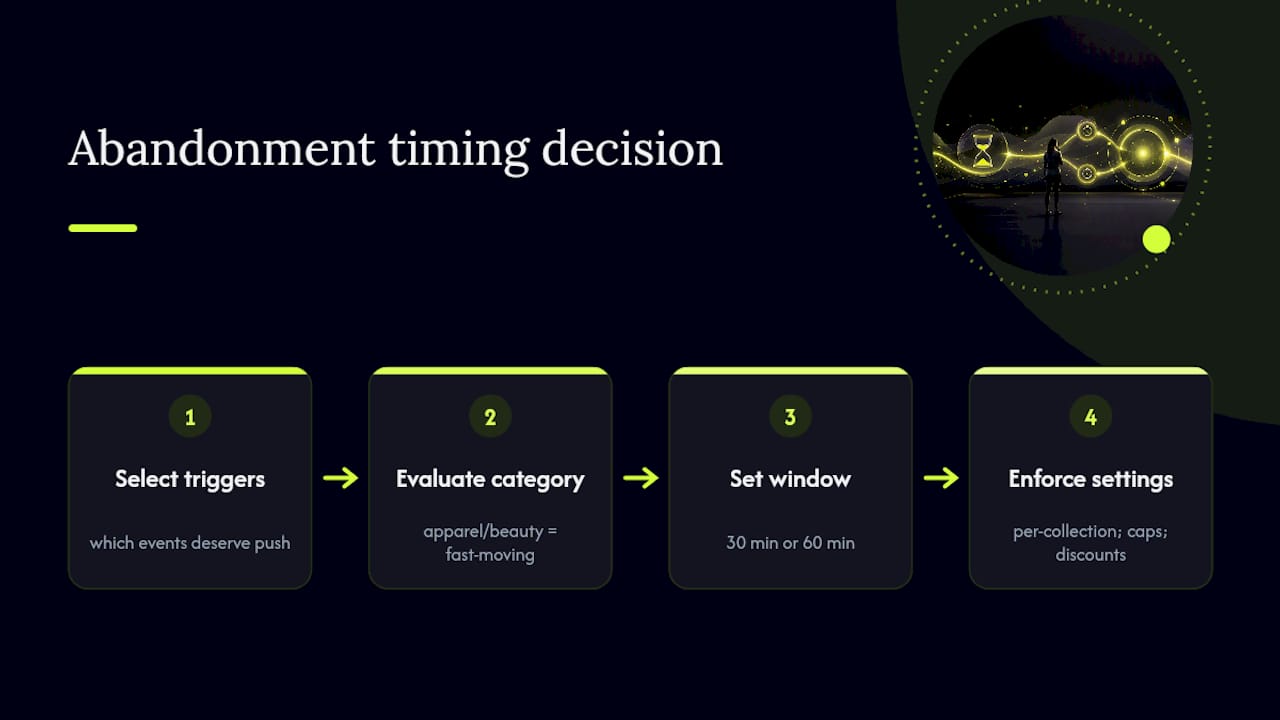
Layer in frequency caps early. A shopper who abandons three separate carts in a week shouldn't get three separate lock-screen pushes if you also have email and SMS running. Decide which channel leads and let the others follow, rather than letting every channel fire independently.
Finally, build your discount logic into the settings layer, not as a manual afterthought. If you're testing discount-inclusive pushes against plain reminders, that logic belongs in your Flow configuration so it's consistent and measurable, not something a team member toggles by hand on a Tuesday. Recovering carts without collecting emails or phone numbers works best when the settings themselves enforce consistency, because inconsistent triggers produce data you can't trust when you go to optimize later.
Permissions and User Consent Best Practices
The App Clip push model sidesteps a real pain point: you're not asking for an email address or a phone number just to attempt recovery. But you are still asking for something, notification permission, and that ask has to be handled with the same respect you'd give any consent request.
Request the permission at the moment it makes sense, immediately after the App Clip loads, not buried behind multiple taps. The push permission window itself is short-lived, so a delayed or confusing ask costs you the one shot you have.
Be direct about what the shopper is agreeing to. A vague system prompt with no context converts worse than one paired with a single line explaining the benefit, something like a reminder about their cart, not marketing spam. Apple's permission dialog is standardized, but the screen leading up to it is yours to design.
Respect a decline. If a shopper dismisses the permission prompt, that's the end of that recovery attempt through this channel, not a cue to re-prompt on every subsequent visit. Store the outcome so your Flow logic doesn't keep asking someone who's already said no.
Document your opt-in rates. StorePush's guide to raising push opt-in rates compares App Clip, progressive web app, and full app permission behavior, which is useful context if you're trying to figure out why your acceptance rate looks different from a competitor's case study.
Security and Privacy Considerations in Push Notifications
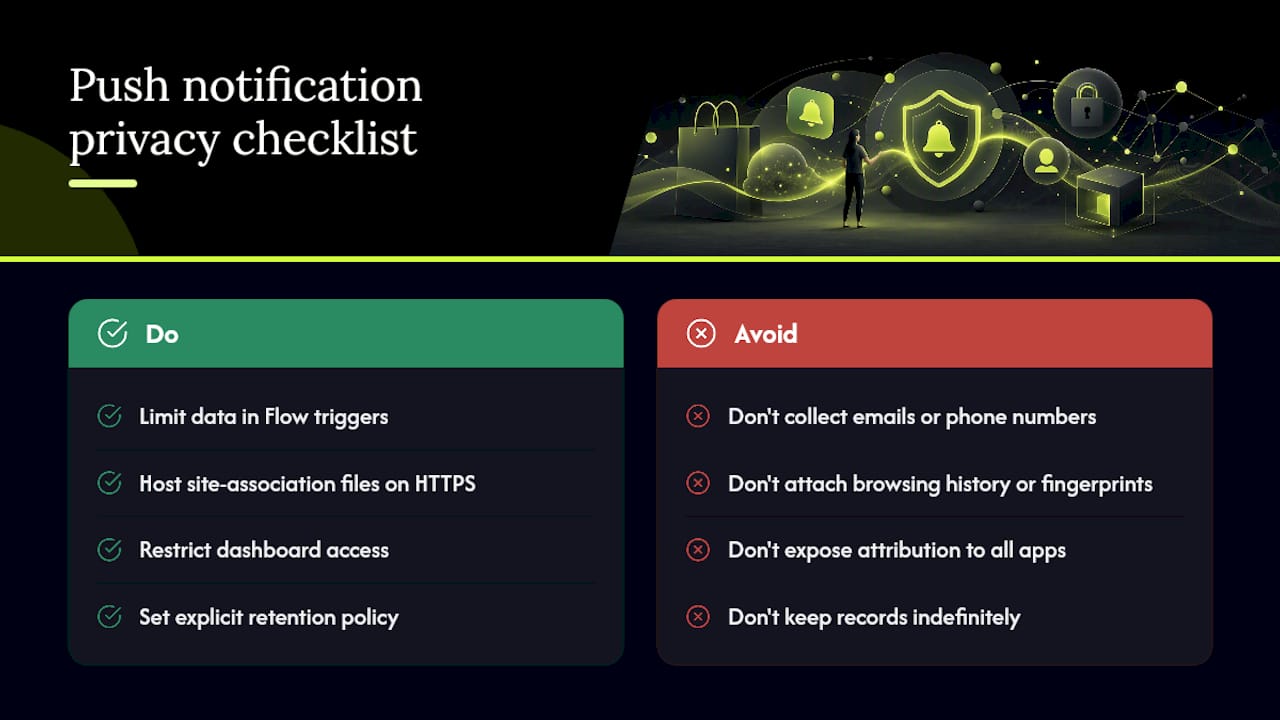
Not collecting emails or phone numbers is a privacy advantage, but it doesn't mean the setup is privacy-neutral. The identifiers you do collect, cart IDs, invocation IDs, device tokens, still need to be handled carefully.
Keep the data you pass through your Flow triggers minimal. A cart ID and item list is enough to power a recovery push. You don't need to attach browsing history or device fingerprinting data just because it's technically available, and doing so raises your compliance surface for no real gain in conversion.
Host your apple-app-site-association and Digital Asset Links files on HTTPS with no exceptions. These files verify your domain's relationship to your App Clip and app, and serving them over an insecure connection undermines the trust chain Apple and Google built the whole Universal Link system on.
Audit who has access to your attribution dashboard. Recovered revenue data, conversion latency, and CTR heatmaps are useful for your marketing team, but they don't need to be visible to every app in your Shopify admin. Limit dashboard access to the people actually optimizing the campaigns.
Finally, keep your retention policy explicit. App Clips themselves have a limited device lifecycle, but your backend attribution records don't automatically inherit that same short memory. Decide how long you keep invocation IDs and order linkages, and don't keep them indefinitely just because storage is cheap.
Why an App Clip-First Setup Actually Moves the Needle
Most cart recovery advice assumes you already have an email address, which means it quietly ignores the majority of visitors who never handed one over. App Clip-first push recovery flips that assumption. It meets anonymous shoppers where they already are, on their lock screen, within minutes of walking away, instead of waiting for a form fill that mostly never comes.
The setup work is real, association files, Flow triggers, deeplink testing, but it's a fixed cost you pay once. Start with a small pilot on your highest-traffic collection, measure recovered revenue against the broader browsing-abandonment problem you're already fighting, then expand from there.
— Lucas
Get Your Shopify Push Setup Running With StorePush
The App Clip build, the Shopify Flow integration, and the add-to-cart triggers described throughout this guide can be handled by an App Clip integration, letting you configure campaigns instead of writing native iOS code. It's built specifically to catch the anonymous majority of your traffic, the shoppers who add to cart and leave before ever typing an email address into a popup.
A demo can walk through your actual store setup: your abandonment windows, product catalog, and what a realistic recovered-revenue estimate might look like for your traffic volume. You'll see a dashboard, an attribution chain from App Clip invocation to Shopify order, and Flow templates ready to adapt.
If you're ready to see the setup on your own store, book a demo with StorePush and get a working pilot running against real traffic within days, not months.
Sources
For deeper technical grounding, AppsFlyer's coverage of App Clip attribution explains why linked identifiers matter, and Airbridge's deeplink guide for e-commerce apps covers propagation testing in more detail. On the Shopify side, StorePush's guides on add-to-cart triggers and Flow automation templates go step by step through the exact configuration covered here.