Yes. App Clips can recover a meaningful share of otherwise lost mobile carts by pairing an ephemeral native checkout with a lock screen push that deep links straight back into it. The mechanism is simple: App Clip plus Apple Pay handles the buy, a push notification with a deep link handles the reminder. With mobile cart abandonment sitting between 70% and 85%, even a modest recovery lift on that volume is real revenue.
TL;DR:
- App Clips are most effective for high-intent, small-cart purchases and when traffic is predominantly iOS users who never provided contact info.
- Building an App Clip recovery flow requires server-side cart persistence, well-designed deep links, integrated Apple Pay, size-optimized packaging, and thorough testing.
- Timing pushes within 15 to 60 minutes after abandonment and using a single follow-up message improves recovery rates without appearing intrusive.
- App Clips are limited to Apple devices and require specific backend setup, making them unsuitable for large or complex carts or Android traffic.
- StorePush offers a solution for targeting abandoned carts without emails by leveraging App Clips for lock screen recovery, charging $50/month plus revenue share.
Table of Contents
- How App Clips Fit Into Mobile Cart Recovery
- Practical App Clip Use Cases for E-Commerce
- When App Clips Make Sense for Cart Recovery (and When They Don't)
- How to Build an App Clip Cart Recovery Flow
- Push and Deep-Link Timing That Actually Converts
- Metrics That Tell You If It's Working
- Where App Clip Cart Recovery Goes Wrong
- How StorePush Handles App Clip Lock-Screen Recovery
- When App Clips Deserve a Spot on Your Roadmap
- Get Started With StorePush's App Clip Recovery
- Sources
- FAQ
How App Clips Fit Into Mobile Cart Recovery
An App Clip is a stripped down slice of a full iOS app, built to launch instantly from a QR code, NFC tag, link, ad, or Messages thread without going through the App Store. Apple caps the initial download at 10 MB (15 MB if you use certain frameworks), and the session is meant to be short lived: the shopper does one focused task, like completing a purchase, and moves on. There is no install screen, no account creation, no app icon cluttering the home screen unless the shopper chooses to keep it.
That constraint is the whole point. A full app asks for a commitment before it delivers any value. An App Clip delivers the value first, checkout in this case, and only asks for a commitment (keeping the app, sharing an email) after the shopper has already gotten what they came for. That ordering is why App Clips work so well for cart recovery specifically: you are not asking someone who just walked away from a purchase to also download something. You are handing them a one-tap path back to where they left off.
A few things matter about how the model behaves in practice:
- Launch triggers vary by context. QR codes on packaging, NFC tags in-store, Safari App Banners, Messages links, and App Clip Codes in ads all trigger the same lightweight experience.
- Sessions are ephemeral by design. Apple does not guarantee a launched App Clip persists once the shopper backgrounds it, so state has to live on your server, not in local memory.
- Apple Pay is a first class citizen. Because App Clips are built for quick tasks, Apple Pay integration is native and fast, which matters when checkout friction is the thing you are trying to eliminate.
- Privacy is baked in, not bolted on. App Clips run with limited permissions by default and location access is capped to a short window, so shoppers are not handing over the same data footprint a full app would collect.
That privacy posture is also why lock screen push through an App Clip is different from a typical marketing push. StorePush's approach, for instance, sends the lock screen notification without ever collecting an email or phone number, which sidesteps the usual precondition for most cart recovery messaging.
Practical App Clip Use Cases for E-Commerce
Cart recovery is the headline use case, but the pattern shows up in a few distinct flows depending on where the shopper drops off. Here is how each one typically works:
- Ad or social checkout. A shopper taps a product ad on Instagram or a QR code on a billboard, and instead of landing in a mobile browser that demands a login, an App Clip opens straight to that product with Apple Pay ready. This is the pattern behind integrations like BigCommerce's StoreClip, which opens an App Clip from ad traffic and sends a follow-up push within Apple's ephemeral session window if the shopper does not finish.
- On-site quick buy shortcut. A returning visitor scans an in-store NFC tag or taps a "buy now" link from an email, and the App Clip skips straight to a pre-filled checkout rather than routing through a full storefront.
- Cart preservation across sessions. A shopper adds items, gets a phone call, and closes Safari. Server-side cart persistence means the App Clip that reopens later still has those items waiting, correlated by a session token rather than a login.
The deep link itself carries the weight of that continuity. A typical link pattern looks something like https://yourstore.com/clip?cart_id=8841&src=push&campaign=abandon_15min, where the cart ID lets your server pull the actual line items instead of stuffing them into the URL. That fallback pattern (server-side cart as the primary source of truth, URL parameters as the lightweight pointer) is standard in deep link cart restoration setups and it keeps your payload lean no matter how big the cart gets.
A sample push payload for the recovery message stays intentionally sparse:
{
  "aps": {
    "alert": "Your cart is waiting.",
    "category": "CART_RECOVERY"
  },
  "cart_id": "8841",
  "collapse_id": "cart_8841"
}
Notice what is missing: no product names, no prices, no images. Everything the checkout screen needs gets fetched fresh from your server the moment the App Clip opens, which keeps the message small and the data current.
When App Clips Make Sense for Cart Recovery (and When They Don't)
App Clips are not the right tool for every abandonment scenario. They earn their place when a few conditions line up.
- High-intent, single-item or small-cart purchases. App Clips shine for a quick reorder, a single product buy, or a fast checkout, not a 40-item grocery run that needs a full browsing experience.
- iOS-heavy traffic. If your audience skews Android, the entire mechanism is moot; App Clips are an Apple-only feature with no equivalent on other platforms.
- Shoppers who never gave you an email or phone number. This is the scenario where App Clips solve a problem email and SMS cannot even attempt. If someone bounced from checkout without entering contact information, a lock screen push tied to their device is often the only re-engagement channel left.
- Ad-driven or QR-driven acquisition. Traffic that already arrives through a tappable link or code is a natural fit, since the App Clip trigger is already part of the user's path.
Where web, email, and SMS still win: shoppers who already handed over an email address are cheaper to reach through a standard abandoned cart email sequence, and SMS remains stronger for high-urgency, low-friction reminders on Android devices. The strongest recovery programs treat these as complementary rather than competing. Combining push with email or SMS as a fallback layer captures the shopper who ignores the lock screen notification but still opens their inbox two days later.
The engineering tradeoff is real too. App Clips require Apple Pay integration, App Clip Code generation if you want physical world triggers, and a backend that can correlate anonymous sessions without a login. That is more setup than dropping in an email automation tool, so weigh it against your actual traffic mix before committing engineering time.
How to Build an App Clip Cart Recovery Flow
Building this well comes down to five pieces working together: cart persistence, deep link design, Apple Pay checkout, App Clip packaging, and testing. Here's the order that tends to cause the fewest surprises.
- Persist the cart server-side first. Every add-to-cart event should write to a database keyed by a session or device identifier, never to local storage alone. This is what lets a shopper close the App Clip, get a push an hour later, and land back on a cart that still has everything in it.
- Design the deep link and its parameters. Keep the URL structure predictable: a cart identifier, a source tag, and maybe a campaign label. Resist the urge to pass product details in the URL itself. The App Clip's job on open is to call your API with that cart ID and render whatever comes back.
- Wire up Apple Pay inside the App Clip. Apple's WWDC 2023 session on App Clips walks through the entitlements and merchant configuration needed to get Apple Pay working inside the constrained App Clip environment. Budget real time for this step. It is the part most teams underestimate.
- Package and host within Apple's size limits. App Clips must stay under Apple's binary size threshold, which forces hard choices about what ships in the clip versus what loads from your server after launch. A detailed guide to sub 10MB Apple Pay checkouts covers the specific tradeoffs, like deferring custom fonts and large images to a post-launch fetch.
- Test the full loop before launch. Verify the deep link opens the App Clip correctly on a cold device, confirm the web fallback works for non-iOS traffic or older iOS versions, and check that the cart state matches across a phone and an iPad signed into the same Apple ID.
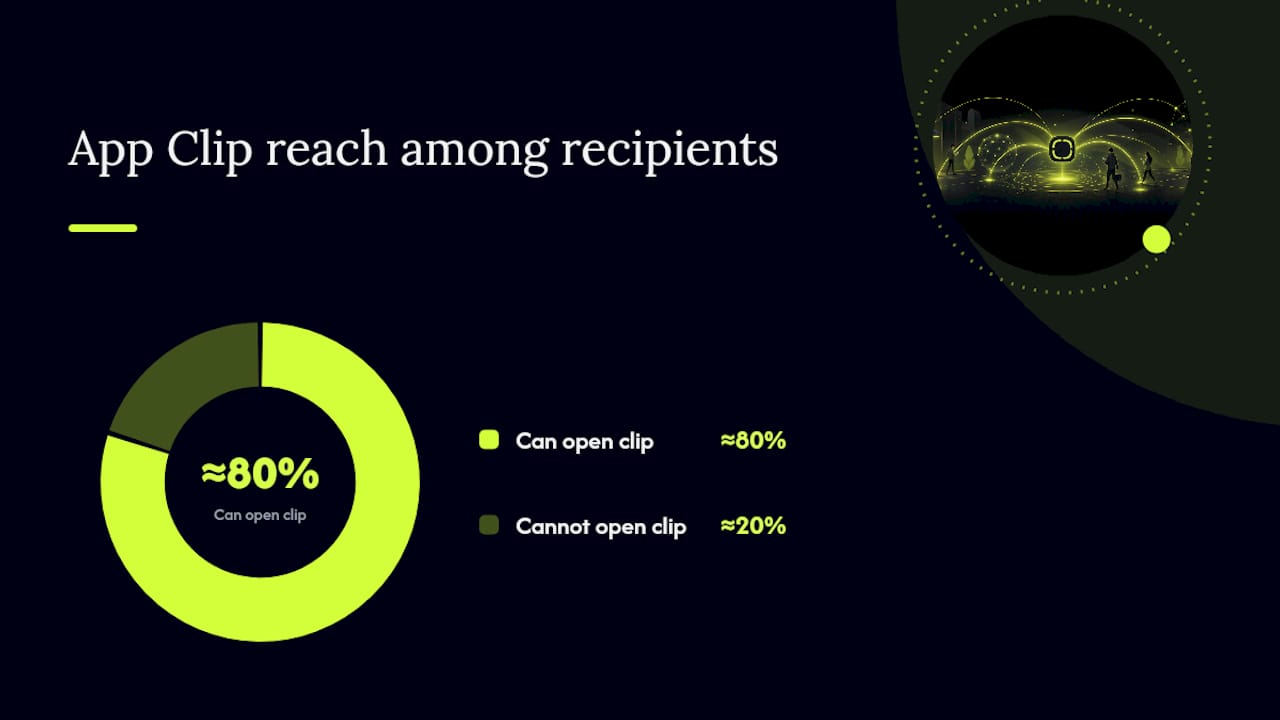
Pro Tip: Build a plain web checkout fallback behind the same deep link before you ship the App Clip. Roughly a fifth of your push recipients could be on Android or an older iOS version that can't open the clip, and a broken link is worse than no message at all.
For teams that want the full technical walkthrough, StorePush's guide to App Clips for iOS developers covers the entitlement setup and App Store Connect configuration in more depth than fits here. One more constraint worth planning around early: App Clip sessions and their Apple Pay checkouts are bound by strict size and duration limits, which is exactly why step two above (keeping the deep link payload to an identifier, not a full cart snapshot) is not optional.
Push and Deep-Link Timing That Actually Converts
Timing is where most cart recovery push programs quietly fail, and App Clip recovery is no exception. Send too fast and you look desperate. Send too slow and the intent that drove the original visit has already decayed.
- First touch: 15 to 60 minutes after abandonment. This window shows up consistently in push and deep-linking playbooks because it balances two competing risks: too early feels like an interruption, too late means the shopper has moved on or bought elsewhere.
- Keep the payload server-driven, not product-driven. The push itself should carry a cart ID and nothing more; let the App Clip fetch live cart data on open so nothing goes stale between send and tap.
- Use a collapse key per cart, not per shopper. A collapse key (Apple calls it a collapse ID) tells the notification system to replace an older message with a newer one instead of stacking both on the lock screen. Tie it to the cart ID specifically, so a shopper with two abandoned sessions still gets two distinct, non-overlapping reminders.
- Set a TTL that matches urgency, not habit. A short time-to-live (a few hours) makes sense for flash sale inventory. A longer TTL makes sense for a considered purchase like furniture, where the shopper might reasonably come back the next day.
- Cap the sequence at one or two touches. A second message, if you send one, works better with a light incentive (free shipping, a small discount) than a plain repeat of the first.
- Cancel any pending follow-up the moment the cart converts. Nothing erodes trust faster than a "still thinking it over?" push landing after the purchase already went through.
- Tag every link for attribution. Append
src=push, a channel label, and a timing bucket (t=30min,t=4hr) to each deep link so your dashboard can separate recovered revenue by send time later.
The 15 to 60 minute window isn't a rule of thumb pulled from nowhere; it reflects how quickly purchase intent decays once a shopper closes the tab. Wait past a couple of hours and you are usually competing with a decision the shopper has already made elsewhere.
Metrics That Tell You If It's Working
Two numbers matter more than any others: recovery rate (the share of abandoned carts that convert after a push) and revenue recovered (the dollar total those conversions represent). Everything else is diagnostic detail that helps you improve those two.
- Time-to-recover tells you whether your 15 to 60 minute window is actually the sweet spot for your specific traffic, or whether your shoppers respond better at a different interval.
- Channel breakdown separates push-driven recoveries from email and SMS ones, so you know which channel to invest more engineering time in.
- Promo cost accounting matters if your second touch includes a discount. A recovered sale that only happened because of a 15% off code is not the same win as one that converted on the reminder alone.
- Attribution should run through URL parameters and server-side hooks together, not URL parameters alone, since some deep links get shared or reopened outside the original push context.
- A/B test timing before you test incentives. Shifting the first touch from 30 minutes to 60 minutes is a cleaner experiment than testing three different discount amounts at once, and it usually moves the needle further.
Where App Clip Cart Recovery Goes Wrong
Most of the failure modes here are self-inflicted, and they are avoidable once you know what to watch for.
- Sending the first push too early. A message that lands five minutes after someone closes the tab reads as aggressive, not helpful, and tends to suppress future engagement even if the shopper eventually comes back on their own.
- Stuffing the payload with product data. Embedding item names, prices, or images in the push risks blowing past encrypted payload size limits and shows stale information if the cart changed before the shopper taps through.
- Skipping collapse keys entirely. Without one, a shopper who abandons twice in the same day gets two separate notifications stacking on the lock screen, which reads as spam even though your intent was helpful.
- Measuring taps instead of completed purchases. A high click-through rate on the push means nothing if the App Clip checkout itself is dropping people. Track the full funnel, not just the open.
- Forgetting to cancel the follow-up after conversion. This is the single most common complaint from shoppers who did convert. The second push still arrives.
Pro Tip: Before scaling any campaign, run it through a 24 hour test with your own team's devices. It surfaces collapse key bugs and payload size issues faster than any staging environment does.
How StorePush Handles App Clip Lock-Screen Recovery
StorePush built its entire recovery model around one constraint: send a lock screen push without ever needing an email address or phone number, using the same native App Clip mechanism described throughout this article. That matters because most cart recovery tools stall out the moment a shopper leaves without giving contact information, which by Contentsquare's estimate is the majority of mobile visitors.
The platform integrates with Shopify, WooCommerce, BigCommerce, and custom storefronts, and pairs the push mechanism with dashboard analytics covering revenue attribution, funnel tracking, and click-through heatmaps so you can see exactly which touch converted which cart.
For teams building this from scratch, StorePush's own technical writeups walk through the specifics:
-
Recovering anonymous carts without email using iOS Web Push App Clips
-
Price-drop alert campaigns built on the same App Clip mechanism
When App Clips Deserve a Spot on Your Roadmap
Prioritize an App Clip cart recovery experiment when your traffic already leans iOS and a meaningful share of abandoners never give you an email. Scope the first version tight: one product category, one push timing window, one attribution tag. Resist the temptation to build the full omnichannel version before you have proof the core mechanism recovers real revenue for your store specifically.
Pair every engineering sprint with a revenue attribution plan from day one. A recovery rate without a dollar figure attached tells you almost nothing about whether the experiment was worth the build time.
— Lucas
Get Started With StorePush's App Clip Recovery
StorePush turns the shoppers you currently cannot reach, the ones who leave without an email or phone number, into a recoverable segment. Because it runs natively through Apple App Clips, there is no app install and no signup form standing between the abandoned cart and the lock screen reminder that brings it back.
Start on the Free plan to test the mechanism on live traffic, then move to Pro at $50 per month plus a 5% commission on attributed recovered revenue once you see the pattern working for your store. If you would rather see the setup walked through live, book a demo and the team will map the integration against your specific storefront. Pairing this with broader conversion rate optimization work tends to compound the gains further up the funnel too.
Sources
For deeper technical grounding, start with Apple's own WWDC 2023 session on App Clips, which covers architecture and packaging constraints directly. Contentsquare's cart abandonment statistics size the opportunity, and the push notification playbook referenced throughout covers timing and payload rules in more granular detail.
- Cart abandonment statistics | Contentsquare
- WWDC 2023 Session: App Clips (Apple Developer)
- Cart abandonment push notifications (Web Push Notifications)
FAQ
Is the App Clip Feature Still Available?
Yes, App Clips remain a fully supported part of iOS, and Apple continues to update the framework, most recently discussed in its WWDC 2023 session. Developers can still build and ship them through App Store Connect using the same entitlements process covered in that session.
Are App Clips Considered Spyware?
No. App Clips run under Apple's standard permission model, which means they request access to location, camera, or other sensitive data explicitly and only for the duration of that short session. Location access, when granted, is typically limited to a brief window tied to the task at hand, not persistent background tracking.
Where Are App Clips Stored on an iPhone?
An App Clip does not install as a full app icon on the home screen by default. It runs temporarily and can appear in the App Library or as a card in the App Clip section of Settings if the shopper interacts with it more than once.
What Shows Up Under App Clips in iPhone Settings?
The Settings app lists recently launched App Clips under its own dedicated section, letting a shopper see which ones have run recently and remove them individually. This is also where a shopper can review what limited data, if any, a specific App Clip was granted access to.
How Much Does StorePush Cost?
StorePush offers a Free plan to get started, plus a Pro plan at $50 per month that adds a 5% commission on attributed recovered revenue. Both plans use the same lock screen App Clip push mechanism described throughout this article.